
You have an idea for an app, a clear picture of what it should do, and zero interest in spending four years learning computer science before you build it. The good news is that a new generation of AI coding tools lets you describe what you want in plain English and get working software back in minutes. The tricky part is picking the right tool from a crowded, hype-filled market. This guide breaks down the actual options, what each one does well, and where each one falls short so you can start shipping instead of researching.
Photo by Daniil Komov from Pexels
TL;DR:- Vibe coding means describing software in natural language and letting AI generate the code. You do not need a CS degree.
- The top tools for non-engineers in 2026 are Cursor, GitHub Copilot, Claude Code, Lovable, Bolt, and v0. Each targets a different skill level and project type.
- Pick a tool based on what you are building (full app, landing page, internal tool) and how much control you want over the code.
Why vibe coding works for non-engineers
The term vibe coding was coined by Andrej Karpathy in early 2025. The core idea: you describe the behavior you want, the AI writes the code, and you guide the process through conversation rather than syntax. This is not drag-and-drop website building. You end up with real, deployable code. The difference is that the AI handles the translation from intent to implementation.
What changed is that large language models got good enough at code generation to produce functional applications from a single prompt. Two years ago, AI could autocomplete a line. Now it can scaffold an entire full-stack app, connect a database, and deploy it to a live URL.
"Salesforce reported shipping code more than 30% faster after adopting it, which tracks with what I saw across a full session.">, 8 Best Vibe Coding Tools in 2026: Tested and Ranked
That speed gain is not limited to professional developers. Non-engineers often see even larger relative gains because the alternative was not coding at all.
Top AI tools for non-engineers

Here is the shortlist. Each tool occupies a different niche, and the right choice depends on what you are building and how hands-on you want to be.
- Cursor - A full code editor (fork of VS Code) with AI built into every interaction. You chat with your codebase, and the AI edits files directly. Best for people who want to learn some code along the way.
- GitHub Copilot - The most widely adopted AI coding assistant. Lives inside VS Code or JetBrains. Autocompletes code, answers questions, and generates functions from comments. Best for incremental building.
- Claude Code - Anthropic's terminal-based coding agent. You describe a task, it plans and executes across multiple files. Best for complex multi-step changes once you have a project started.
- Lovable - A browser-based tool that generates full-stack web apps from a text prompt. You see a live preview instantly and iterate through conversation. Best for MVPs and prototypes.
- Bolt (by StackBlitz) - Similar to Lovable but runs entirely in the browser using WebContainers. Generates, runs, and deploys apps without any local setup. Best for quick experiments.
- v0 (by Vercel) - Generates React UI components from text descriptions. You describe a dashboard, a form, or a landing page, and v0 produces polished components. Best for frontend-focused projects.
How Cursor and Copilot assist vibe coding
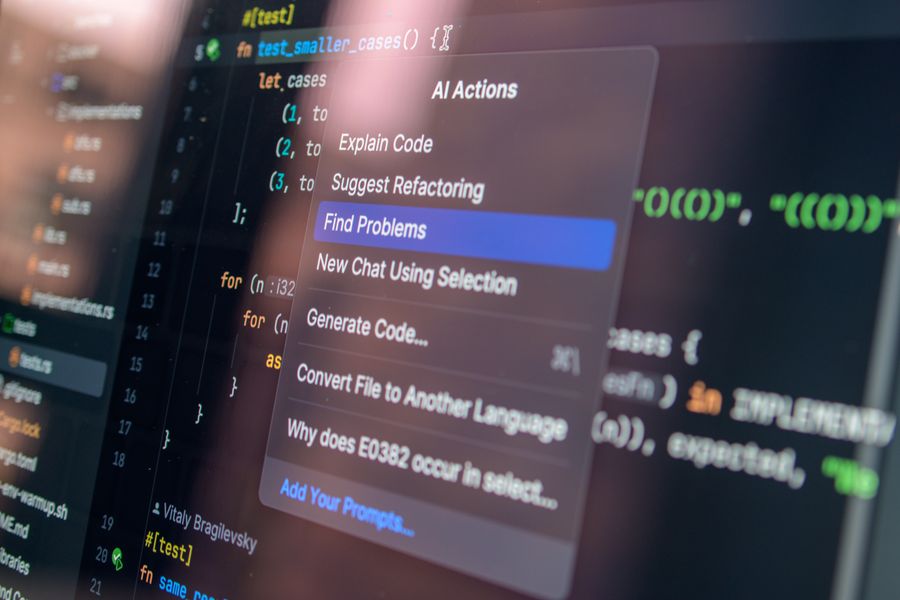
Cursor gives you a chat panel next to your code. You highlight a block, ask "make this form save to Supabase," and Cursor rewrites the file. It understands your entire project context because it indexes all your files. For a non-engineer, this means you can start with a Lovable-generated app, open it in Cursor, and keep iterating with natural language. The learning curve is moderate: you need to be comfortable looking at code, even if you do not write it from scratch.
GitHub Copilot works differently. It predicts what you are about to type and offers completions. The newer Copilot Chat feature lets you ask questions about your code, generate tests, and explain errors. For non-engineers, Copilot is most useful after you have some code to work with. It shines when you are making small changes: "add a loading spinner here," "validate this email field," "sort this list by date."
Both tools require a code editor. If opening VS Code feels intimidating, start with Lovable or Bolt to generate your first project, then graduate to Cursor when you need finer control.
Comparing the tools side by side
Here is a practical comparison based on what matters most to someone without an engineering background.
| Feature | Cursor | GitHub Copilot | Lovable | Bolt | v0 |
|---|---|---|---|---|---|
| Setup required | Install editor | Install extension | None (browser) | None (browser) | None (browser) |
| Code visibility | Full access | Full access | Export available | Full access | Component code |
| Best for | Iterating on existing code | Small edits, learning | Full app MVPs | Quick prototypes | UI components |
| Learning curve | Medium | Medium | Low | Low | Low |
| Deployment | Manual or CLI | Manual or CLI | One-click | One-click | Copy to project |
| Monthly cost (2026) | ~$20 | ~$10-19 | ~$20 | ~$20 | Free tier + paid |
The browser-based tools (Lovable, Bolt, v0) get you from zero to a running app fastest. The editor-based tools (Cursor, Copilot) give you more control and scale better as your project grows.
Real-world projects built by non-engineers

A product manager at a fintech startup used Lovable to build an internal dashboard that tracked customer onboarding metrics. The entire app, including Supabase database, authentication, and a chart library, was generated in under two hours. Before vibe coding, this request sat in the engineering backlog for three months.
A freelance designer used v0 to generate React components for a client portfolio site. Instead of handing wireframes to a developer and waiting a week, she generated the components herself, tweaked the styling in Cursor, and deployed to Vercel the same afternoon.
An indie hacker built a SaaS waitlist page with Bolt, connected Stripe for pre-orders, and launched on Product Hunt within 48 hours of having the idea. No backend experience. No framework knowledge. Just clear descriptions of what each page should do.
These are not edge cases. They represent the standard workflow for thousands of builders using these tools daily.
How to pick the right tool
The decision comes down to three questions:
- What are you building? A full web app points to Lovable or Bolt. A set of UI components points to v0. Ongoing iteration on an existing codebase points to Cursor.
- How much code do you want to see? If the answer is "none," start with Lovable. If you want to learn as you go, Cursor is the better investment.
- What is your budget? Most tools cost $10-20/month. Free tiers exist but hit limits fast. Factor in hosting costs too: Vercel and Supabase have generous free tiers for small projects.
The interactive card below summarizes how these tools map to common project types, so you can match your next idea to the right starting point.
Match Your Project to a Tool
What comes next for AI coding tools
The trajectory is clear: these tools get better every month. Expect three shifts in the near term.
First, multi-modal input will expand. Instead of only typing descriptions, you will sketch a UI on paper, photograph it, and the AI will generate the code. v0 already accepts image inputs for component generation.
Second, agent-based workflows will mature. Tools like Claude Code already plan and execute multi-step tasks autonomously. Soon, you will describe a feature ("add Stripe subscriptions with a free trial") and the agent will create the database tables, API routes, UI components, and tests without you touching a single file.
Third, deployment and monitoring will merge into the coding tools. Lovable already deploys with one click. The next step is built-in error tracking, performance monitoring, and automatic fixes when something breaks in production.
Your First Vibe Coding Project Checklist
Your progress is saved automatically in your browser.
FAQ
Frequently Asked Questions
Additional Resources
- 8 Best Vibe Coding Tools in 2026: Tested and Ranked - Lovable: Best for non-technical founders building full-stack MVPs. What it does: Lovable is an AI-powered app builder for full-stack web ...
- Level up your vibe-coding: A non-engineer's guide to ... - At the entry level, you've got tools like Figma Make, Loveable, Replit and Bolt.new — great for quick prototypes or no-code style experiments
- I tried every vibe-coding tool so you don't have to - The four tools I landed on are Base44, Bolt.new, Replit, and Canva Code. They all promise roughly. It works through the build step by step, had ...