

You asked Cursor to scaffold a Next.js app with a Postgres backend, authentication, and a Stripe integration. Twenty minutes later you had a working prototype. Two days later you had a production outage caused by an AI-generated database migration that silently dropped a column. Full-stack vibe coding accelerates the build phase dramatically, but the challenges it introduces across the entire stack are real, specific, and worth understanding before they cost you a sprint.
Photo by Magda Ehlers from Pexels
TL;DR:- AI tools generate frontend and backend code fast, but integrating that output with existing stacks, ORMs, and CI pipelines creates friction that slows you down if you are not prepared.
- Code quality degrades when AI suggestions bypass your linting, type-checking, and review standards.
- Managing complex workflows across layers requires explicit prompt strategies, locked dependency versions, and human checkpoints at every integration boundary.
Why full-stack amplifies the risk
Single-layer AI assistance is manageable. You prompt for a React component, review it, ship it. Full-stack vibe coding is different because a single prompt session can touch routing, database schemas, API contracts, authentication middleware, and client-side state all at once. Each layer has its own conventions, and AI models frequently mix them.
A Next.js App Router project, for example, uses server components by default. Cursor or Copilot might generate a useEffect hook inside a server component because the training data includes thousands of Pages Router examples. That compiles. It even renders on the first load. Then it breaks in production when the component tries to hydrate on the client.
The core issue: AI tools optimize for plausible code at the file level. They do not optimize for architectural consistency across your stack. That gap is yours to fill.
Integrating AI with existing stacks

Most professional teams do not start from zero. You have an existing monorepo, a specific ORM (Prisma, Drizzle, TypeORM), a CI pipeline, and deployment targets. AI-generated code lands in the middle of all that, and the integration points are where things break.
Common integration friction points:
- ORM mismatches. You use Drizzle with explicit schema files. The AI generates raw SQL or Prisma-style queries because those appear more often in training data.
- Auth layer conflicts. Your app uses NextAuth v5 with a custom adapter. AI output assumes v4 patterns or a completely different auth library.
- Environment variable naming. AI invents
DATABASE_URLwhen your.envusesDB_CONNECTION_STRING. The code compiles, tests pass locally with defaults, and staging breaks. - Package version drift. A prompt generates code targeting
react-queryv3 syntax while your project runs TanStack Query v5.
tsconfig.json, your ORM schema file, and your .env.example into the context window before prompting. Cursor's .cursorrules file and Copilot's custom instructions exist for exactly this reason. Define your stack once, and the model respects it more consistently.
CONVENTIONS.md file in your repo root listing your ORM, auth library, state management approach, and naming conventions. Reference it in every AI prompt session. This single file eliminates half the integration mismatches.Maintaining code quality at scale
The speed of AI-generated code creates a review bottleneck. A developer using Cursor can produce 300 lines of working code in an hour. Reviewing 300 lines of unfamiliar, AI-generated code takes longer than reviewing 300 lines a colleague wrote, because AI code lacks the implicit context of "I know how Sarah thinks."
Quality challenges specific to vibe-coded full-stack projects:
- Type safety erosion. AI frequently uses
anyin TypeScript or skips generic parameters. Over a week of heavy AI usage, your strict codebase accumulates type holes. - Test coverage gaps. AI writes the feature but not the test. Or it writes a test that asserts the happy path and ignores edge cases your team normally covers.
- Dead code accumulation. AI generates utility functions inline instead of reusing your existing helpers. After a month, you have three different
formatDateimplementations. - Security blind spots. AI-generated API routes often skip input validation, rate limiting, or authorization checks that your team's boilerplate normally includes.
- Run
tsc --noEmitin CI withstrict: true. No exceptions. - Enforce ESLint rules that ban
anyand require explicit return types on exported functions. - Use a mutation testing tool like Stryker to verify that AI-generated tests actually catch regressions.
- Add a pre-commit hook that flags new files without corresponding test files.
"This will stop 95% of the build errors and save you time.">, The Golden Rules of Full Stack Vibe Coding
Managing complex workflows
A full-stack feature touches multiple layers in sequence: database migration, API endpoint, server-side logic, client component, state management, and end-to-end test. AI tools handle each step in isolation. The workflow between steps is your responsibility.
Here is where most teams lose time. They prompt for the entire feature at once, get a blob of code that spans five files, and spend the next two hours untangling the dependencies between those files.
A better approach: layer-by-layer prompting.
Instead of "Build a user profile page with edit functionality and avatar upload," break it into discrete prompts:
- Schema first. "Add an
avatar_urlcolumn to theuserstable in my Drizzle schema. Generate the migration." - API second. "Create a PATCH endpoint at
/api/users/[id]/avatarthat accepts a multipart upload and stores the file in S3. Use my existings3Clientfromlib/s3.ts." - Client last. "Build a React component that lets the user crop and upload an avatar. Use the endpoint from step 2. Use
react-dropzonewhich is already inpackage.json."
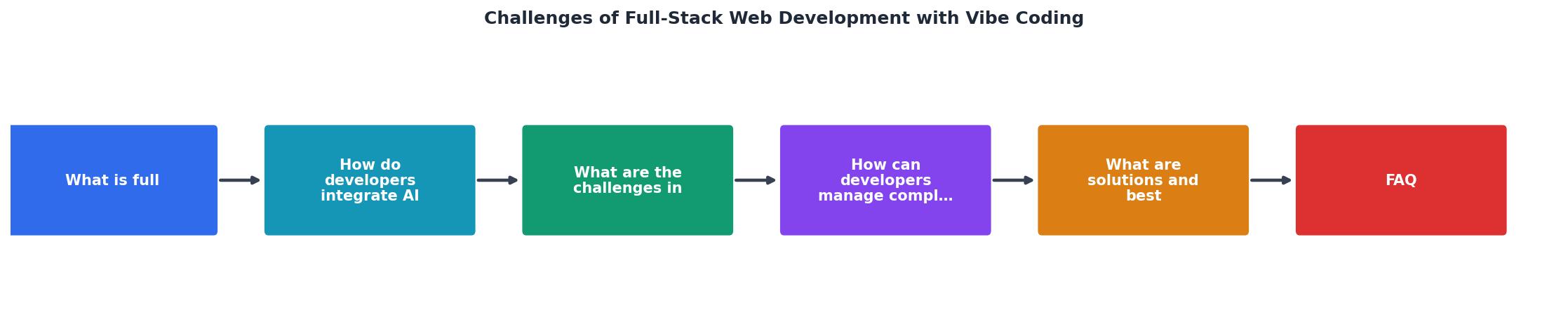
The diagram above shows the flow: Schema, API, Client, Review, Commit. Each step feeds context to the next. Skipping the Review step between layers is where bugs compound.
Solutions and best practices

Knowing the challenges is half the work. Here are concrete practices that teams shipping production full-stack apps with vibe coding actually use.
Lock your dependencies aggressively. Use exact versions in package.json (no ^ or ~). AI-generated code assumes the latest API surface. If your lockfile drifts, the generated code and your runtime diverge silently.
Use schema-driven development. Define your database schema and API contracts (OpenAPI spec or tRPC router) before prompting for implementations. When the AI has a schema to reference, its output aligns with your data model instead of inventing one.
Establish a "vibe coding review" checklist. Standard code review catches logic errors. AI-specific review catches pattern mismatches: wrong library version, missing error boundaries, hardcoded values that should come from environment variables, and duplicated utilities.
Run integration tests, not just unit tests. AI-generated unit tests pass because the AI wrote both the code and the test. Integration tests that hit your actual database and API layer catch the real problems: missing migrations, incorrect join conditions, broken auth middleware.
The following interactive card summarizes the challenge areas and their severity based on common patterns observed in professional full-stack vibe coding projects:
Full-Stack Vibe Coding Challenge Severity
| Monolithic Prompting | Layer-by-Layer Prompting |
|---|---|
| One prompt, five files changed | One prompt per layer |
| Hard to review diffs | Each diff is focused |
| Bugs compound across layers | Bugs caught at boundaries |
| Context window overloaded | Context stays relevant |
| Rollback means reverting everything | Rollback is granular |
Full-Stack Vibe Coding Best Practices
Your progress is saved automatically in your browser.
FAQ
Frequently Asked Questions
any types via ESLint, require test files for new modules through pre-commit hooks, and run integration tests against real infrastructure. Add an AI-specific review step that checks for version mismatches, duplicated utilities, and missing error handling. The Vibe Coding Bible at vibecodingbible.org covers these workflows in depth with team-ready checklists..cursorrules files and GitHub Copilot with custom instructions both let you define project constraints that persist across sessions. For schema-driven development, Drizzle Kit and Prisma Migrate keep your database layer consistent. tRPC or OpenAPI specs enforce API contracts. Stryker (mutation testing) verifies that AI-generated tests actually catch regressions. Standard CI tools like GitHub Actions tie everything together.What is the most frustrating integration mismatch you have hit when using AI tools across your full stack? Share your experience so others can learn from it.
Additional Resources
- The Golden Rules of Full Stack Vibe Coding - Rule # 1: commit, commit, commit. Rule #2: define the project scope . Rule #3: define your rules before you begin. Rule #2: define the project ...
- A Structured Workflow for "Vibe Coding" Full-Stack Apps - Although you can do a lot without ever touching code yourself, it still requires you, the developer, to guide, review, and understand the code.
- Boosting Productivity with Vibe-Coding: Lessons Learned - Problems: - Context is a problem. Another problem is when you switch projects. UIs are not consistent, especially complex UIs. The code can ...