

Your team already has a CI pipeline, a code review process, and a branching strategy that took months to get right. Now someone drops an AI coding assistant into the mix and suddenly half the pull requests look different, nobody agrees on when to use it, and the review burden doubles instead of shrinking. The real challenge is not adopting AI tools but weaving them into the workflows you already trust without breaking what works.
Photo by Mikhail Nilov from Pexels
TL;DR:- Start by auditing your current workflow for high-friction, repetitive tasks where AI delivers the fastest ROI.
- Evaluate tools against your stack, security requirements, and team size before committing.
- Set explicit team norms for AI-generated code: tagging, review depth, and test coverage expectations.
- Treat AI output like junior-developer output: useful, fast, but never merged without scrutiny.
Why AI belongs in your existing stack
Most productivity claims around AI coding tools focus on greenfield projects. That misses the point for working engineers. You spend the majority of your time inside an established codebase with existing conventions, test suites, and deployment pipelines. AI tools earn their keep when they reduce friction in that context, not in a blank-file demo.
The gains are concrete: faster boilerplate generation, quicker test scaffolding, reduced context-switching when exploring unfamiliar modules. But those gains only materialize when the tool fits your workflow rather than replacing it.
Evaluate AI tools before you commit
Not every AI assistant fits every team. Before installing anything, run each candidate through a short evaluation checklist:
- Language and framework support - Does it handle your primary stack well? GitHub Copilot excels in TypeScript and Python. Codeium covers a broader set of languages with free-tier access. Tabnine offers on-premise deployment for teams with strict data policies.
- IDE compatibility - If your team lives in VS Code, JetBrains, or Neovim, the tool must integrate natively. A browser-only assistant adds friction.
- Data privacy and compliance - Where does your code go? Copilot Business keeps prompts out of model training. Tabnine Enterprise runs entirely on your infrastructure. For regulated industries, this is a dealbreaker, not a nice-to-have.
- Context window and codebase awareness - Tools like Cursor and Cody (by Sourcegraph) index your repository to give answers grounded in your actual code. Generic autocomplete without repo context produces more hallucinations.
- Cost per seat vs. measured output - A $19/month tool that saves 45 minutes a day per developer pays for itself in the first hour. Track actual time savings during a trial, not just "it feels faster."
| Criteria | GitHub Copilot Business | Tabnine Enterprise | Cursor Pro |
|---|---|---|---|
| On-premise option | No | Yes | No |
| Repo-wide context | Limited | Limited | Full codebase indexing |
| IDE support | VS Code, JetBrains, Neovim | Most major IDEs | Cursor (VS Code fork) |
| Starting price/seat/mo | $19 | $39 | $20 |
| Offline mode | No | Yes | No |
Map AI to your workflow stages
The mistake most teams make is turning on autocomplete and calling it "AI integration." A proper integration maps AI capabilities to specific stages of your development lifecycle.
Here is how the stages connect:
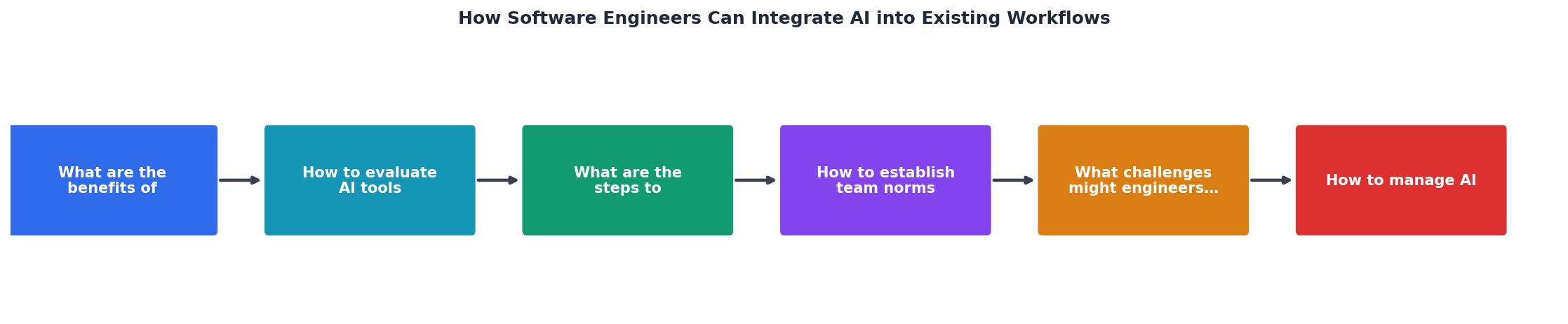
Walk through each stage:
- Planning - Use AI chat (Copilot Chat, Claude, ChatGPT) to explore design options, generate RFC drafts, or summarize long issue threads. This saves 20-30 minutes per planning session.
- Coding - Inline autocomplete handles boilerplate: data classes, API route stubs, repetitive CRUD logic. Let it draft; you shape.
- Testing - AI generates unit test scaffolds from function signatures. You fill in edge cases and assertions. This is where AI saves the most time for the least risk.
- Review - AI-powered review bots (CodeRabbit, Copilot code review) flag potential issues before a human reviewer looks at the PR. They catch style violations and simple logic errors, freeing you to focus on architecture and intent.
- Debugging - Paste a stack trace into an AI chat with repo context. It narrows the search space. You still diagnose, but you start closer to the root cause.
- Documentation - AI drafts docstrings, README updates, and changelog entries from diffs. A five-minute edit beats a thirty-minute blank-page session.
Establish team norms

Without shared rules, AI adoption creates chaos. One developer accepts every suggestion verbatim. Another refuses to use it at all. A third uses it but never mentions it in PRs. You need explicit norms.
Tagging AI-generated code. Agree on a convention. Some teams use a [copilot] tag in commit messages. Others add a PR label. The goal is traceability, not blame. When a bug surfaces six months later, knowing that a block was AI-generated tells the reviewer to check assumptions more carefully.
- Hardcoded values the AI invented (API URLs, magic numbers, default configs)
- Missing error handling on edge cases
- Subtle logic that looks correct but handles only the happy path
- Imported dependencies the AI pulled in that your project does not use
Prompt sharing. Encourage the team to share effective prompts in a shared doc or Slack channel. A prompt that generates clean migration scripts or solid test fixtures is a reusable asset.
"The value for me is speed and iteration, not blind acceptance.">, How I use AI as a Software Engineer
Tackle the real challenges

AI integration is not frictionless. Here are the problems that actually show up in practice and how to handle them:
Inconsistent code style. AI suggestions do not always match your linting rules or project conventions. Fix: enforce formatting and linting in CI. If the AI output does not pass eslint, ruff, or ktlint, it does not merge. Automated formatters solve 90% of style drift.
Subtle logic bugs. AI-generated code compiles, passes basic tests, and looks reasonable. But it might silently drop null checks, mishandle timezone conversions, or use a deprecated API. Fix: pair AI generation with property-based testing or mutation testing to catch logic gaps that conventional unit tests miss.
Over-reliance and skill atrophy. If you accept every suggestion without reading it, you stop learning the codebase. Fix: rotate "AI-off" days or sprints where the team writes code manually. This keeps fundamentals sharp and reveals which tasks genuinely benefit from AI versus which ones you were just being lazy about.
Security blind spots. AI can generate code with SQL injection vulnerabilities, insecure deserialization, or leaked secrets in config files. Fix: run SAST tools (Semgrep, Snyk Code) in CI on every PR. Treat AI output as untrusted input.
Manage AI-generated code long-term
Generating code is the easy part. Maintaining it is where teams struggle. AI-generated code tends to be verbose, sometimes duplicative, and occasionally introduces patterns that diverge from your architecture.
Three practices that keep things clean:
- Refactor immediately. Do not merge AI output as-is. Rename variables to match your conventions. Extract shared logic. Remove dead code the AI included "just in case."
- Track AI-generated modules separately. Some teams tag files or modules that were primarily AI-generated. When those modules need changes, reviewers know to be extra thorough.
- Measure defect rates. Compare bug density in AI-generated code versus human-written code over a quarter. If AI modules have higher defect rates, tighten review requirements or restrict AI use to lower-risk areas.
AI Integration: Q1 Team Metrics
Example data for a 6-person backend team
Real-world integration patterns
Two patterns that work well in production teams:
Pattern 1: The "AI Draft, Human Polish" loop. A backend team at a mid-size fintech company uses Copilot to generate initial implementations of API endpoints from OpenAPI specs. The developer reviews, adjusts error handling, adds integration tests, and submits the PR. Average time per endpoint dropped from 90 minutes to 35 minutes. The key: the developer always rewrites the error-handling layer manually because AI consistently underestimates edge cases in payment flows.
Pattern 2: The "AI Reviewer" gate. A platform engineering team added CodeRabbit as a required check on every PR. It flags potential issues before the human reviewer opens the diff. Human reviewers report spending less time on nitpicks (missing null checks, inconsistent naming) and more time on design decisions. The team reduced average review turnaround from 6 hours to 2.5 hours.
Both patterns share a principle: AI handles the predictable parts, humans handle judgment calls.
For a deeper dive into building these workflows with engineering rigor, the Vibe Coding Bible at vibecodingbible.org covers team-scale AI adoption patterns across 459 pages of practical guidance.
AI Integration Checklist for Engineering Teams
Your progress is saved automatically in your browser.
FAQ
Frequently Asked Questions
[ai-assisted] tag in the commit message or a PR label is enough.Additional Resources
- How I use AI as a Software Engineer | by Luca Palminteri - I've slowly integrated AI into my daily workflow. Not as a replacement for thinking, but as a way to learn faster, unblock myself sooner, and ...
- Learnings from two years of using AI tools for software ... - AI tooling also got more advanced integration into existing IDE functionality: AI started showing up in “quick fix” menus, and integration with
- How to Integrate AI Agents into Software Workflows - Integrating AI agents into your software workflows doesn't require a complete overhaul. By starting small, focusing on high-friction areas, and ...