

Photo by cottonbro studio from Pexels
Vibe coding lets you build faster by leveraging AI, but speed without structure breeds chaos. Most beginners start strong, shipping prototypes in days, then hit a wall: unclear prompts slow down the AI, context switches fragment focus, and debugging takes longer than the original build. The gap between "this works locally" and "this ships reliably" is where optimization matters most.
TL;DR
- Identify workflow bottlenecks early: unclear prompting, scattered context, missing error checks, and communication delays cost the most time.
- Use AI tools to automate repetitive tasks, generate test cases, and catch errors before manual review.
- Prioritize ruthlessly, focus on features that generate feedback, defer perfection.
- Collaborate asynchronously on platforms that preserve context and reduce decision latency.
- Real indie developers save 15–30 hours per project by implementing these strategies.
The bottlenecks beginners face
You ship a feature, then spend twice as long explaining to the AI what you actually wanted. Unclear prompts generate code that looks right but misses edge cases. The AI can't read your mind, and you can't articulate requirements precisely enough on the first try.
Context switching kills momentum. You're building a checkout flow, then a notification bug pulls you away, then you return to checkout and forget where you were. The AI doesn't retain context across sessions, so you're re-explaining the entire architecture every time.
Missing error handling surfaces only in production. The AI generates happy-path code fast, but doesn't always add validation, retry logic, or graceful degradation. You discover these gaps when users do unexpected things.
Distributed teams (even solo builders across time zones) lose synchronization. Decisions get made in Slack threads, feedback sits unanswered, and no one has the full picture of what's in progress or blocked.
The good news: most of these bottlenecks are fixable without changing tools. Better structure in prompts, deliberate context management, and async-first communication turn friction into flow.
How AI tools help automate and reduce errors
AI doesn't just write code faster, it handles work that scales poorly for humans. Test generation is the clearest win. Ask Claude or ChatGPT to generate unit tests for a function, and you get coverage that would take you an hour to write by hand. The tests reveal edge cases you missed in the original spec.
Error detection happens passively once you build the habit. Paste your code into an AI prompt with the context, ask "what breaks here?" and get back a list of vulnerabilities, race conditions, or off-by-one errors. This is faster than code review for catching common mistakes.
Documentation generation saves time and keeps specs in sync. Instead of writing API docs by hand, have the AI generate them from your code, then refine. The AI catches gaps (missing error codes, undocumented parameters) that you'd overlook.
Linting and formatting are table stakes. Tools like Prettier, ESLint, and their equivalents in other languages enforce consistency without human debate. Combined with pre-commit hooks, they're invisible, code is always in shape.
The key insight: don't use AI to replace thinking. Use it to eliminate repetitive decisions and catch predictable mistakes. You focus on design and tradeoffs. The AI handles the tedious parts.
"The first skill you need to develop in the vibe coding world is prompting.">, Medium
Prioritizing tasks effectively
Beginners try to build everything at once. The AI makes this tempting because you can generate full CRUD operations in minutes. Then you're stuck balancing ten incomplete features instead of shipping one that users can validate.
Start with the smallest feature that generates feedback. Not the most important, the smallest. A basic search function beats a perfect authentication system if search teaches you what users actually need. Deploy it fast, learn from real usage, then build the next layer.
Use a simple prioritization framework:
- Feedback velocity - does it teach you something about the market?
- Implementation cost - how long does it take to ship?
- Unblocking dependencies - does it enable other features?
Document your decisions in a shared space (even if it's just a Notion page). Write down: what you're building next, why, and what blocks it. This becomes your north star during context switches.
Collaborative platforms enhance workflow efficiency
Even solo builders benefit from async collaboration tools. GitHub Issues and Projects keep tasks visible. Notion or Linear organize specs. Slack (with threading discipline) preserves context instead of losing it in a channel scroll.
The practice that matters most: write decisions in text, not in Slack. When you decide to pivot a feature, write it down in the issue. When you discover a bug, post a reproducible example in the project. This creates a searchable record that both you and the AI can reference later.
Use pull request descriptions as living documentation. Instead of a one-liner, write the problem you're solving, the approach you took, and tradeoffs you made. The next time you work on that feature (or explain it to the AI), you have context.
For teams, async-first communication means:- All decisions live in tickets or docs, not Slack DMs.
- Code reviews include rationale, not just corrections.
- Planning documents are written before meetings, not during.
Real examples from indie developers
Luna, a solo founder building a SaaS for freelancers, shipped her MVP in three weeks using Cursor and Claude. She attributed the speed to two decisions: she built only the core invoice and payment flow (20% of features, 80% of value), and she used prompt templates for repetitive tasks like API endpoints.
Her workflow: each endpoint type got a template prompt, "create a [resource] endpoint that validates [fields], returns [format], handles [errors]." She filled in the template for users, invoices, and payments. The AI generated consistent code. Her time went to integration and testing, not boilerplate.
Dev, an indie game developer, struggled with vibe coding until he adopted a "prompt journal." Every time he got stuck, he wrote the problem and the solution in a shared doc. After three months, he had 50+ reusable prompts for common tasks: "generate a player movement system with physics," "create an inventory UI with drag-and-drop," etc. His new projects went 40% faster because he had a foundation to prompt from.
Both Luna and Dev shared one pattern: they stopped trying to use AI for creative decisions and started using it for implementation. They decided what to build, the AI built it. That separation reduced back-and-forth and kept momentum high.
Tools that streamline operations
The right tool stack depends on your stack and team size, but some categories are universal:
Prompting frameworks: Cursor has built-in templates; consider Promptbase or Fabric for reusable prompt collections. Having 10 battle-tested prompts beats endless Googling.
Version control: Git + GitHub or GitLab. Non-negotiable. Keeps history and enables collaboration.
Testing platforms: Vitest (JavaScript), pytest (Python), Jest. Don't write tests manually; let the AI generate them, then refine.
Monitoring: Sentry or similar catches errors in production before users report them. Pair with Datadog or New Relic to spot performance regressions.
Project management: Linear, GitHub Projects, or Jira. Keeps work visible and reduces Slack chaos.
Documentation: Mintlify or Docs.so generates docs from code. No manual sync.
CI/CD: GitHub Actions, GitLab CI, or Vercel automatically run tests and deploy on push. Reduces deploy friction.
The trap: don't add tools faster than you need them. Start with Git and a testing framework. Add monitoring when you ship. Upgrade to a dedicated issue tracker when Notion feels slow.
A beginner workflow checklist
Here's how to set up your first optimized vibe coding workflow:
Beginner-Friendly Vibe Coding Workflow Setup
Your progress is saved automatically in your browser.
Understanding the workflow at a glance
The diagram below shows how each step connects, from prompt to production:
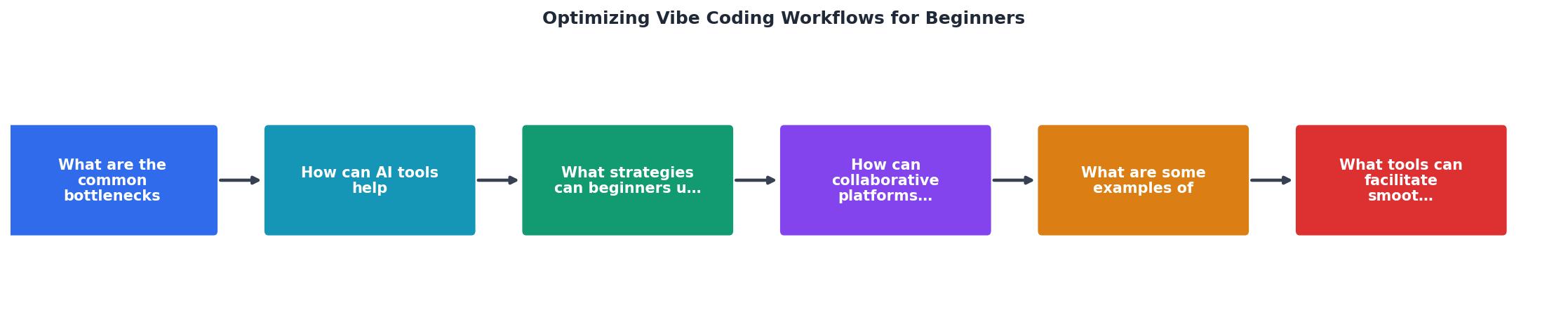
Follow the flow: write clear specs and prompts, generate code with AI, test automatically, catch errors early with monitoring, then iterate. Feedback loops are tight. Pain points are visible and addressable.
Interactive workflow comparison
To see how your current workflow compares to a structured one, here's a breakdown of typical time allocation before and after optimization:
Before Optimization
After Optimization
This example assumes a typical feature project. The 16-hour difference compounds across multiple projects, that's roughly two weeks of reclaimed time per quarter for a solo builder.
FAQ
Frequently Asked Questions
Additional Resources
- Taming Vibe Coding: The Engineer's Guide - The vibe coding workflow · Red (Fail): You start with a small feature or test that fails. · Green (Pass): Focus solely on making that test pass.
- Vibe Coding Best Practices: Avoid the Doom Loop with ... - Vibe coding is a way to create software—not by writing code—but by describing what you want in natural language and letting an AI write the code ...
- A comprehensive beginner's step-by-step vibe coding tutorial - Master app building with AI, hands-on projects, and step-by-step guidance in this complete vibe coding tutorial for beginners.