

Shipping AI-generated code at scale means your app runs the moment someone hits deploy, but security flaws don't announce themselves until a breach happens. Every line the AI writes is code you own, and every shortcut you take compounds the risk. This guide cuts through the noise and gives you a concrete, step-by-step approach to building production-grade software with AI without the nightmare of a security incident.
Photo by Erik Mclean from Pexels
TL;DR
- AI coding accelerates feature delivery but introduces security blind spots, you must verify, not trust.
- Start with input validation and secrets management; they prevent 80% of common vulnerabilities.
- Use a checklist workflow (scan, review, test, audit) before any production deploy.
- Tools like Semgrep, OWASP dependency checkers, and code review processes are non-negotiable.
- Security takes 10–15% of your development time when baked in from the start; it costs 10x more to fix later.
Why security matters in AI-assisted development
AI coding is fast. That's the whole point. But speed without discipline is how you end up with a live application that leaks customer data or gets compromised on day two. When you use Cursor, Claude, or any AI pair programmer, you're trading some control for velocity. The catch: security doesn't trade away.
A significant portion of AI-generated code contains patterns that look correct but miss edge cases, exactly the kind of vulnerability a determined attacker exploits. The AI isn't malicious; it's just following statistical patterns from training data that includes insecure examples.
Your job is not to blame the AI. It's to build a repeatable process that catches problems before they reach users. That process is what separates a shipped product from a liability.
Common mistakes and misconceptions
Most builders skip security in the vibe-coding phase because they assume it will be "handled later" or because they don't know what to check. That assumption is dangerous. Here's what actually happens:
Misconception 1: "My app is too small to be a target." Wrong. Bots scan the entire internet for misconfigured databases, exposed API keys, and unpatched endpoints. Your size doesn't matter; exposure does.
Misconception 2: "The AI knows security best practices." It doesn't. The AI reflects the training data, which includes both good and bad code. It has no real concept of threat models or context.
Misconception 3: "Security review happens at the end." This is the most expensive mistake. Security baked in from day one costs a fraction of a retrofit. Late discovery means rewriting core features.
Misconception 4: "I can skip secrets management if I'm careful." You can't. Humans are predictably careless. Use environment variables, a secrets vault (like HashiCorp Vault or AWS Secrets Manager), and never hardcode a password or API key, period.
The real pattern: teams that ship secure AI-generated code treat security as a workflow step, not an afterthought.
Step-by-step approach
Start with threat modeling
Before you write the first line of code or prompt the AI, spend 15 minutes asking yourself: What could go wrong? Who wants your data? What's the cost if something breaks?
For a simple SaaS product, your threats might be:- SQL injection via user input
- Stolen API keys exposed in the codebase
- Unencrypted passwords in the database
- Missing rate limiting leading to brute-force attacks
Validate all input
Input validation is unsexy and unglamorous. It's also where 40% of exploits start. Every form field, API parameter, and user action must be checked before it touches your database or logic.
Ask the AI to generate validation layers. Tell it explicitly: "Write a password validation function that checks for minimum 12 characters, requires uppercase, lowercase, number, and symbol. Reject anything else." Be specific. Generic prompts produce generic (and often insecure) code.
For APIs, validate the request format, data type, length, and allowed values. Reject anything that doesn't match your schema. This is not negotiable.
Manage secrets centrally
Hardcoded API keys, database passwords, and authentication tokens are the fastest path to a breach. Stop it now.
Use environment variables for local development. For production, use a secrets manager:- AWS Secrets Manager for AWS deployments
- HashiCorp Vault for on-prem or multi-cloud setups
- Doppler or 1Password for small teams
.env and any secrets files to .gitignore. Run a pre-commit hook (like git-secrets or Husky) to scan for exposed keys before they're pushed.
Set up dependency scanning
Dependencies are where old vulnerabilities hide. Every npm package, Python library, or Go module you pull in carries risk. Many are unmaintained or have known exploits.
Use automated dependency scanning in your CI/CD pipeline:- npm:
npm audit(built-in) or Snyk - Python: Safety or pip-audit
- Go:
go list -json -m all | nancy sleuthor GitHub Dependabot - Docker: Trivy for image scanning
Implement code review discipline
AI-generated code needs human eyes. This isn't about rejecting the AI; it's about catching the edge cases and context-specific issues the AI can't know.
During review, ask:- Does this validate input?
- Where are secrets stored? Hardcoded?
- Does this query use parameterized statements (not string concatenation)?
- Is there rate limiting or brute-force protection?
- What happens if this fails? Does it expose errors to the user?
Test for common vulnerabilities
Static analysis tools catch patterns automatically. Semgrep is free and effective; it scans code for insecure patterns without needing to run the code.
Configure Semgrep for your language and run it in CI/CD:
semgrep --config=p/security-audit .
It'll flag SQL injection risks, hardcoded secrets, weak cryptography, and more. You can also run OWASP ZAP for dynamic testing, it actually runs your app and probes for vulnerabilities in the live interface.
Encrypt sensitive data
Data in motion (API calls, database connections) and data at rest (in the database) must be encrypted.
- Use HTTPS everywhere. Let's Encrypt certificates are free.
- For database passwords, use bcrypt or Argon2. Never store plaintext or use MD5.
- For sensitive fields (SSNs, credit cards), encrypt them at the application layer before they hit the database.
- Use a modern cipher like AES-256-GCM, not older algorithms.
Tools and workflows that help
The following tools work with AI-assisted development, not against it. They fit into your workflow without requiring a security team:
Semgrep (free, open source) scans code for insecure patterns. Configure rules for your language and run it on every commit.
Snyk or npm audit (for Node) automatically scans dependencies and suggests fixes. Many fixes can be auto-applied.
OWASP ZAP (free) does dynamic security testing. Point it at your staging app and it probes for OWASP Top 10 vulnerabilities.
Doppler or 1Password (commercial) manage secrets securely and rotate them automatically.
Git-secrets (free) prevents hardcoded secrets from being committed.
Dependabot (GitHub-native) opens pull requests to update vulnerable dependencies automatically.
Combine these into a CI/CD pipeline: scan dependencies → run Semgrep → run code review → run dynamic tests on staging → deploy. This takes 10–15 minutes, not hours.
The vibe securing workflow at a glance
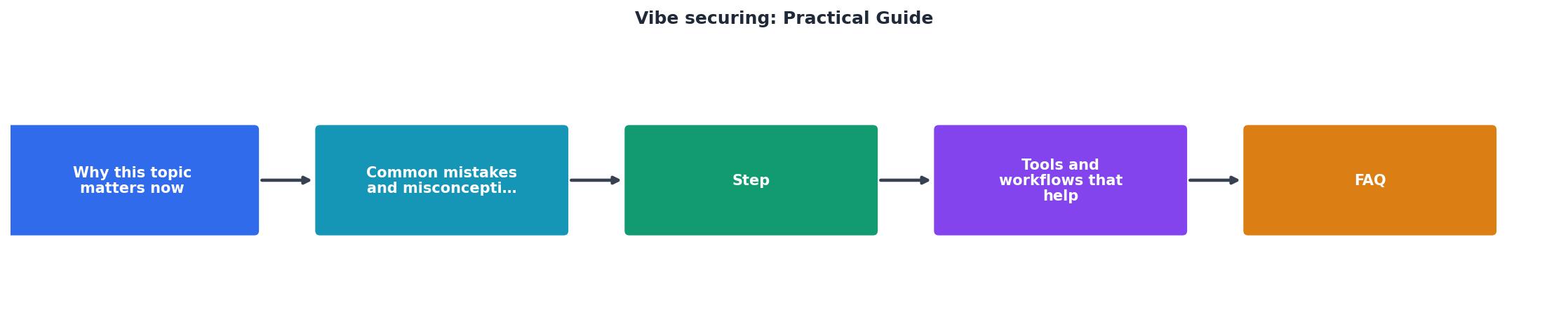
- Prompt: Tell the AI exactly what you want and mention security constraints
- Generate: AI writes the code
- Scan: Run static analysis (Semgrep, dependency check)
- Review: Human eyes check for logic, edge cases, secrets
- Test: Run unit tests and security tests
- Audit: Optional pen test or additional review for high-risk features
- Deploy: Push to production with confidence
Interactive Security Checklist Visualizer
To help you track your security posture, here's a dashboard showing the typical coverage across a vibe-coded project. Use this as a reference for where to focus your effort:
Practical Securing Checklist
Use this checklist before every production deploy. Print it, bookmark it, or add it to your CI/CD pipeline:
Pre-Deploy Security Checklist
Your progress is saved automatically in your browser.
FAQ
Frequently Asked Questions
"Essential for security teams adapting to AI-first development and developers who want to code faster without creating security incidents.">, Secure AI Coding: Mastering Vibe Coding Without the Risks
The shift toward automated security in development pipelines is already happening. The question is whether you're leading it or catching up after a breach. Teams integrating security into their vibe-coding workflow from day one ship faster, sleep better, and avoid the disaster of a preventable exploit.
Security doesn't slow you down if it's woven into the process from the start. The moment you decide to add it later, after you're "done", you pay the friction tax of retrofitting, refactoring, and re-testing. The practical teams build it in.
Additional Resources
- The Art of Vibe Coding and Staying Secure: A Practical Guide - Learn how to safely use AI coding tools. Get expert tips on secure development, advanced prompting, and risk-aware AI practices.
- Build faster, stay secure: A practical guide to safe vibe coding - But vibe coding comes with security risks. The same AI tools that help you build faster can also introduce vulnerabilities. So how can you get ...
- A practical guide to secure vibe-coding for small businesses - Core principles of securing vibe code. Always verify. Treat AI-generated code as a rough draft. It should always be reviewed and rigorously ...