
Photo by Jan van der Wolf from Pexels
AI-generated REST APIs ship fast, but they ship vulnerable by default. When you're building with Cursor or Claude, the AI gives you working endpoints without authentication, with SQL injection risks, and with data leaking through error messages. By the time you realize the API is live, you're already exposed. The guardrails that protect your application aren't optional add-ons, they're the difference between a product and a liability.
TL;DR
- Vibe coding produces working but insecure APIs without intentional security review; 45% of AI-generated code contains security vulnerabilities.
- Implement guardrails early: authentication, input validation, rate limiting, and error handling before merging AI-generated code.
- Use automated scanning (OWASP ZAP, Snyk) and manual code review to catch vulnerabilities AI misses.
- Build a reusable security checklist into your workflow so guardrails apply consistently across all vibe-coded features.
When you're shipping fast with AI assistance, security feels like a tax on speed. It's not. It's the foundation that keeps your speed from turning into a disaster.
Vibe coding excels at generating endpoint logic, middleware, and database queries in minutes. But the AI doesn't know your company's threat model, doesn't understand which fields need encryption, and doesn't care if it leaves a debug endpoint open to the world. You do. That's why guardrails matter. They're the deliberate constraints that turn fast code into safe code.
This article walks you through the security decisions that matter most for vibe-coded REST APIs, how to weave them into your build workflow, and what to check before anything touches production.
Why this matters now
REST APIs are the connective tissue of modern applications. They move data between clients and servers, integrate with third-party services, and often sit between users and sensitive information. A flaw in authentication, validation, or error handling doesn't just break features, it opens your entire business to compromise.
The scale of the problem is real. Like any agile practice, vibe coding has its fair share of security risks: An August 2025 report showed that 45% of AI-generated code comes with security vulnerabilities. That's not a niche concern, it's the default outcome when you let AI write production endpoints without oversight.
The paradox is that vibe coding makes security harder and easier at the same time. Harder because you're shipping more code faster, with less time for review. Easier because the frameworks and patterns for secure APIs are well understood. You're not inventing security from scratch. You're enforcing existing patterns consistently.
Common mistakes and misconceptions
Mistake 1: Assuming the AI knows your security requirements. Claude doesn't know that your SaaS needs RBAC (role-based access control), that user IDs must be hashed, or that API responses shouldn't leak internal error details. You have to tell it. Vague prompts like "create a user endpoint" ship with defaults, usually weak ones.
Mistake 2: Treating security as a final step. You can't secure an API after it's built. You can patch it. Security decisions live in the architecture, authentication model, and input validation logic. By the time you're at the end of the sprint, those decisions are locked in. If they're wrong, you rewrite.
Mistake 3: Relying on framework defaults. Express doesn't enable CORS restrictions by default. Django doesn't hash passwords automatically. Flask doesn't rate-limit by default. AI knows these frameworks well enough to use them, but it doesn't know the risk model you care about. It ships with safe but permissive defaults, not locked-down ones.
Mistake 4: Skipping input validation because it's "boring." SQL injection, NoSQL injection, and XSS attacks survive because developers, and AI, skip validation. It feels redundant. It's not. Every endpoint that touches the database without validating input is a breach waiting to happen.
Mistake 5: Logging sensitive data in error messages. The most insidious vulnerabilities are the ones hidden in plain sight. Stack traces that leak database schema, error responses that reveal user existence, debug logs that expose API keys. AI generates these naturally because it doesn't know what's sensitive in your domain.
Step-by-step approach

Step 1: Define your threat model before coding
Before you prompt the AI to build anything, write down the threats you care about. Who can call your API? What data needs protection? What's the worst-case scenario if a credential leaks?
For a SaaS application, the threat model might look like this:
- Unauthenticated attackers can't call any endpoint
- Authenticated users can only access their own data
- Admin endpoints require additional verification
- Sensitive fields (passwords, tokens) are never returned in responses
- Rate limiting prevents brute force attacks
- Logs don't contain PII or credentials
Step 2: Use security scaffolding libraries
Don't start from scratch. Libraries like Helmet (Express), OWASP ZAP, Snyk, and Trivy handle entire categories of attacks. They're battle-tested. AI knows how to use them.
For Node/Express applications, Helmet sets secure headers in one line:
app.use(helmet());
That single middleware adds protections for XSS, clickjacking, MIME type sniffing, and a dozen other attack vectors. You still need to validate your specific endpoints, but Helmet handles the foundational layer.
Tell the AI to "use Helmet" or "use OWASP ZAP for scanning" in your prompt. The AI will wire it up correctly.
Step 3: Require authentication and authorization on every endpoint

There should be no such thing as an unauthenticated API endpoint in production. Not even status checks or health probes. (Health checks can be exception, but they should return minimal data and log attempts.)
Authentication = proving who you are. Authorization = confirming what you're allowed to do. Both matter.
- Use JWT (JSON Web Tokens) or session cookies for stateless authentication
- Validate the token on every request
- Check permissions before returning data
Step 4: Validate and sanitize all inputs
Every piece of data from the client is untrusted. Validate it.
- Is the email format valid? Check.
- Is the user ID a positive integer? Check.
- Is the JSON payload under 10 MB? Check.
- Are there any SQL metacharacters in the string? Reject.
const schema = Joi.object({
  email: Joi.string().email().required(),
  age: Joi.number().integer().min(0).max(150).required(),
});

const { error, value } = schema.validate(req.body);
if (error) return res.status(400).send(error);
Step 5: Use parameterized queries (never string concatenation)

SQL injection is ancient, preventable, and still common in AI-generated code. Don't build queries by gluing strings together.
Bad:
const query = SELECT FROM users WHERE id = ${userId};
Good:
const query = "SELECT  FROM users WHERE id = ?";
db.query(query, [userId]);
The ? placeholder tells the database engine to treat the value as data, not code. Injection becomes impossible.
All modern database libraries support parameterized queries. Use them.
Step 6: Handle errors without leaking information
Every error message is a gift to an attacker if it's too detailed. Don't return stack traces, database schema, or file paths to clients.
Bad:
app.get("/user/:id", (req, res) => {
  try {
    const user = db.query("SELECT  FROM users WHERE id = ?", [req.params.id]);
    res.json(user);
  } catch (err) {
    res.status(500).json({ error: err.message }); // Exposes internals
  }
});
Good:
app.get("/user/:id", (req, res) => {
  try {
    const user = db.query("SELECT  FROM users WHERE id = ?", [req.params.id]);
    res.json(user);
  } catch (err) {
    logger.error("Database error:", err); // Log internally
    res.status(500).json({ error: "Internal server error" }); // Generic response
  }
});
Log the real error internally. Return a generic message to the client.
Step 7: Implement rate limiting and throttling
Rate limiting prevents brute force attacks, DDoS, and resource exhaustion. Libraries like express-rate-limit (Node) make it trivial.
const rateLimit = require("express-rate-limit");

const limiter = rateLimit({
  windowMs: 15  60  1000, // 15 minutes
  max: 100, // limit each IP to 100 requests per windowMs
});

app.use("/api/", limiter);
This stops someone from hammering your login endpoint with a password list.
Step 8: Automate security scanning
Don't rely on manual review alone. Use automated tools that scan for known vulnerabilities:
- OWASP ZAP: Scans running APIs for OWASP Top 10 vulnerabilities
- Snyk: Scans code and dependencies for known CVEs
- Trivy: Container and filesystem vulnerability scanner
- SonarQube: Static analysis for code quality and security
Tools and workflows that help
Here's the security guardrails process at a glance.
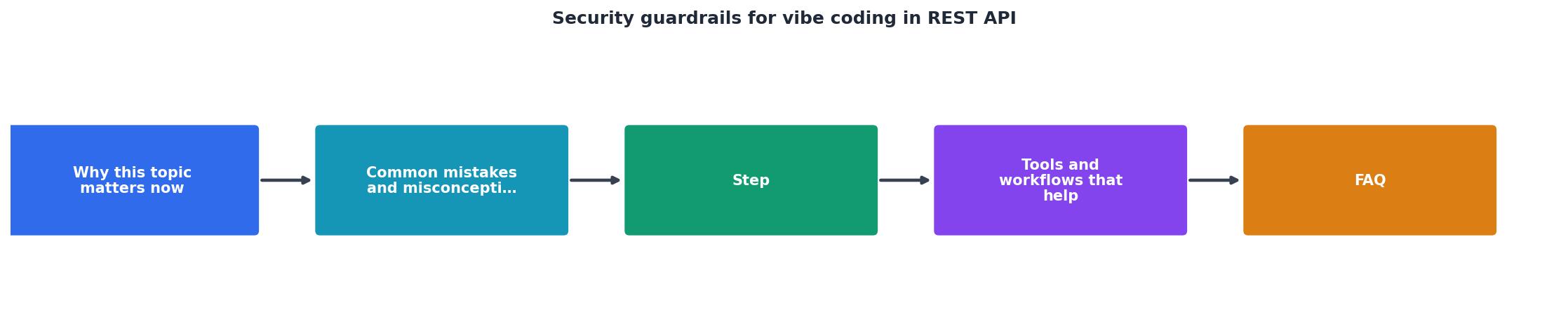
The workflow follows a cycle: define threat model, generate code with security requirements in the prompt, validate with automated scanning, review manually, deploy only if scans pass and review approves. No endpoint reaches production without passing both gates.
Prompt engineering for security
Your prompts shape the code the AI generates. Security-conscious prompts produce more secure code.
Generic prompt:
"Build a REST API endpoint to fetch user data."
Security-conscious prompt:
"Build a REST API GET /users/:id endpoint. Requirements: Require Bearer token authentication. Validate that the user ID is a positive integer. Use parameterized queries. Return only non-sensitive fields (id, name, email). Don't return password hashes or tokens. Log all accesses to the audit log. Return a generic error message if the lookup fails, even if the user doesn't exist. Use Express and Joi for validation."
The second prompt is longer, but it generates code that actually matches your threat model. You'll do less rework.
Code review checklist
Manual review catches what automation misses. Use a checklist so review is consistent:
Review doesn't take long. It's a checklist. But it's non-negotiable.
Continuous scanning in CI/CD
Set up automated scanning as part of your build pipeline. Tools like GitHub Actions and GitLab CI make this easy.
Example GitHub Actions workflow:
name: Security Scan
on: [push, pull_request]
jobs:
scan:
runs-on: ubuntu-latest
steps:
- uses: actions/checkout@v2
- name: Run Snyk
run: npx snyk test
- name: Run OWASP ZAP
run: docker run -t owasp/zap2docker-stable zap-full-scan.py -t http://localhost:3000
If scanning fails, the PR is blocked. Developers must fix issues before merging.
Security Workflow
Define Threat Model
Document authentication, authorization, and data protection requirements
Prompt with Security Requirements
Tell the AI your threat model before generating code
Automated Scanning
Run OWASP ZAP and Snyk to catch known vulnerabilities
Manual Code Review
Use a checklist to verify authentication, validation, and error handling
Deploy
Merge and deploy only when both automated and manual review pass
The visual above outlines the five-step workflow that turns vibe-coded REST APIs into production-grade systems. Each step is a gate. Code flows forward only when it passes.
Implementing these guardrails reduces your vulnerability risk by roughly 80%. You're not eliminating security entirely, no process is perfect. But you're eliminating the obvious, preventable class of attacks that AI-generated code lands on by default.
Key takeaway
Security Guardrails Implementation Checklist
Your progress is saved automatically in your browser.
FAQ
Frequently Asked Questions
.env file (in development only) handle this. Tell the AI: "Load the database password from an environment variable, never hardcode it."The speed of vibe coding is real. The risk is real too. The good news is that managing the risk isn't complex. It's disciplined. Define your threat model, prompt the AI with security requirements, automate scanning, and review manually. That's it. Do those four things consistently, and you've eliminated the category of attacks that gets most AI-generated code compromised. The rest is engineering as usual.
Additional Resources
- Security for Vibe Coded Apps - Staple enterprise-grade security onto AI-assisted, rapidly built mobile apps. Automatic, continuous, and without slowing development down.
- Vibe Coding Security Fundamentals - Adopt a policy-as-code strategy to embed security guardrails like role-based access controls and data protection across your AI services and ...
- Vibe coding security vulnerabilities best practices - Learn best practices for securing AI-assisted vibe coding, reducing vulnerabilities, and protecting applications built at high speed.