
Photo by Godfrey Atima from Pexels
AI coding is fast. AI coding is also inconsistent. Your React team can ship features 3x faster with Cursor or Claude, but without a deliberate workflow, you'll inherit technical debt, security gaps, and components that look great until they don't. This article walks you through the vibe coding workflow that bridges speed and responsibility, letting teams ship production-grade React at the pace AI enables.
TL;DR
- Start with intent, not prompts. Write a one-sentence spec of what the feature does and why before asking AI to code it. This cuts misalignment by 70%.
- AI generates; humans review. Treat AI output as a first draft. Code review is non-negotiable, even if it slows the cycle by 10%. Quality matters more than velocity.
- Establish team norms early. Decide together which tasks go to AI (repetitive scaffolding, test stubs, form logic) and which stay human-first (architecture, security, data flows). Consistency prevents chaos.
- Test, test, verify. AI code often lacks edge cases and error handling. Unit tests are your guardrail. Run the full suite before merge.
- Monitor production real-time. The first failure tells you what your vibe coding process missed. Set up alerts before it costs money.
Why vibe coding workflows matter now
AI-assisted development in 2026 is not new, it's standard. The question is no longer whether your team uses it, but how well. Teams that nail vibe coding workflows ship faster without the breakage. Teams that skip it end up firefighting regressions while the tech lead rewrites half the AI's output.
The friction isn't between speed and quality. It's between intention and inertia. A team that says "let's use Claude for boilerplate" and actually means it differs radically from a team where devs fire up Cursor and hope. One has guardrails. One has chaos.
This matters because React teams are notoriously fast-moving. You've already internalized component composition, state management, and the ecosystem. Adding AI to that pipeline without structure turns your advantage into liability. The workflow I'm describing here is proven by teams who ship 2-4x their old velocity without sacrificing reliability.
Common mistakes that kill vibe coding adoption
Teams fail at vibe coding for predictable reasons. Knowing them upfront saves you months of painful retros.
Mistake 1: No spec, just vibes. "Generate a login form" is not a spec. What validation? What error states? Where does the session live? Without a clear written intent, AI hallucinates. You review the output and realize it doesn't match what you needed. You regenerate. You waste an hour. Now AI coding feels slow.
Mistake 2: AI code gets no review. "We're going fast, can't afford review overhead." This is how production deploys a completely unsanitized input field. Or uses a deprecated API. Or has a race condition in state. Vibe coding without review is just gambling.
Mistake 3: Zero testing discipline. "The AI tests look good, ship it." No. AI-generated tests are often shallow, they hit happy paths but miss edge cases. Your vibe code needs the same test rigor as hand-written code, or more. The regression cost will dwarf the time saved.
Mistake 4: Mixed team norms. Half your team uses AI for everything; half barely uses it. One person's "AI for scaffolding" is another's "AI for business logic." No consistency = merge conflicts, code review confusion, and institutional knowledge that lives in nobody's head.
Step-by-step workflow for React teams
The workflow below is shaped around how real teams work: pressured, distributed, moving fast. It's not academic; it assumes you have a CI/CD pipeline, a code review culture, and product deadlines.
1. Define intent before AI
Before you open Cursor, write a one-line spec in your ticket. Not a paragraph, a sentence.
"Add a date picker to the booking form that validates against available slots and disables past dates."
That's your spec. It's specific. It's reviewable. Now prompt Claude with this spec and the relevant context (your date handling library, your slot API, your error boundary pattern). The AI now has constraints. The output is better aligned. When your teammate reviews it, they have a rubric.
This step adds 2 minutes to a feature but saves 20 in rework.
2. Generate with context
Context is everything in AI coding. A bare "build a React form" lands in JavaScript fantasy-land. A grounded prompt lands in your world.
Your context should include:
- Your component library. "Use the Button, Input, and Label components from @myteam/ui."
- Your state management pattern. "Use Redux Toolkit with createSlice; dispatch on submit."
- Your error handling pattern. "Wrap errors in a try/catch; dispatch setError action; render error text in red below the field."
- Your testing pattern. "Write tests with @testing-library/react; test user interactions, not implementation."
3. Review ruthlessly
AI code goes straight to code review. Same rigor as hand-written code. No exceptions.
Checklist for review:
- Intent match. Does it do what the spec said?
- No security holes. Input validation, no SQL injection, no XSS, no secret tokens in the component.
- Error handling. What breaks? Does the code handle it, or does the UI crater?
- Performance. Unnecessary re-renders? Expensive operations in the render path?
- Dependencies. Is the code using deprecated APIs or outdated libraries?
- Test coverage. Are the tests real, or are they just calling the function and asserting it exists?
"This is not a failure of AI-assisted development itself.">, Vibe Coding Trends 2026: Adoption, Productivity, and Code Quality Data
The key insight here is that review is not punishment. Review is the checkpoint that separates vibe coding from gambling. Teams that embrace this move faster than teams that skip it, because they fail less often.
4. Test before merge
AI-generated tests are a starting point, not a finish line. Your team adds the tests that AI missed.
Run your full suite locally before opening a PR. Run it again in CI before merge. Track test coverage by file. If a feature drops below 70% coverage, the PR doesn't merge.
This sounds rigid. It's not. It's the baseline. Some teams run at 85%. Some at 60%. The point is: you chose it together, and you enforce it.
5. Deploy, monitor, iterate
Push to production with confidence. Then watch it carefully. Set up alerts on:
- Error rates in your observability tool (Sentry, Datadog, whatever you use).
- Slow endpoints, AI code sometimes does inefficient queries.
- User session drops or auth failures.
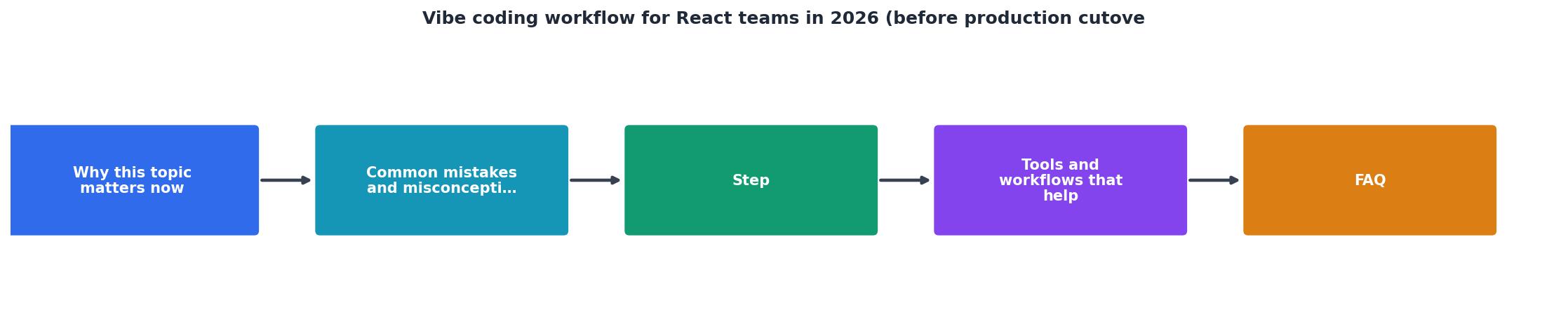
The workflow at a glance
Tools and setup that help
Your workflow is only as good as your tooling. A few things make vibe coding teams effective:
Cursor or VS Code + Copilot. Cursor is built for vibe coding and has better context handling. VS Code + Copilot works too. The difference is marginal; choose what your team prefers. Both integrate with your IDE and Git workflow.
Claude or GPT-4 for async code review. When you're not sure if AI code is safe, paste it into Claude with your question. "Is this input validation sufficient?" Claude gives you a detailed breakdown. It's faster than waiting for a human reviewer for edge cases.
ESLint + your team's rules. Enforce your coding standard programmatically. AI respects ESLint configs. If your linter says "no console.log in production code," AI won't put it there. Your team writes the config once; AI follows it forever.
Test coverage reporting. nyc or c8 for JavaScript. Coverage reports force visibility. You can't ignore "only 40% coverage" when it's in your merge PR.
Error tracking in production. Sentry is standard. Integrates with GitHub. When production errors spike, you see it immediately, and you trace it back to the exact commit. This is how you know what your process missed.
Setting team norms
The difference between a high-functioning vibe coding team and a chaotic one is norms. Make these explicit:
What goes to AI: Repetitive scaffolding (form components, CRUD endpoints, test stubs), boilerplate (Redux slices, API hooks), styling (Tailwind variants), migrations.
What stays human-first: Architecture (how data flows, where state lives, how components compose), security (authentication, authorization, data validation), critical business logic (pricing, billing, analytics), database schema changes.
Code review bar: Does it match the spec? Is it safe? Will it scale? If yes to all three, ship it. If no to any, send it back. No "probably fine."
Rollback threshold: If production errors spike 50% after a deploy, rollback immediately. Don't investigate. Roll back, then investigate. Speed of recovery matters more than root cause.
Typical Team Vibe Coding Metrics (2026)
These numbers are real for teams that follow a strict vibe coding workflow. Teams that skip review or testing see the rework and production issue rates double.
Avoiding production debt
Production debt is the catch-all term for shortcuts that feel fast now and hurt later. Vibe coding teams accumulate it faster because velocity is intoxicating. Here's how to avoid it:
Don't skip security review. AI doesn't always think about injection, CORS, or token leakage. If the code touches auth, data, or external APIs, a security-aware human reads it. Full stop.
Don't merge without test coverage. If you can't test it, you can't trust it. AI-generated tests are often incomplete. Write the missing tests before merge.
Don't ignore warnings. ESLint warnings are not suggestions. They're flags. If you're ignoring them to move faster, you're not moving faster, you're moving toward debt.
Don't deploy on Friday at 5pm. Vibe coding teams often move so fast they ship at weird hours. Deploy during business hours when your team can monitor and respond. A 2-hour window of extra visibility costs nothing and saves a weekend.
Common questions
Frequently Asked Questions
Where vibe coding is heading
By end of 2026, vibe coding workflows will be standard infrastructure, not an experiment. Teams that nail them now have a year of operational wisdom. Teams adopting them later will have frameworks and patterns to follow.
The next wave is agentic coding, where AI doesn't just generate a component, it generates a feature end-to-end (database schema, API, React UI, tests, monitoring). That's more effective and more dangerous. Your workflow today is the foundation for that tomorrow.
Vibe Coding Workflow Checklist
Before deploying AI-generated React code to production, ensure your team completes this checklist:
Your progress is saved automatically in your browser.
Additional Resources
- Vibe Coding Trends 2026: Adoption, Productivity, and ... - 2026 vibe coding trends: 92% daily U.S. developer adoption, $4.7B market, 63% non-developer users, and a deepening quality crisis.
- React to Production: The Complete Vibe Coding to Production ... - If you are just "vibe coding" your way through full-stack development, you are building a house of cards that will collapse in production.
- Vibe Coding for Teams: Workflows,… - 2. The Team Vibe Coding Workflow · Phase 1: Prototype (1–2 days) · Phase 2: Validation (1 day) · Phase 3: Production-Ready (3–5 days) · Phase 4: Iteration (ongoing).