
Flutter teams shipping to iOS and Android are discovering a hard truth: AI gets you to "working" fast, but "production-ready" still requires discipline. Vibe coding, using AI tools like Cursor, Claude, or Copilot as a co-pilot, lets you move faster on mobile without the burnout or the midnight panic when something breaks. The workflow that works is not the one you'd guess from hype articles. It's lean, opinionated, and built for teams that care about shipping real software.
Photo by Daniil Komov from Pexels
TL;DR: A production-grade vibe coding workflow for Flutter teams combines AI acceleration with human review gates, shared conventions, and incremental validation. Define your AI boundaries upfront (what to generate, what to guard), use AI for boilerplate and tests, always review and understand the output, integrate testing early, and establish team norms so AI doesn't become a liability.
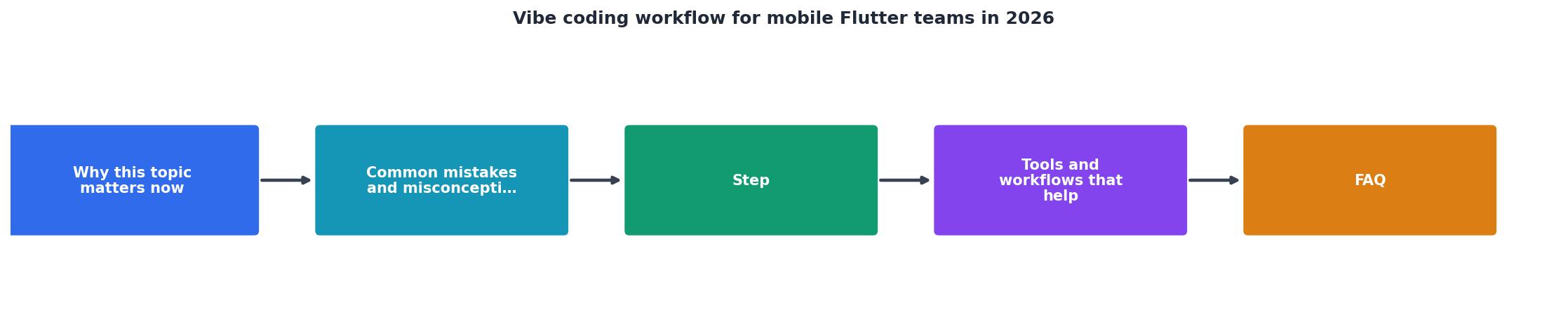
Why this matters now
Flutter adoption hit a turning point in 2025. The framework matured, tooling stabilized, and the mobile app market split into two camps: teams shipping at velocity and teams moving carefully. AI-assisted development is the biggest lever for velocity, but it's also the fastest way to accumulate technical debt if you skip the guardrails.
Mobile development compounds mistakes faster than web. A backend bug affects users gradually; a mobile app crash affects everyone immediately. Deployment is async. Rollbacks are public. And when your Flutter app behaves differently on iOS versus Android, the problem space is already twice as large. AI can't handle that ambiguity alone.
The workflow that wins is one where AI handles the repetition, state management boilerplate, widget scaffolding, test cases, string interpolation, while humans own the architecture, the review, and the judgment calls. Teams that blend the two move faster than either approach alone.
Common mistakes and misconceptions
Most teams make the same missteps when they bring vibe coding into mobile projects.
"AI can write our business logic; we just review for bugs." Wrong. AI is good at tactical coding, terrible at architectural reasoning. If you hand it a feature spec, it will generate something that works on day one and becomes unmaintainable by month three. The time you save disappears when you're refactoring.
"We'll use AI for everything except the critical path." This sounds smart until you realize every path becomes critical once users find it. Better approach: use AI for the types of code that are easy to test and verify, tests themselves, state managers, UI layer, and keep humans on anything architectural.
"Our review process is strict; we'll catch problems in PR." Not on mobile. A code review that takes three days means your AI-generated code sits in a feature branch where it doesn't run on real devices. By the time you spot issues, they're entangled with other work.
"We can use the same workflow we use for backend work." Mobile is different. Your backend service can be patched in minutes. Your app lives on millions of phones. The stakes are higher and the feedback loop is slower, so your vibe coding workflow needs to be more conservative.
Step-by-step approach

1. Define your AI boundaries
Before you write a single prompt, decide what your team will and won't generate with AI. This is not a policy document; it's a working agreement.
Generate with AI:- Boilerplate code: State managers, providers, bloc setups, widget scaffolding.
- Tests: Unit tests, mock builders, test data generators. AI is fast here and wrong code is caught immediately.
- Documentation: Comments, README sections, error messages.
- Utility functions: Formatters, validators, string helpers.
- Navigation architecture: Your route structure, argument passing, deep link handling. This needs human thought.
- State management strategy: Whether you use Riverpod, BLoC, or Provider is too foundational. Stick with what your team knows.
- Widget composition for complex UI: Custom layout logic, performance-sensitive render trees.
- Business logic: Any code that implements your domain rules or touches user data.
AI_USAGE.md file in your repo. Link it in your team Slack. Reference it in code review when someone asks "can I use AI for this?"
2. Use AI for tests, not just code
This is the leverage point most teams miss. AI is exceptional at generating test cases. It's mediocre at generating the code being tested.
Reverse your workflow: write the test first (with AI help if you want), commit it, then write the code to pass it. This gives you a specification that's independent of implementation and a guard against AI-generated code that passes by accident.
Example: You need a utility that parses a Firebase timestamp and formats it for display. Instead of asking AI to write the parser, ask it to write the test cases that the parser must pass. Then write the parser yourself or use AI-generated code as a first draft that you validate against the tests.
3. Build incrementally on real devices
Do not wait for a feature branch to be "complete" before you test on a real device. Build, deploy to your device or simulator, and validate after every chunk of work.
This is harder with AI-generated code because it's tempting to trust it and keep generating. Fight that temptation. A feature that runs on your device for five minutes beats a feature that looks good in code review and crashes in production.
Use a local development build that deploys in seconds. If your deployment takes more than 30 seconds, you'll skip validation checks and end up with problems downstream.
4. Establish a code review cadence
Code review for vibe coding teams needs to be faster and more structured than traditional review. Aim for same-day review. Set a rule: no AI-generated code ships without human eyes, and no review takes longer than 24 hours.
Create a review checklist focused on things AI gets wrong:- Does this match the architecture we defined in
AI_USAGE.md? - Are there edge cases the AI missed? (Off-by-one errors, null handling, async race conditions.)
- Does this code run on both iOS and Android without platform-specific bugs?
- Are there tests that validate the behavior?
"I'm a Google Developer Expert in Dart & Flutter.">, Vibe Coding Flutter: The Senior Dev's Honest Take
5. Test on multiple devices and OS versions
AI-generated code often works on one platform and breaks on the other. This is not a flaw in AI; it's a complexity of mobile development. iOS and Android have different timing, memory, and rendering characteristics.
Use Firebase Test Lab or equivalent to run your automated tests on a matrix of devices before merging. Aim for at least one iOS and one Android version plus a simulator. This takes 10 minutes and catches 70% of platform-specific issues before code review.
The workflow in practice
Here's what a real day looks like: You're building a feature to fetch user settings and display them in a form. You break it into pieces: data layer (fetch), state layer (caching), UI layer (form). For each piece:
- Write the test that the code must pass.
- Use AI to generate the code (or 80% of it).
- Test on your device immediately.
- Open a PR, pair review with one teammate.
- Merge same day if it passes review and device testing.
Tools and workflows that help
Your toolchain matters because it either reinforces good habits or enables shortcuts. Invest in tools that make the right path the easy path.
Code editor: Use Cursor or Copilot in your IDE. Not ChatGPT in a browser. The difference is context. Cursor reads your codebase and generates code that fits your patterns. ChatGPT has no idea what your project looks like and generates plausible but misaligned code.
Static analysis: Set up Dart analyzer, lint rules, and Format with strict settings. Make the analyzer fail the build if code doesn't conform. This catches a whole class of AI-generated problems automatically (unused variables, null safety violations, style drift).
Automated testing: Firebase Test Lab, GitHub Actions for Flutter, or Codemagic. Pick one and run tests on every PR. Make them required to merge. AI-generated code passes linters; it fails device testing more often.
Version control: Use small commits. "Add user settings form" is one commit. "Add API client for settings" is another. This makes it easy to revert a broken piece if validation surfaces a problem. Large commits hide problems until they're expensive to fix.
Team communication: Use a shared Slack channel for "AI-generated code review checklist" or "Device testing failures." When someone finds a pattern of issues with AI output, share it. Your team learns collectively faster.
FAQ
Frequently Asked Questions
AI_USAGE.md. Half a day. Day two and three: set up code review templates and automated testing. One day total. The real implementation is cultural; teams usually stabilize on the new norms in two to three sprints. By sprint four, it feels normal.Workflow checklist
Vibe Coding Readiness Checklist
Your progress is saved automatically in your browser.
Interactive workflow dashboard
To visualize how this workflow flows in your day-to-day, here's an interactive breakdown of time allocation and decision points:
Daily Vibe Coding Time Allocation
The proportions above show the realistic breakdown when your team has stabilized on the workflow. Early on, validation takes longer because you're learning where AI code typically breaks. After a few weeks, you'll notice your team develops a sixth sense for risky patterns and validation accelerates.
The truth about vibe coding at scale
If you're tempted to skip the workflow because you've heard vibe coding is "just as good as hand-written code," stop. It's not. AI code is faster to write, often pragmatic, and frequently wrong in subtle ways. The win is not quality; it's throughput. You get 1.5x to 2x the features in the same sprint, but only if you maintain the guardrails.
Teams that treat vibe coding as a license to ship without review, without testing, without understanding their own code: they move fast for six weeks, then spend three months fixing production issues. This is not theoretical. It's the pattern we see repeatedly.
The teams that win are the ones that use vibe coding to eliminate repetition, not to eliminate thinking. They use AI for the 20% that's boilerplate and tedious, then spend their human effort on the 20% that's architectural and risky. The workflow above is how you keep that balance intact.
Get started with your team by defining your boundaries this week. Pick one small feature, build it with the workflow above, and learn what works for your specific context. Mobile development is too varied (different backend systems, different UI patterns, different platform quirks) to have a one-size-fits-all process. But the core, test first, AI draft, human review, device validation, scales from solo to teams of twenty.
Additional Resources
- Vibe Coding Flutter: The Senior Dev's Honest Take - Vibe coding is AI-assisted dev where intent replaces syntax — coined by Andrej Karpathy in Feb 2025, now a legitimate workflow · Flutter is one ...
- Top 5 Vibe Coding Tools to Build Mobile Apps in 2026 - 1. Nowa — The AI Flutter Builder That Keeps Your Code Neat · 2. FlutterFlow — The Oldest Flutter Builder · 3. DreamFlow — FlutterFlow's younger ...
- Vibe Coding Flutter in 2026: 4 Tools Ranked + What Breaks - Quick Answer. You can vibe code a Flutter app in 2026: FlutterFlow ($39/month Basic tier with code export, as of mid-2026) is the visual ...