
Your team ships REST APIs fast with AI, but nobody's sure if the code is actually production-ready. Endpoints work in isolation, then fail under load. Security reviews find gaps nobody caught. The AI output is 80% there, and manually fixing the remaining 20% burns through your sprint. Without a clear workflow, vibe coding becomes a liability instead of a force multiplier.
Photo by Daniil Komov from Pexels
TL;DR:- Vibe coding for REST APIs requires three phases: prompt clarity (what you're building), verification (does it work and is it safe?), and team standardization (how your team codes together).
- AI output needs mandatory code review, load testing, and security scanning before merge.
- Establish shared conventions for endpoints, error handling, and documentation to scale beyond single-person development.
- Use templates and checklist-driven code review to catch what AI misses without slowing down.
Why this matters right now
REST API teams in 2026 are caught between two worlds. Shipping speed has multiplied with AI assistance, a team member can scaffold an entire authentication service in an hour. But that same velocity introduces new risks: inconsistent error responses, missing input validation, unauthenticated endpoints, database queries that N+1 under real traffic. The tools got faster; the engineering discipline didn't scale with them.
The gap isn't about AI capability. Modern models generate solid API code. The gap is workflow. Teams that vibe code without process end up debugging production incidents caused by things the AI could have handled correctly if the prompt had been precise or if someone had verified the output. The cost of that incident erases weeks of saved development time.
This workflow bridges that gap. It's built for teams that want to ship fast without shipping broken.
Common mistakes that slow you down
Teams adopting vibe coding for REST APIs usually stumble in predictable places.
Prompt ambiguity. The most common mistake: treating the AI as a code typist instead of an architect. Developers write vague requests like "add user endpoints" without specifying error codes, authentication requirements, rate limiting, or idempotency. The AI fills in reasonable defaults, but those defaults don't match your system. You end up rewriting half the code in review. Precise prompts take slightly longer upfront but eliminate 80% of revision loops.
No verification stage. Shipping AI code directly to review, or worse, directly to production, creates a false sense of efficiency. A few lines of manual testing catch issues that code review alone misses. Load testing reveals N+1 queries and connection pool leaks. Automated security scanning flags common API vulnerabilities before they become incidents.
Inconsistent conventions. When each team member vibe codes independently, they produce working but incompatible services. One endpoint returns { error: "User not found" }, another returns { message: "Invalid request" }. One uses /api/v1/users, another /users. One implements custom JWT validation, another delegates to middleware. Small inconsistencies compound into maintenance overhead and confuse clients integrating your APIs.
Skipping documentation. AI can generate endpoint docs, but it generates them lazily if you don't ask explicitly. Teams that ship API code without OpenAPI specs or Postman collections end up in a painful cycle where clients guess the request shape, and support spends time answering questions that docs should answer.
Step-by-step approach

1. Design the interface first
Before you write a prompt, nail down what the endpoint does. This is not AI work, this is architecture.
Decide on:- HTTP method and path. For a user registration endpoint, is it
POST /auth/registerorPOST /users/register? Match your team's convention. - Request schema. What fields does the client send? Are they required? What type? Do you validate email format? Check password strength?
- Response schema. Success case: what fields does the endpoint return? Error cases: what error codes (400, 401, 403, 404, 500)? What does the error response look like?
- Side effects. Does the endpoint send a verification email? Log activity? Increment a counter?
- Authentication. Bearer token? API key? Session cookie?
- Rate limiting. Does this endpoint have rate limits? Per user or global?
2. Write precise prompts
Now hand the spec to the AI. A vague prompt produces guesswork; a precise prompt produces production code.
Bad prompt: "Create a user registration endpoint."
Good prompt: "Create a REST API endpoint for user registration. Use Node.js/Express. HTTP method: POST. Path: /auth/register. Request body: JSON with email (string, required, must be valid email), password (string, required, min 12 chars), name (string, required). Response on success: 201 Created with JSON body { id, email, name, createdAt }. Response on email already registered: 409 Conflict with { error: 'Email already registered' }. Response on invalid password: 422 Unprocessable Entity with { error: 'Password must be at least 12 characters' }. Hash password with bcrypt before storing. No rate limiting yet. Use the existing userRepository and logger modules. Reference these modules in the imports; generate the implementation only. Add inline comments explaining validation and error handling."
The difference is specific. You're telling the AI the shape of the data, the HTTP semantics, the error codes, the crypto strategy, and the style of your codebase. AI code generated from this prompt matches your system. AI code generated from the vague prompt requires rewrites.
3. Verify before review

Code review is not verification. Review catches style and logic; verification confirms the endpoint actually works and is reasonably secure.
Test locally. Spin up the API and hit the endpoint manually. Does it return the expected response? Does it handle edge cases? Try registering twice with the same email, does it return 409? Try a password that's too short, does it return 422?
Load test. Run a quick artillery or k6 test. 100 concurrent requests. Does the endpoint stay responsive? Do you see connection pool exhaustion in the logs?
Security scan. Run the code through a static analyzer. OWASP Top 10 for APIs:- Is user input validated and sanitized?
- Is the password hashed?
- Is the endpoint authenticated (if it should be)?
- Are sensitive fields excluded from the response (no password hash in the response body)?
- Do error messages leak information (never say "email is already registered" if you're hiding which accounts exist, that's an enumeration vulnerability)?
4. Standardize and document
The difference between one developer shipping a solid endpoint and a team shipping 10 inconsistent endpoints is standardization.
Define a template for your team. This lives in a shared doc or repository:
API Conventions Document:- All endpoints live under
/api/v1. - Authentication: Bearer token in
Authorizationheader. - Error responses: Always return JSON with
{ error: string, code: string }. Example:{ error: "Email already registered", code: "EMAIL_DUPLICATE" }. - Timestamps: Return in ISO 8601 format.
- Pagination: Use
?page=1&limit=20. Responses include{ data: [...], total: number, page: number, limit: number }. - Rate limiting: 100 requests per minute per user for most endpoints, 10 per minute for auth endpoints.
- Logging: Log all authentication failures and all requests that touch user data.
- Testing: All endpoints require unit tests (happy path + error cases) and integration tests.
Generate OpenAPI/Swagger documentation from the code or maintain it alongside the code. Tools like Swagger Codegen or API Blueprint generate client libraries from this. Clients know the exact shape of every endpoint. Questions drop by 80%.
The vibe coding workflow in action
Here's what a real workflow looks like, end-to-end:
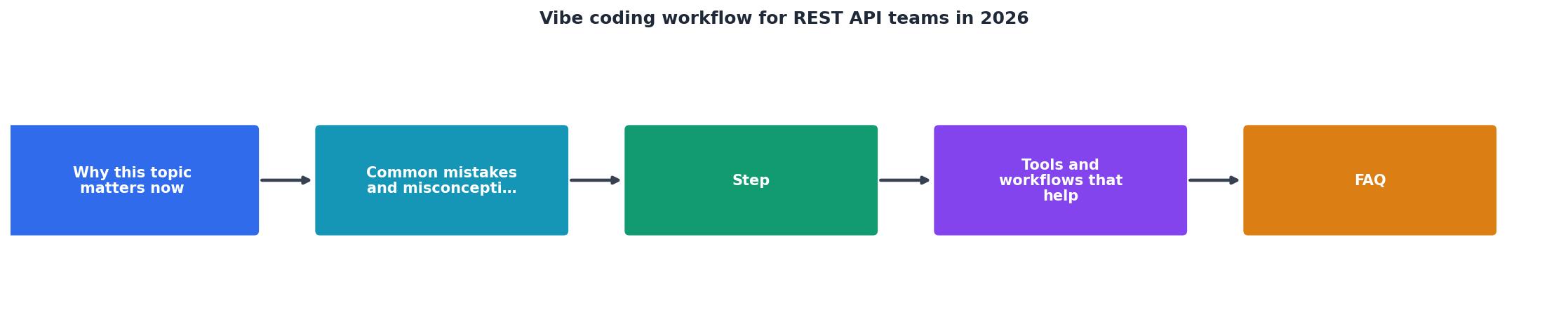
- Spec. Developer writes a one-page spec for the new endpoint.
- Prompt. Developer writes a precise prompt referencing the spec.
- Generate. AI generates the code.
- Local test. Developer hits the endpoint locally, confirms it returns the right response and handles errors.
- Security scan. Developer runs Snyk/Semgrep, fixes any findings.
- Code review. Peer reviews the code against conventions, checks for logic errors, and verifies tests are present.
- Merge. Code goes to main and deploys.
- Monitor. Logs and metrics confirm the endpoint is healthy in production.
Tools and workflows that help
"Vibe coding repositions the developer as architect and reviewer rather than typist.">, Vibe Coding: The Complete Developer's Guide (2026)
AI coding assistants: Cursor, GitHub Copilot, or Claude in your IDE. Cursor is especially strong for REST API code generation because it understands multi-file context.
Template repositories: Set up a repo template with your API skeleton, Express boilerplate, middleware for auth and logging, error handling utilities, testing setup. Developers clone the template and fill in the endpoint logic. Consistency is automatic.
Spec-driven generation: Tools like OpenAPI Generator or Swagger Codegen can scaffold endpoints from an OpenAPI spec. Write the spec first, generate the skeleton, then use AI to fill in the business logic.
Testing frameworks: Jest or Mocha for unit tests. Supertest for integration testing HTTP endpoints. These frameworks integrate with Cursor and Claude, developers can ask the AI to generate tests, then verify they pass.
Security scanning: Snyk or Semgrep in your CI/CD pipeline. Fail the build if vulnerabilities are found. No exceptions.
Load testing: k6 or Artillery in CI. A simple smoke test, 100 concurrent requests to critical endpoints. Catch connection pool leaks and N+1 queries before they hit production.
API documentation: Stoplight or Postman to maintain OpenAPI specs. Auto-generate docs for clients.
Code review checklist: A GitHub/GitLab template that reminds reviewers to check against conventions, verify tests, and confirm security scanning passed.
Your Vibe Coding Checklist
- Design endpoint interface before prompting
- Write precise, context-aware prompts
- Test locally (happy path + error cases)
- Run security scanning on generated code
- Peer review against conventions
- Load test before merge
- Maintain OpenAPI documentation
- Monitor metrics in production
When a team follows this workflow consistently, deployment confidence goes up, code review time drops, and production incidents tied to API code disappear. The AI does the typing; your process ensures the code is production-grade.
REST API Vibe Coding Checklist
Your progress is saved automatically in your browser.
FAQ
Frequently Asked Questions
/api/v1. New major changes (breaking request/response formats) go to /api/v2. Old endpoints stay at v1 until deprecation. Document the sunset date. Clients upgrade at their pace. Tools like Stripe and Twilio handle this well, study their approach.Additional Resources
- Vibe Coding: The Complete Developer's Guide (2026) - This guide provides that bridge, covering tool selection, environment setup, a hands-on REST API tutorial, workflow patterns, and the pitfalls ...
- Vibe Coding Trends 2026: Adoption, Productivity, and ... - 2026 vibe coding trends: 92% daily U.S. developer adoption, $4.7B market, 63% non-developer users, and a deepening quality crisis.
- Vibe Coding Tools in 2026 | Enterprise-ready solutions ... - Vibe coding tools let you describe what you want in natural language instead of writing code line by line. Connect any REST API, GraphQL ...