How to Build Data-Driven Apps with AI Tools
Data-driven apps turn raw information into decisions. AI tools compress what once took months into weeks, handling data pipelines, feature extraction, and model integration without boilerplate overhead. But speed isn't enough, you need the right datasets, clean integration patterns, and visualization that makes numbers speak.

Photo by Marek Prášil from Pexels
Data-driven apps turn raw information into decisions. AI tools compress what once took months into weeks, handling data pipelines, feature extraction, and model integration without boilerplate overhead. But speed isn't enough, you need the right datasets, clean integration patterns, and visualization that makes numbers speak.
TL;DR
- Data-driven apps use real datasets to fuel intelligent features; AI tools accelerate data processing and model training but don't replace engineering fundamentals.
- Start by identifying high-quality datasets that match your problem domain, validate them, and plan your integration strategy before writing code.
- Use Claude, Cursor, or similar tools to scaffold data pipelines, but review for correctness and handle edge cases manually.
- Effective data visualization bridges the gap between raw numbers and user action, choose tools and designs that fit your audience's needs.
- Real wins come from combining fast AI iteration with controlled quality checks, not from cutting corners.
Data-driven applications have become the foundation of modern software. Whether tracking user behavior, predicting demand, or recommending content, apps that learn from data outcompete those that don't. AI tools make building these apps faster, but they also make it easier to ship broken ones. The real skill is knowing what to automate with AI and what requires your judgment.
What are data-driven apps and why they matter

A data-driven app makes decisions based on data patterns, not hard-coded rules. Instead of saying "show users these five items," it learns which items they interact with and personalizes accordingly. Instead of a fixed discount tier, it predicts which offer maximizes lifetime value.
The benefits are concrete:- Higher engagement through personalization
- Better resource allocation via predictive analytics
- Faster decision-making backed by real metrics
- Compounding advantage as more data feeds the model
AI tools lower the barrier to entry. A non-engineer can scaffold a data pipeline. A junior developer can draft feature engineering logic. A team can prototype in days instead of weeks. But this speed comes with a trap: moving fast without understanding the foundations means learning your mistakes in production.
Selecting the right datasets for AI integration
Your app is only as good as its data. Garbage in, garbage out, that principle hasn't changed, and AI won't save you from it.
Start with these criteria:
Relevance. Does the data actually predict what you care about? If you're building a churn prediction app, user engagement data (clicks, session length, feature usage) matters. Payment history alone doesn't. Ask yourself: what patterns in this data would a human need to make the same decision?
Volume. You need enough examples for patterns to emerge. A thousand records of user behavior is often enough for simple models. A million is better. Less than a hundred and you're likely fitting noise, not signal.
Quality and completeness. Missing values, duplicates, and inconsistent formatting add overhead and break your assumptions. Ask: what percentage is missing? How are missing values coded (null, -1, "unknown", blank)? Can you clean it programmatically?
Recency. Old data is stale data. If your app recommends products, last month's preferences are more useful than last year's. If you're predicting infrastructure load, historical patterns matter, but recent spikes matter more.
Legal and ethical constraints. Can you use this data? Are there privacy regulations, licensing restrictions, or fairness concerns? Startups often stumble here, using data they can't legally train on, or discovering mid-launch that their model discriminates against protected groups.
When you evaluate a dataset, don't rely on description alone. Download a sample. Inspect it. Use AI to help: ask Claude to spot anomalies or suggest cleaning steps. But verify the suggestions. AI will confidently recommend nonsense if you let it.
Datasets to consider:- Your own user behavior (most valuable, most available)
- Public datasets (Kaggle, UCI Machine Learning Repository, Google Dataset Search)
- Partnered data (with businesses, institutions, or research labs)
- Synthetic data (generated to test pipelines before real data arrives)
Integrating AI tools for data processing

Integration means connecting your data to models and serving predictions back to users. AI tools like Cursor and Claude can scaffold this quickly, but the scaffold still needs load-bearing walls.
The process: five key steps
1. Ingest data, Pull data from your source (database, API, CSV, data warehouse) into a format your pipeline can work with. Ask Claude to draft the ingestion script. Verify it handles edge cases: what if the API times out? What if a field disappears? Don't assume the first version is correct.
2. Clean and transform, Normalize values, handle missing data, create features. This is where most of the real work lives. A model is only useful if the inputs are consistent. Use AI to suggest transformations, but test them manually on sample data first.
3. Train or tune a model, If you're building a custom model, tools like Hugging Face, TensorFlow, or even simpler libraries like scikit-learn handle the heavy lifting. If you're using a pre-trained model (e.g., a language model for text classification), you may only need to fine-tune it. AI tools can scaffold both, but training is still compute-intensive and slow. Budget time here.
4. Validate predictions, Test your model on data it hasn't seen. Check: Does it predict accurately? Does it fail in expected ways? Does it treat different user groups fairly? A model that works on your test set but fails in production is worse than no model.
5. Deploy and monitor, Ship the model as an API or embedded service. Log predictions and outcomes. Watch for model drift, when real-world data shifts and your model's accuracy drops. This happens constantly. Plan for retraining.
"The best AI app builders automate boilerplate code, scaffold backend logic, and remove infrastructure setup from the critical path, but budget time for the steps that require human judgment.">, AI App Development: Guide To Building AI
Tools that work well together
- Data processing: Python (pandas, polars), SQL
- Model training: scikit-learn, PyTorch, TensorFlow, or cloud services (Google Vertex AI, AWS SageMaker)
- Serving: FastAPI, Flask, or managed endpoints (Hugging Face Inference, Replicate)
- Orchestration: Airflow, Dagster, or simpler cron-based jobs
- Monitoring: Prometheus, DataDog, or custom logging
Visualizing data results effectively

A chart that shows the right thing in the right way changes behavior. A chart that doesn't gets ignored or misunderstood.
Choose the right visualization type:- Trends over time: Line chart (revenue growth, user acquisition)
- Comparisons: Bar chart (feature usage by segment, performance across models)
- Part-to-whole: Pie or donut chart (revenue by source, user distribution)
- Relationships: Scatter plot (correlation between spend and retention)
- Distributions: Histogram (how users cluster by age, spend)
- One message per chart. If you're trying to show three things, make three charts.
- Label axes. Use units. Make assumptions visible.
- Use color purposefully. Red doesn't always mean bad; it just means "different." Avoid color blindness traps.
- Interactive dashboards are effective but can overwhelm. Start static, add interactivity for specific use cases.
- Lightweight and fast: Plotly, Chart.js, Apache ECharts
- Embedded in your app: D3.js (effective, steep learning curve), Three.js (3D)
- Dashboard platforms: Metabase, Looker, Grafana
- Simple and spreadsheet-like: Observable, Google Sheets
Examples of successful data-driven app projects
Real projects that ship:
Spotify's recommendation engine, Uses billions of listening events to predict what you'll want to hear next. Built on massive infrastructure and continuous retraining. The payoff: discovery drives stream time and retention.
Stripe's fraud detection, Analyzes transaction patterns to flag likely fraud in milliseconds. Data-driven because the model learns which combinations of features predict fraud in the real world, not from a rule book written by hand.
Airbnb's search ranking, Personalizes listing order based on your search behavior, preferences, and booking history. Data-driven search converts browsers into bookers.
Linear's AI features, Uses project and issue data to suggest next steps, auto-categorize tickets, and help teams work faster. Built incrementally; started with simple features, layered complexity.
Amazon's Just Walk Out, Combines computer vision and transaction data to let you shop without checkout. Data-driven in real time, but built on years of sensor fusion and labeling work.
Each of these started as a hypothesis: "If we personalize this, users will engage more." Then they measured. Then they iterated. None of them were perfect on day one.
Interactive data processing workflow
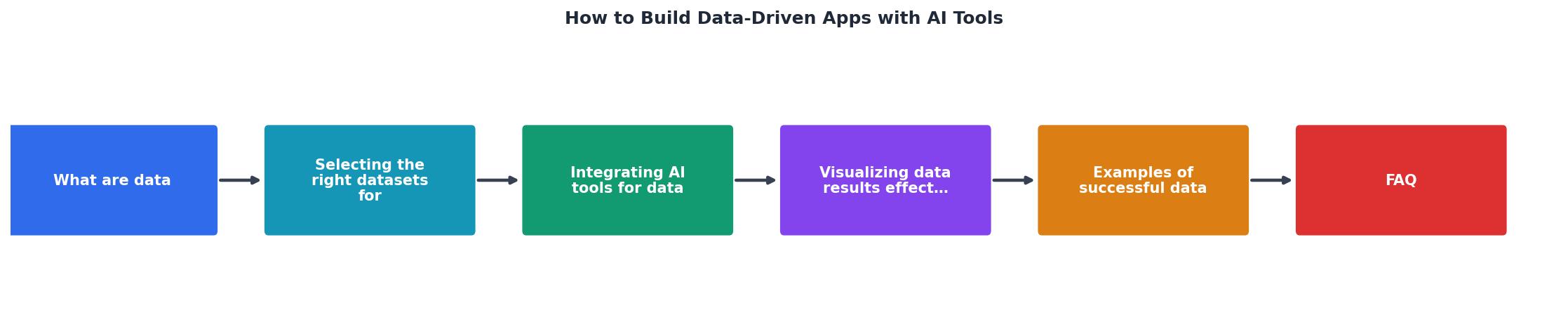
To illustrate how data flows through a modern app, here's a visual representation of a typical pipeline:
This pipeline is the skeleton of every data-driven app. The specific tools and timelines vary, but the structure holds. AI tools can help you code each step faster. Your job is to make sure each step is honest, inputs are clean, logic is correct, outputs are validated.
FAQ
Frequently Asked Questions
Building data-driven apps with AI tools is fast. Shipping production-grade data-driven apps is deliberate. The gap is narrowest when you know where to automate (boilerplate, scaffolding, exploratory analysis) and where to slow down (data validation, edge cases, testing, monitoring). Start with a clear question, clean data, and an honest pipeline. Let AI speed up the commodity parts. Own the parts that matter.
Additional Resources
- Build an App with AI: Get a Shareable URL - Discover how to build an app with AI using simple prompts. Learn how to create a multi-file app, launch it online, and get a shareable URL ...
- Building Model-Driven Power Apps the Modern Way (2025 ... - Model driven Power Apps empower you to quickly build robust, data-driven business applications using no-code/low-code tools.
- AI App Development: Guide To Building AI-Powered Apps - This guide walks through every phase of AI app development, from defining your project goal to monitoring AI applications in production.
Ready to Master Vibe Coding?
Learn to build software faster with AI assistance using the Vibe Coding Bible.
Get Started