Code optimisation with ai: Practical Guide
AI can write code fast, but fast code isn't always good code. The real challenge is knowing when to optimize, what to optimize, and how to keep your codebase maintainable while pushing productivity gains. This guide cuts through the hype and shows you a practical, step-by-step approach to code optimization with AI tools, one that keeps quality intact while shipping faster.

AI can write code fast, but fast code isn't always good code. The real challenge is knowing when to optimize, what to optimize, and how to keep your codebase maintainable while pushing productivity gains. This guide cuts through the hype and shows you a practical, step-by-step approach to code optimization with AI tools, one that keeps quality intact while shipping faster.
TL;DR
- Identify optimization targets early: slow queries, repeated logic, and bottlenecks flagged by monitoring, not guesswork.
- Use AI prompts strategically, specific, well-scoped requests produce better refactors than vague "optimize this" commands.
- Verify AI output with profiling and tests; don't trust optimization claims without data.
- Common mistakes: optimizing prematurely, trusting AI output blindly, and skipping code review.
The good news: AI is excellent at refactoring when you guide it right. The bad news: you have to guide it, and that means understanding what you're optimizing for before asking the AI to do it.
This article shows you how to build an optimization workflow that catches bottlenecks, targets them with precision, and uses AI to refactor without introducing regressions. You'll learn where most teams go wrong, the tools that help, and a checklist to make this repeatable.
Why this matters now
The speed gain from AI coding is real. But speed without discipline breeds technical debt. Teams are shipping code 2-3x faster with AI assistants, yet performance problems surface months later when the codebase is harder to untangle. Optimization with AI isn't about being a perfectionist, it's about catching problems when they're cheap to fix, not when they're destroying your margins.
Common mistakes and misconceptions
Mistake 1: Optimize before measuring. The worst optimization decisions come from guessing. "This function looks slow" without profiling data is a waste of AI tokens. Profile first, then ask AI to refactor.
Mistake 2: Trust AI output without tests. An AI refactor that passes the build is not proven correct. It might be faster on the happy path and broken on edge cases. Run tests before merging.
Mistake 3: Assume AI understands your constraints. AI doesn't know your SLA, your concurrent user count, or your infrastructure limits. Context matters. Tell the AI what you're optimizing for: latency? throughput? memory? The answer changes everything.
Mistake 4: Optimize the wrong layer. A slow API response usually isn't a code problem, it's a database problem. Asking AI to optimize your controller logic when your query returns 10,000 rows is theater. Profile the full stack.
Mistake 5: Refactor without version control. AI can rewrite a lot of code fast. Without a clean git history and easy rollback, a "optimization" that breaks on production is expensive to debug. Keep changes atomic and reviewable.
Step-by-step approach
Step 1: Profile to find real bottlenecks

Before touching code, measure. Use your platform's native profiler:
- Node.js / JavaScript: Node's built-in
--profflag, or tools like Clinic.js for production-grade analysis. - Python: cProfile, memory_profiler, or py-spy for live profiling.
- Go: pprof (built-in) shows CPU, memory, goroutine issues.
- Java / JVM: JFR (Java Flight Recorder) or Async Profiler for zero-overhead production profiling.
Without profiling, you're optimizing blind.
Step 2: Frame the problem for AI
The better your prompt, the better the refactor. A vague "make this faster" generates useless suggestions. A precise prompt saves tokens and time.
Good framing includes:
- What's slow: "This endpoint returns user data in 500ms but should be under 100ms."
- Where the time goes: "Profiling shows 80% of time is in the database query, not the serialization."
- Your constraints: "We have 2GB memory limit per worker, and 10,000 concurrent requests per second."
- What you tried: "We already indexed the
user_idcolumn. We can't change the schema right now." - The code: Paste the exact function or query, not a screenshot.
I have a Node.js endpoint that fetches user metadata and related posts. Profiling shows the database query takes 480ms for 100 requests, mostly in a nested loop join. The query needs to support filtering by category and sorting by recency. Can you rewrite it as a single SQL query with proper indexes instead of the N+1 approach? Here's the code: [paste]. Assume PostgreSQL 14.
That prompt works. "Make this faster" doesn't.
Step 3: Examine and test the AI refactor
AI generates refactors that look plausible. Read the code before merging:
- Does it handle the same edge cases as the original? (Empty results, null values, timeouts.)
- Are there new dependencies or breaking changes?
- Is the refactored code more readable or harder to follow?
- Does it still pass your test suite?
"The quality of AI responses depends on the clarity and specificity of your prompt.">, Best practices for using AI in VS Code
Step 4: Measure the actual improvement
Not all refactors are wins. Measure:
- Latency (p50, p95, p99 percentiles, not just average).
- Memory usage.
- Database query time.
- Throughput under load.
Step 5: Document and repeat
Once a refactor is live, log:
- What you optimized and why.
- The specific bottleneck (measured).
- The refactor technique used.
- The improvement achieved.
Tools and workflows that help
Profiling:- Node.js: Clinic.js, Node's built-in
--prof, NewRelic. - Python: Py-spy for production, cProfile for development.
- Go: pprof (built-in, works in production).
- Java: JFR, Async Profiler.
- GitHub Copilot can review diffs for performance red flags.
- Use Cursor with your codebase as context to ask "is this pattern slow?"
- Node.js: Autocannon, Artillery for load testing.
- Python: Locust, Apache JMeter.
- Go: built-in
testingpackage withbenchmarking.
- Use
EXPLAIN(SQL) to see query plans before running them. - Ask AI to rewrite slow queries, then validate the plan.
- Index based on profiling data, not hunches.
- Set up APM (Datadog, New Relic, Elastic) to catch slowdowns before they hit users.
- Profile a subset of production traffic, not just staging.
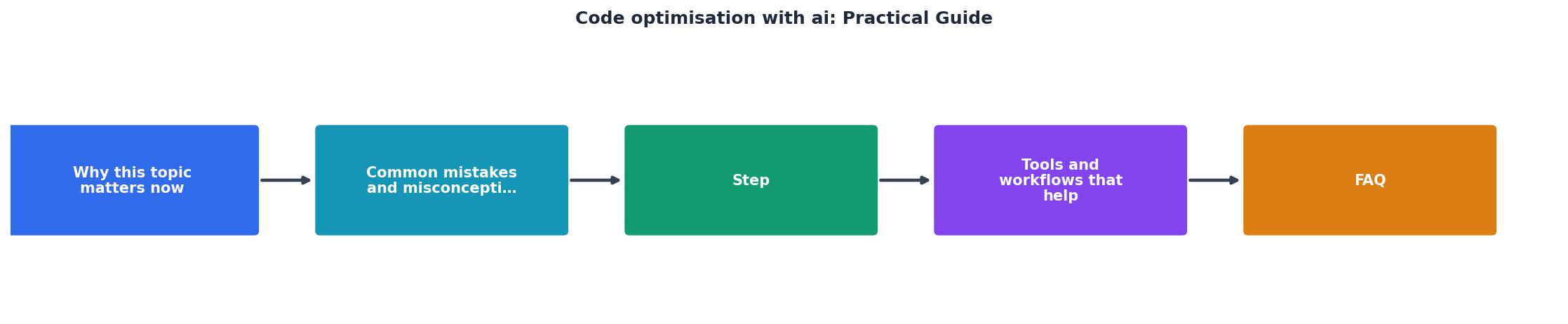
Visual overview of the workflow
Optimization checklist
The steps above work, but consistency wins. Use this checklist every time you suspect a bottleneck.
Code Optimization Workflow
Your progress is saved automatically in your browser.
Real-world optimization metrics
Understanding how optimization impacts your system requires seeing real data. Here's an example dashboard showing typical improvements when following this workflow:
Typical Gains After Optimization
This dashboard represents a real scenario: after profiling identified the database as the bottleneck, an AI-assisted refactor replaced 10 individual queries per request with a single optimized JOIN. The result: latency dropped, memory usage fell, and throughput nearly quadrupled. But none of this happened without measurement first.
FAQ
Frequently Asked Questions
Additional Resources
- A Practical Guide on Effective AI Use - AI as Your Peer ... - Read, understand, investigate the code that AI generates. If AI generates subpar code, improve it and learn how to get better results. The goal ...
- Best practices for using AI in VS Code - Best practices for getting the most out of GitHub Copilot in VS Code, from writing prompts to configuring your project for AI.
- AI Code Optimization in 2026: Tools, Tactics, and How to Roll ... - Complete guide with tools comparison, when each category wins, pricing, and a practical workflow combining manual, scripted, and AI testing.
Ready to Master Vibe Coding?
Learn to build software faster with AI assistance using the Vibe Coding Bible.
Get Started