Best Practices for Collaborative AI Coding
Your team adopted Copilot or Cursor three months ago. Individual velocity went up, but the codebase started drifting. One developer prompts for functional-style utilities, another gets class-heavy output, and pull requests now take longer because reviewers cannot tell what was hand-written and what was generated. Collaborative AI coding needs explicit practices around version control, code sharing, and peer review to keep quality high and the team aligned.

Your team adopted Copilot or Cursor three months ago. Individual velocity went up, but the codebase started drifting. One developer prompts for functional-style utilities, another gets class-heavy output, and pull requests now take longer because reviewers cannot tell what was hand-written and what was generated. Collaborative AI coding needs explicit practices around version control, code sharing, and peer review to keep quality high and the team aligned.
Photo by cottonbro studio from Pexels
TL;DR:- Standardize AI tool configurations across the team with shared prompt libraries and model settings.
- Enforce branching strategies and commit conventions that distinguish AI-generated code from manual edits.
- Treat AI output as a first draft: every generated block goes through the same peer review and CI pipeline as human-written code.
- Use structured review checklists to catch the subtle bugs AI introduces at scale.
Why collaboration rules change with AI
A solo developer using AI autocomplete can iterate fast and fix mistakes in place. Scale that to a five-person team and the dynamics shift. Each engineer's prompts produce slightly different patterns. Without shared conventions, the codebase accumulates inconsistencies that compound during integration.
Teams that establish shared AI coding standards early report measurable gains. The key is treating AI as a team member that needs onboarding: give it the same style guide, the same architectural constraints, and the same review expectations you give a new hire.
Three areas matter most:
- Version control discipline to keep AI-generated changes traceable
- Shared prompt and configuration management so the AI produces consistent output
- Peer review workflows adapted for AI-assisted code
Integrate AI tools into team workflows
Dropping an AI coding assistant into an existing workflow without adjustments creates friction. Here is what works in practice:
- Shared configuration files. Tools like Cursor support
.cursorrulesproject files. Commit these to the repo so every team member's AI follows the same architectural patterns, naming conventions, and forbidden anti-patterns. - Prompt libraries. Create a
/promptsdirectory or a shared Notion page with tested prompts for common tasks: writing tests, generating API endpoints, refactoring legacy modules. This eliminates the "everyone prompts differently" problem. - Model pinning. Lock the team to a specific model version (e.g., GPT-4o or Claude 3.5 Sonnet) for a given sprint. Different models produce different code styles, and mixing them in one codebase creates unnecessary churn.
Version control for AI-generated code

Standard Git practices still apply, but AI-assisted development introduces new considerations:
Commit granularity
AI tools can generate hundreds of lines in seconds. Resist the urge to commit everything in one shot. Break AI output into logical commits the same way you would break manual work:
- One commit per feature or fix
- Separate refactoring commits from behavior changes
- Keep generated test files in their own commits
Branch strategy
Use feature branches with descriptive names that signal AI involvement when relevant: feat/ai-gen-auth-middleware tells reviewers what to expect. Some teams add a [generated] tag in commit messages for AI-heavy changes. This is not about blame; it is about giving reviewers the right mental model before they start reading.
Conventional commits
Adopt a commit message convention like Conventional Commits (feat:, fix:, refactor:) and enforce it with a Git hook. AI tools sometimes produce vague commit messages like "Update files." Override those immediately.
The following diagram shows how these practices connect in a typical sprint cycle:
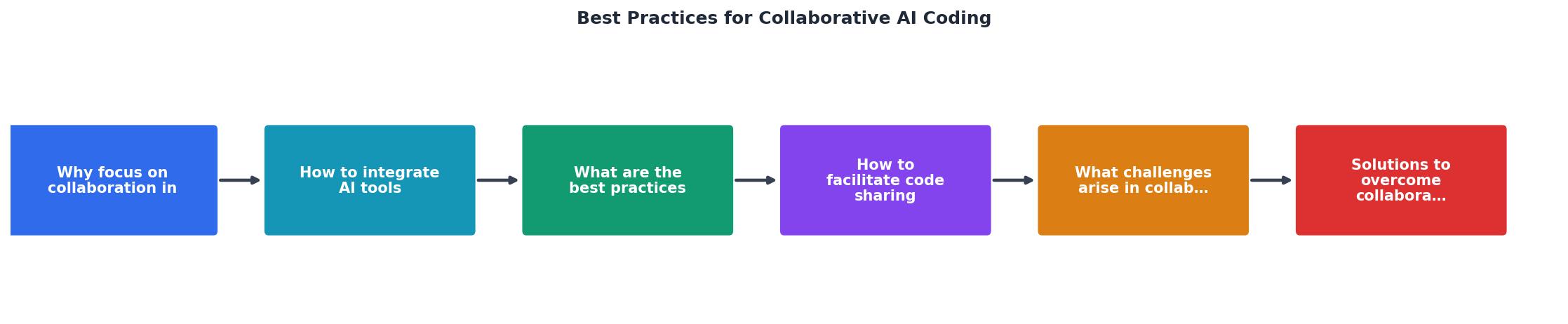
The flow moves through five steps: Define Standards, Configure Tools, Generate Code, Review & Test, and Merge & Monitor. Each step feeds back into the previous one when issues surface.
Peer review adapted for AI output

AI-generated code passes syntax checks and often looks clean. That is exactly what makes it dangerous in review. Reviewers tend to skim code that "looks right" and miss subtle logic errors, unnecessary abstractions, or security gaps.
"Teams see up to 40% reduction in code review time while maintaining or improving quality standards.">, How to implement collaborative AI coding in enterprise teams: A strategic guide
That reduction only holds when the review process is structured. Here is what to change:
- Require a "what did the AI do" summary. The PR author writes a short paragraph explaining which parts were AI-generated and what prompts produced them. This gives reviewers context.
- Focus on logic, not style. AI output is usually well-formatted. Spend review time on business logic correctness, edge cases, and error handling instead of indentation.
- Check for hallucinated APIs. AI models sometimes call functions or methods that do not exist in your dependency versions. Verify imports and method signatures against actual docs.
- Run mutation testing. Tools like Stryker (JavaScript/TypeScript) or mutmut (Python) verify that tests actually catch bugs. AI-generated tests often have high coverage but low fault detection.
| Traditional Review Focus | AI-Assisted Review Focus |
|---|---|
| Code style and formatting | Logic correctness and edge cases |
| Naming conventions | Hallucinated API calls |
| Test existence | Test effectiveness (mutation score) |
| Architecture compliance | Prompt-to-output traceability |
Common challenges and solutions
Every team hits friction points when scaling AI coding. These are the most frequent ones and what to do about them:
- Inconsistent output across team members. Solution: shared
.cursorrulesor system prompts committed to the repo, reviewed like any other config. - Over-reliance on AI for unfamiliar domains. Solution: pair programming sessions where one engineer prompts and the other validates. This builds shared understanding.
- Context window limits causing fragmented code. Solution: break tasks into smaller, well-scoped prompts. Feed the AI one module at a time, not the entire codebase.
- Merge conflicts from parallel AI generation. Solution: tighter task decomposition in sprint planning. Two engineers prompting the AI to build overlapping features will produce conflicting code faster than manual development would.
The dashboard below shows a typical team's metrics after adopting structured collaborative AI coding practices for one quarter:
Quarterly Team Metrics (5-Person Team)
Collaborative AI Coding Setup Checklist
Your progress is saved automatically in your browser.
FAQ
Frequently Asked Questions
// AI-generated) adds noise and becomes stale quickly as humans modify the code later. Focus on traceability through Git history rather than inline markers. PR descriptions with prompt context give reviewers what they need without cluttering the source files.Additional Resources
- How to implement collaborative AI coding in enterprise teams - Complete guide to implementing collaborative AI coding in enterprise environments. Covers team workflows, security, training frameworks, ...
- Best Practices I Learned for AI Assisted Coding - Claire Longo - All you need to be an effective AI-assisted coder is a basic knowledge of software engineering best practices and core AI concepts.
- Vibe Coding with AI: Best Practices for Human-AI ... - The challenge is no longer simply writing code. Instead, developers must learn how to collaborate effectively with AI coding agents: How should ...
Ready to Master Vibe Coding?
Learn to build software faster with AI assistance using the Vibe Coding Bible.
Get Started