Deploying AI-Built Apps to the Cloud: A Step-by-Step Guide
You've built an AI application that works locally. Now you need to get it in front of users without it crashing, bleeding data, or costing you a month's revenue in cloud bills. Moving from your laptop to the cloud is where vibe-coded prototypes hit reality, and the difference between a working demo and a shipping product becomes clear. This guide walks you through the actual steps to deploy AI apps to AWS, Google Cloud, or Azure, along with the monitoring and scaling strategies that keep them ru

Photo by Magda Ehlers from Pexels
You've built an AI application that works locally. Now you need to get it in front of users without it crashing, bleeding data, or costing you a month's revenue in cloud bills. Moving from your laptop to the cloud is where vibe-coded prototypes hit reality, and the difference between a working demo and a shipping product becomes clear. This guide walks you through the actual steps to deploy AI apps to AWS, Google Cloud, or Azure, along with the monitoring and scaling strategies that keep them running.
TL;DR:- AI apps need containerization, environment isolation, and auto-scaling to work reliably in the cloud.
- AWS, Google Cloud, and Azure each offer different pathways (EC2/ECS, Cloud Run, App Service) suited to different team sizes and budgets.
- Deploy with CI/CD pipelines to catch errors before they hit production.
- Monitor inference latency, token usage, and cost to avoid surprises.
- Start simple (managed services), then optimize once you have real traffic patterns.
Why Deploy to the Cloud?
Running AI applications locally or on a single server works until it doesn't. The moment real traffic arrives, your app needs three things your laptop can't provide: scalability, reliability, and cost predictability.
Cloud platforms solve this by handling infrastructure at scale. When your app gets 10 traffic spikes a day, the cloud spins up more servers automatically. When a server crashes, the platform restarts it without you waking up at 3 a.m. When inference requests pile up, load balancing spreads the work.
AI applications specifically demand this because they're unpredictable consumers of resources. An API call that takes 100 milliseconds one day might take 5 seconds the next, depending on the model's response generation. GPU availability varies. Memory usage during batch processing can spike. Cloud platforms give you knobs to adjust for this volatility without manually babysitting servers.
The other win is operational simplicity. Deploying to AWS, Google Cloud, or Azure means you're not managing databases, security patches, or load balancers yourself. Your job is shipping the app, not managing infrastructure. That's especially valuable for small teams and indie builders who lack a dedicated DevOps engineer.
How to Prepare AI Apps for Cloud Deployment?
Before you push a line of code to any cloud provider, your app needs preparation. This isn't optional; it's the difference between a deploy that works and one that explodes at scale.
Containerize your application. Docker is the standard. Your app, its dependencies, and its runtime go into a container image. This guarantees that what runs on your machine runs the same way on 50 cloud servers. If you haven't containerized yet, you need to:
- Create a
Dockerfilethat specifies the base image (Python 3.11, Node 18, etc.), installs dependencies, and defines the entry point. - Build the image locally and test it with
docker runbefore uploading anywhere. - Push the image to a container registry (Amazon ECR, Google Container Registry, Azure Container Registry).
- Store sensitive data (database passwords, API keys, model credentials) in your cloud provider's secrets vault, not in code.
- Read environment variables at runtime for things like the database host, inference service URL, or logging level.
- This lets you deploy the same container to staging and production with different configurations.
- Underestimate and your app crashes under load. Overestimate and you pay for resources you don't use.
- Test locally to establish a baseline, then add 20-30% headroom for safety.
- For AI inference, GPU memory is usually the bottleneck. Test your model's actual memory footprint.
- Implement a
/healthendpoint that returns 200 OK if the app is running. - Implement a
/readinessendpoint that checks if dependencies (database, model, external APIs) are available. - The platform uses these to decide whether to route traffic to a server or restart it.
- Listen for SIGTERM signals and close connections cleanly.
- Set a timeout (typically 30 seconds); after that, the platform kills the process anyway.
- This prevents incomplete requests or data loss.
What Are the Steps to Deploy AI Apps on AWS?

AWS is the biggest cloud platform, and there are multiple paths to deploy an AI app. Pick the one that matches your complexity and team size.
For simple, stateless services: Use AWS ECS (Elastic Container Service) or Fargate. This is the managed container orchestration service. You define your container, how many copies to run, and CPU/memory per instance. ECS handles the rest. If you want even less infrastructure overhead, use Fargate, which runs containers without you managing servers.
The deployment flow:
- Push your Docker image to Amazon ECR (Elastic Container Registry).
- Create an ECS task definition (essentially a blueprint saying "run this image with 2 vCPU and 4 GB memory").
- Create an ECS service that says "always keep 3 copies of this task running."
- Attach an Application Load Balancer (ALB) to route traffic across the instances.
- Set up auto-scaling rules: "if CPU goes above 70%, spawn more instances; if it drops below 30%, kill some."
For machine learning workloads specifically: Use AWS SageMaker. SageMaker is built for ML deployments. You can:
- Host pre-trained models (including large language models) and invoke them via API.
- Set up automatic scaling based on inference load.
- A/B test models by routing percentages of traffic to different versions.
For batch processing: Use AWS Batch or Step Functions. If your AI work is batch-oriented (process 10,000 images overnight, generate reports, fine-tune models), don't spin up a live API. Use Batch to submit jobs and let AWS schedule and run them on spare capacity (cheaper). Use Step Functions to orchestrate multi-step workflows (download data → preprocess → inference → save results).
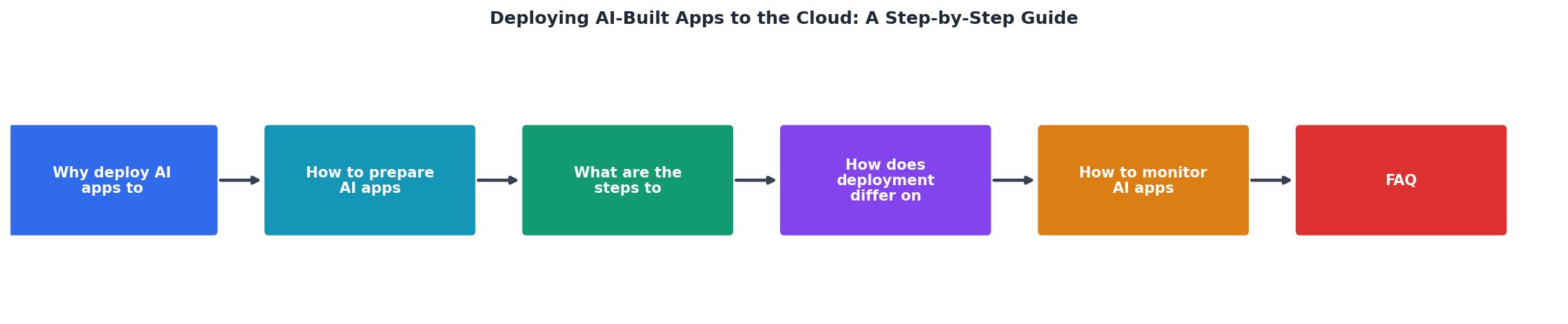
The process diagram below shows a typical deployment flow:
Step by step for ECS + Fargate:
- Create an ECR repository: Go to AWS console, ECR, create repo, get login token.
- Build and push:
docker build -t my-ai-app . && docker tag my-ai-app:latest 123456789.dkr.ecr.us-east-1.amazonaws.com/my-ai-app:latest && docker push 123456789.dkr.ecr.us-east-1.amazonaws.com/my-ai-app:latest. - Create a task definition: Define CPU (0.25-4 vCPU), memory (512 MB-30 GB), container image, port mappings, environment variables.
- Create a Fargate service: Specify the task definition, number of desired tasks (start with 2-3), subnet, security group.
- Attach ALB: Create a load balancer, target group, and link it to the service.
- Set up auto-scaling: In ECS, define a service-level scaling policy (target CPU 70%, min tasks 2, max tasks 10).
- Test: Call the load balancer's DNS name and verify your app responds.
"Yavendio, an AI-powered WhatsApp commerce platform serving 7,000+ customers across Latin America, ran a team of 15 engineers with no dedicated DevOps.">, What is the easiest way to deploy AI
How Does Deployment Differ on Google Cloud and Azure?
Google Cloud and Azure offer similar capabilities but with different APIs and pricing models. The core ideas are the same: containerize, push, scale.
Google Cloud: Cloud Run is the simplest path. If you want a managed container service with minimal config, Cloud Run is it. You upload a Docker image; Google runs it serverless, meaning you pay only for the CPU-seconds your code uses. No upfront provisioning, no idle servers draining your budget.
- Push your image to Google Container Registry.
- Run
gcloud run deploy my-app --image gcr.io/my-project/my-app --platform managed --memory 2Gi. - Cloud Run scales automatically from 0 to 1,000 instances based on traffic.
- Pricing: pay for execution time, not reserved capacity.
Azure: App Service is the mainstream choice. App Service runs containers with familiar scaling and monitoring.
- Push your image to Azure Container Registry.
- Create an App Service Plan (defines CPU, memory, tier).
- Deploy:
az containerapp up --name my-app --image myacr.azurecr.io/my-app:latest. - Set up auto-scale rules based on CPU or memory.
- Or use Azure Container Instances for simple, serverless container runs (similar to Google Cloud Run).
Key differences:
| Aspect | AWS | Google Cloud | Azure |
|---|---|---|---|
| Easiest entry | ECS Fargate | Cloud Run | Container Instances |
| Most control | ECS + EC2 | GKE | Kubernetes Service |
| ML-specific | SageMaker | Vertex AI | Azure ML |
| Pricing model | Reserved/on-demand | Pay-per-use (Cloud Run) | Reserved/on-demand |
How to Monitor AI Apps Post-Deployment?

Deployment is not the finish line. After your app goes live, you need to watch it. Blindly launching and hoping is how you end up debugging production at midnight.
Monitor these metrics:
- Request latency (P50, P95, P99). How fast are responses? For AI inference, measure both the time to first token and time to final token. If P99 latency is 10 seconds but your SLA is 5 seconds, you have a problem.
- Error rate. What percentage of requests fail? A spike usually signals a bug, resource exhaustion, or a dependency (database, model API) going down.
- Throughput (requests per second). Is your app handling expected load? If it's flat at 100 RPS but you expect 1,000 during peak hours, your scaling rules aren't working.
- CPU and memory usage. Are instances running out of resources? If CPU hits 100%, you're bottlenecked; if it's consistently at 20%, you're over-provisioned and wasting money.
- GPU utilization (if applicable). GPU instances are expensive. Are your models actually using the GPU, or are they sitting idle?
- Cost per inference. Divide your monthly cloud bill by the number of inferences. If it's climbing, you might have a memory leak, runaway background jobs, or inefficient model serving.
Set up alerts. Don't check dashboards manually. Tell your monitoring system to page you (or send Slack) if:
- Error rate > 5% for 5 minutes.
- P99 latency > 10 seconds.
- CPU > 90% on any instance for 10 minutes.
- Disk full.
Use logging, not just metrics. Metrics tell you that something broke; logs tell you why. Structure your logs (JSON format) and send them to a log aggregator:
- AWS CloudWatch Logs, Google Cloud Logging, Azure Application Insights.
- When an error happens, search logs by error code, user ID, or request ID to diagnose.
- Set up log alerts for rare but severe errors (out of memory, API key invalid).
- Add correlation IDs to requests so you can follow one user's request through all the services.
- AWS X-Ray, Google Cloud Trace, and Azure Application Insights all support this.
- Traces help you pinpoint whether latency is in the model, database, or network.
- Ops dashboard: CPU, memory, error rate, latency (for on-call engineers).
- Business dashboard: Requests per day, inference cost per request, top users (for founders/PMs).
- ML dashboard: Model accuracy, inference latency by model version, GPU utilization (for ML engineers).
Containerize
Write Dockerfile, build image, test locally.
Push to Registry
Upload to ECR, GCR, or ACR.
Configure Service
Define resources, replicas, health checks.
Deploy
Start instances, attach load balancer.
Monitor & Scale
Watch metrics, adjust auto-scaling rules.
Understanding this flow visually helps teams communicate what's happening at each stage of deployment. The five steps above represent the journey from code to live traffic, and each has different stakeholders and tools.
How to Set Up CI/CD for Automated Deployments?
Manually deploying every time you fix a bug or add a feature is slow and error-prone. Set up a CI/CD pipeline so that code changes automatically test, build, and deploy.
A basic pipeline looks like:
- Commit to Git. You push code to your repository (GitHub, GitLab, Bitbucket).
- Trigger CI. A webhook tells your CI system (GitHub Actions, GitLab CI, CircleCI) to run tests.
- Run tests. Unit tests, integration tests, and linting run. If any fail, the pipeline stops and notifies you.
- Build container. If tests pass, build the Docker image and push it to your registry.
- Deploy to staging. Run the new image on a staging environment. Smoke tests verify it works.
- Deploy to production. After approval (manual gate) or automatically (if using trunk-based development), deploy to production.
- Monitor. Dashboards and alerts watch for errors or latency spikes that indicate a bad deployment.
- When you update your model, tag it with a version (model_v1.2.3).
- Bake the model into the container or reference it from a model registry.
- If a new model version causes latency to spike or accuracy to drop, rollback to the previous version automatically.
AI Cloud Deployment Checklist
Your progress is saved automatically in your browser.
FAQ
Frequently Asked Questions
Additional Resources
- What is the easiest way to deploy AI-built apps? | Blog - One of the easiest ways to deploy an AI-built app is to connect your Git repository to a platform that handles the build, infrastructure, ...
- Build an App with AI: Get a Shareable URL - Discover how to build an app with AI using simple prompts. Learn how to create a multi-file app, launch it online, and get a shareable URL ...
- AI App Development Guide: How to Build AI Apps - Explore how to build AI apps with our comprehensive AI app development guide. Learn about data prep, choosing models, testing, and secure deployment.
Ready to Master Vibe Coding?
Learn to build software faster with AI assistance using the Vibe Coding Bible.
Get Started