Evaluating AI Integration Impacts on System Architecture
Adding AI capabilities to an existing system is not a feature toggle you flip on a Friday afternoon. It changes data flows, latency profiles, infrastructure costs, and failure modes in ways that ripple across every layer of your stack. Engineering leaders who skip a structured architectural assessment end up firefighting production incidents instead of capturing the productivity gains they promised the board. This guide gives you a concrete framework for evaluating those impacts before they become outages.


Adding AI capabilities to an existing system is not a feature toggle you flip on a Friday afternoon. It changes data flows, latency profiles, infrastructure costs, and failure modes in ways that ripple across every layer of your stack. Engineering leaders who skip a structured architectural assessment end up firefighting production incidents instead of capturing the productivity gains they promised the board. This guide gives you a concrete framework for evaluating those impacts before they become outages.
Photo by cottonbro studio from Pexels
TL;DR:- Map every AI component against your current architecture to identify coupling, latency, and data-flow changes before writing a single line of integration code.
- Use a structured evaluation framework covering compute, data pipelines, security boundaries, and failure isolation.
- Plan scalability from day one: AI workloads have fundamentally different resource profiles than traditional CRUD services.
- Balance innovation speed with architectural stability by introducing AI behind well-defined interfaces and feature gates.
Why architectural assessment matters
Most teams treat AI integration as an API call. Call OpenAI, call your internal ML model, parse the response, done. That works in a prototype. In production, that single API call introduces a new external dependency with variable latency (200ms on a good day, 8 seconds under load), a new cost center billed per token, a new data exfiltration surface, and a new failure mode your circuit breakers were never designed for.
Skipping the architectural assessment means you discover these problems in staging or, worse, after launch. The cost of retrofitting is 5x to 20x higher than designing for AI workloads upfront. For engineering leads responsible for system reliability, this is not optional work.
Three categories of impact demand evaluation:
- Structural changes to service boundaries, data flows, and deployment topology
- Operational changes to monitoring, alerting, cost management, and incident response
- Security and compliance changes to data handling, model access, and audit trails
How to assess architectural changes

A structured evaluation starts with mapping. Take your existing architecture diagram (you have one, right?) and overlay every point where AI components will touch the system. For each touchpoint, answer five questions:
- What data crosses this boundary? Identify PII, proprietary code, or regulated data that would flow to an AI service.
- What is the latency budget? If your API endpoint has a 300ms SLA and the AI call takes 400ms, you have a problem before you start.
- What happens when the AI service is unavailable? Define the fallback: cached response, graceful degradation, or hard failure.
- What is the cost per request? Token-based pricing means a single chatty prompt can cost more than your entire database query layer.
- Who owns this integration? AI components that sit between two team boundaries create ownership gaps.
"The foundation for this investigation was created by combining the key ideas and findings from the carefully selected literature.">, Artificial Intelligence Impacts on Architecture and Smart Built Environments: A
Evaluation criteria matrix
Use a scoring matrix for each AI integration point. Rate each criterion on a 1-5 scale:
- Coupling risk: How tightly does the AI component bind to existing services?
- Data sensitivity: What classification level of data flows through?
- Latency impact: How much does the AI call add to end-to-end response time?
- Cost predictability: Can you forecast monthly spend within 20%?
- Failure blast radius: If this component fails, how many downstream services are affected?
Strategies for system stability

Stability during AI integration comes down to isolation. You want the AI layer to be a guest in your architecture, not a load-bearing wall.
Introduce AI behind an abstraction layer. Create an internal service or SDK that wraps all AI calls. Your application code calls ai_service.summarize(text), not openai.chat.completions.create(...). When you switch providers, change models, or add caching, only the wrapper changes.
Use async processing for non-critical AI features. If AI generates product recommendations, email summaries, or content tags, push those jobs to a queue. Your main request path stays fast. The AI results arrive when they arrive.
Implement circuit breakers with AI-specific thresholds. Standard circuit breakers trip on HTTP 5xx errors. AI services fail differently: they return 200 OK with garbage output, they time out at 30 seconds instead of 500ms, or they return rate-limit errors in bursts. Configure your circuit breakers to detect these patterns.
Set hard cost limits. A runaway loop hitting a token-based API can burn through thousands of dollars in minutes. Set per-minute and per-hour spend caps at the infrastructure level, not just in application code.
Canary deployments for AI features
Roll out AI integrations to 1-5% of traffic first. Monitor three things:
- P99 latency of the affected endpoints
- Error rate including soft failures (malformed AI responses)
- Cost per request compared to your budget model
Planning for AI scalability
AI workloads scale differently than traditional web services. A CRUD endpoint that handles 10,000 requests per second with a few database replicas becomes a completely different problem when each request triggers an LLM inference call.
Separate compute pools. Run AI inference workloads on dedicated infrastructure (GPU instances, dedicated API rate limits) isolated from your core application servers. This prevents AI traffic spikes from starving your checkout flow or authentication service.
Cache aggressively. Many AI calls are semantically similar. If 40% of your users ask variations of the same question, a semantic cache (using embedding similarity) can cut your AI API costs and latency dramatically. Tools like GPTCache or custom Redis-based solutions work here.
Design for model swaps. The model you use today will not be the model you use in six months. Your architecture should treat the AI model as a pluggable dependency, not a hardcoded integration. Store model identifiers in configuration, version your prompts, and keep response parsing flexible.
Plan capacity for batch vs. real-time. Some AI features (content generation, data enrichment) can run in batch overnight. Others (chat, code completion) must be real-time. Separate these workloads in your architecture from the start.
The following diagram shows the evaluation process at a glance:
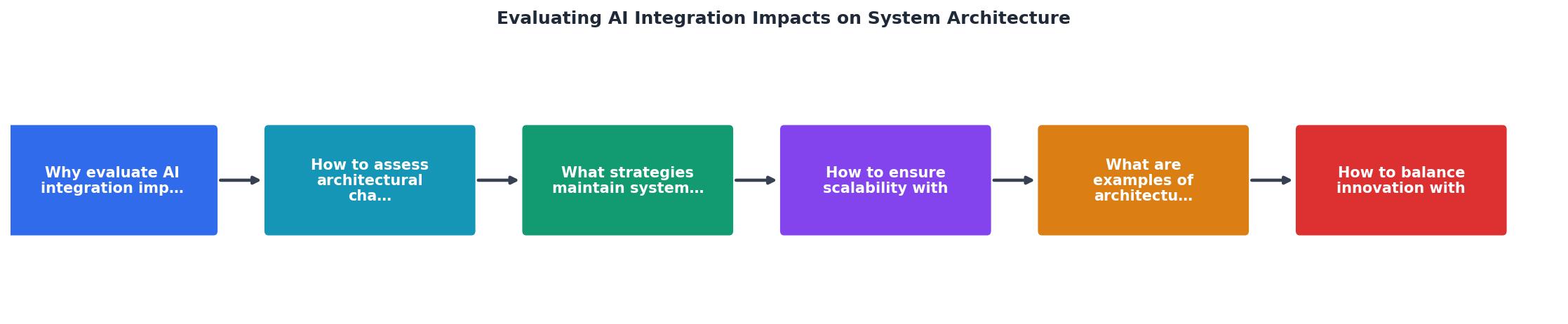
The key steps are: Map touchpoints, Score risks, Design isolation, Deploy canary, Monitor and expand. Each step feeds back into the previous one when metrics fall outside acceptable ranges.
Architectural transformations in practice

Real companies have gone through these transformations, and the patterns are instructive.
Shopify added AI-powered product descriptions and shopping assistants. Their architecture introduced a dedicated AI gateway service that handles rate limiting, prompt management, and response caching. The gateway sits between the storefront and multiple AI providers, letting them switch models without touching application code.
GitHub Copilot required Microsoft to build an entirely new inference infrastructure. The IDE sends code context to a dedicated service that manages model routing, response streaming, and telemetry. The key architectural decision: the AI service is stateless and horizontally scalable, while all state (user preferences, context windows) lives in the client.
Stripe integrated AI for fraud detection by adding a scoring service in the payment processing pipeline. The critical design choice was making the AI score advisory, not blocking. The existing rules engine makes the final decision, and the AI score is one input among many. This meant a bad AI prediction could not single-handedly block legitimate transactions.
The common thread: every successful integration introduced AI as a separate, well-bounded service with clear fallback behavior.
Balancing innovation with stability
The pressure to "add AI" comes from everywhere: the CEO read an article, the board wants an AI strategy slide, competitors launched a chatbot. As an engineering lead, your job is to channel that pressure into changes that actually improve the product without destabilizing the platform.
Use feature gates for every AI feature. Ship AI capabilities behind flags that can be toggled per user segment, per region, or globally. When the AI provider has an outage at 2 AM, you disable the flag instead of deploying a hotfix.
Establish an AI integration review checklist. Before any AI feature enters the sprint, it passes through a lightweight review covering the five questions from the assessment section above. This takes 30 minutes and prevents weeks of rework.
Budget for AI operational costs separately. AI API costs are variable and hard to predict. Track them as a distinct line item, not buried in your general cloud spend. Review weekly for the first three months of any new integration.
The framework below captures the full evaluation process for your team to use directly.
Here is an example dashboard showing how a typical mid-size engineering team might track AI integration health across their system:
AI Integration Health Dashboard (Example)
AI Architecture Impact Assessment Checklist
Your progress is saved automatically in your browser.
FAQ
Frequently Asked Questions
Additional Resources
- Socio-technical assessment of generative AI integration in ... - Abstract. Generative artificial intelligence (GAI) has the potential to reshape workflows across the Architecture, Engineering, and Construction (AEC) sector.
- Artificial Intelligence Impacts on Architecture and Smart ... - This study explores the transformative role of artificial intelligence (AI) in designing and managing sustainable urban environments.
- How Artificial Intelligence Is Changing Architecture and ... - AI-driven software can quickly generate multiple building layouts, evaluate zoning requirements, and analyze site conditions. This allows design ...
Ready to Master Vibe Coding?
Learn to build software faster with AI assistance using the Vibe Coding Bible.
Get Started