How to Use the Vibe Coding Bible Preview Before You Buy
You found the Vibe Coding Bible, you see it is 459 pages long, and now you want to know if those pages actually solve the problems you are hitting right now. The free preview exists for exactly this reason, but most people skim it in thirty seconds and learn nothing. This guide shows you how to read the preview strategically so you walk away with a clear yes-or-no decision and a handful of techniques you can use immediately.

You found the Vibe Coding Bible, you see it is 459 pages long, and now you want to know if those pages actually solve the problems you are hitting right now. The free preview exists for exactly this reason, but most people skim it in thirty seconds and learn nothing. This guide shows you how to read the preview strategically so you walk away with a clear yes-or-no decision and a handful of techniques you can use immediately.
Photo by https://kaboompics.com/ from Pexels
TL;DR:- The preview covers the table of contents, the introduction, and selected chapters that reveal the book's structure and depth.
- Read it with a specific problem in mind (debugging, security, deployment) to evaluate whether the book addresses your actual blockers.
- Spend 15 to 20 minutes with the preview using the step-by-step approach below, and you will know exactly whether the full book is worth your investment.
Why the Preview Matters
A 459-page technical book is a commitment. You are not buying a blog post. You are buying a reference that sits next to your IDE while you ship software with AI tools like Cursor, Claude, or Copilot. The preview lets you verify three things before spending money: the writing style matches how you learn, the topics cover your current gaps, and the depth goes beyond what free tutorials offer.
Most people building with AI hit a wall around the 80% mark. The app works in development, then breaks in production. The preview specifically addresses this gap. If you read it with intention, you will spot whether the book tackles your version of that wall.
Common Preview Mistakes
Three mistakes kill the value of any book preview:
- Speed-scrolling the table of contents without stopping to match chapter titles to your actual problems. The TOC is a diagnostic tool, not decoration.
- Skipping the introduction because it "looks like fluff." The Vibe Coding Bible introduction defines what production-grade vibe coding means and sets up the framework the entire book uses. Miss it, and the chapter previews will feel disconnected.
- Reading only the first page of each chapter instead of picking one chapter and reading it deeply. Surface-level sampling tells you nothing about whether the explanations click for you.
Step-by-Step Preview Strategy
Here is the exact process for extracting maximum value from the free preview in under 20 minutes.
Step 1: Identify Your Blocker
Open a blank note. Write one sentence describing what is stopping your project right now. Examples: "My app crashes when two users edit the same record." "I do not know how to deploy securely." "AI-generated code works but I cannot debug it when it breaks."
Step 2: Scan the Table of Contents
Open the preview and go straight to the TOC. Look for chapter titles and section headings that match your blocker. The Vibe Coding Bible organizes content around real shipping problems: testing, debugging, security, architecture, deployment, and validation. Circle or note every heading that connects to your one-sentence problem.
Step 3: Read the Introduction Fully
The introduction is roughly 10 to 15 pages. Read every word. It explains the book's core thesis: vibe coding gives you speed, but production-grade software requires specific engineering practices layered on top. This section tells you whether the author's perspective matches yours.
"Vibe coding gives you speed, flexibility, and power, but testing, debugging, and validation give you something even more valuable: trust.">, Medium
Step 4: Deep-Read One Chapter
Pick the chapter closest to your blocker. Do not skim. Read it like you would read documentation for a tool you are about to use. Pay attention to:
- Whether the explanations assume a CS degree or meet you where you are
- Whether concrete examples use tools you actually work with (Cursor, Claude, Lovable, v0)
- Whether the advice is actionable today, not theoretical
Step 5: Evaluate and Decide
After 15 to 20 minutes, you have enough data. Ask yourself: "Did I learn something I can apply to my project this week?" If yes, the full book will multiply that across 459 pages. If the writing style or depth did not click, you saved yourself money.
Tools and Workflows That Help

Reading a preview is more effective when you pair it with your actual development environment. Here is what works:
- Split screen setup: Open the preview on one side and your project code on the other. When the preview mentions a concept (like input validation or error handling), check whether your codebase does it. This turns passive reading into an instant audit.
- Note-taking with Notion or Obsidian: Create a note titled "Vibe Coding Bible Preview Notes" with three sections: Things I Already Do, Things I Need to Fix, Things I Did Not Know About. Fill it in as you read.
- Cursor or your AI editor open: When the preview describes a technique, try asking your AI assistant to implement it in your project. If the AI struggles or produces something different from what the book describes, that gap is exactly why the book exists.
What to Look for in Each Section

Different parts of the preview serve different evaluation purposes:
- Table of Contents: Tells you the book's scope. If your problem area has multiple chapters dedicated to it, that is a strong signal.
- Introduction: Reveals the author's philosophy and whether the book treats you as a peer or talks down to you.
- Sample chapters: Show the actual depth. Look for code examples, step-by-step instructions, and real-world scenarios rather than abstract theory.
- Chapter summaries or key takeaways: If included in the preview, these give you a compressed version of what each chapter delivers.
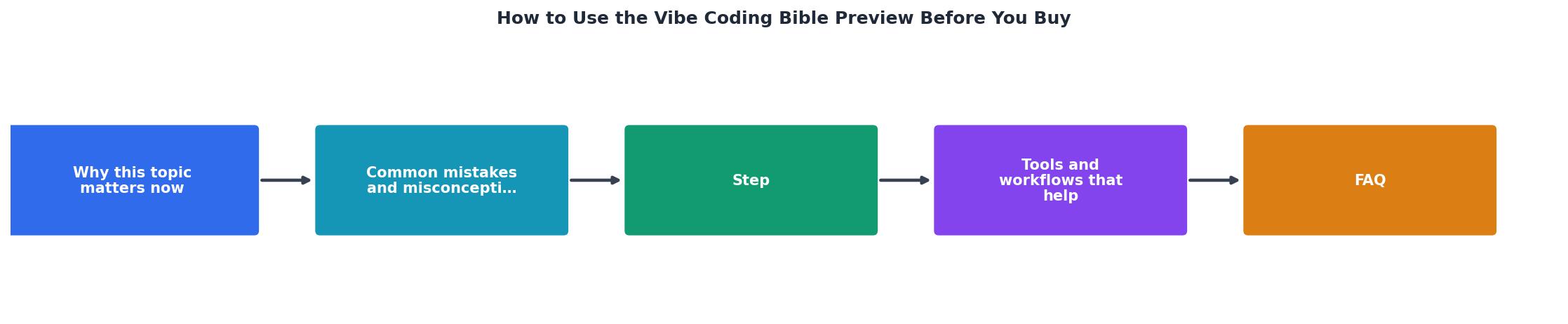
Preview Reading Strategy
Follow these steps for a 20-minute evaluation
Write Your Blocker
One sentence describing your current project problem
Scan the TOC
Match chapter headings to your specific blocker
Read the Introduction
Understand the book's philosophy and framework
Deep-Read One Chapter
Pick the chapter closest to your problem and read fully
Evaluate and Decide
Did you learn something actionable for this week?
Preview Reading Checklist
Your progress is saved automatically in your browser.
FAQ
Frequently Asked Questions
Additional Resources
- I Wrote a 459-Page Book on Vibe Coding. It's Not What You ... - The Vibe Coding Bible is your ultimate guide to building smarter with AI — 500 pages of prompts, systems, and developer wisdom that actually ...
- The Vibe Coding Bible: How to Build Useful Things with ... - A good practice is to copy the exact error text into your prompt (or read it out loud, if using voice). For example, if you get an exception ...
- The Vibe Coding Bible | AI Software Engineering Guide - PRO TIP: Chain the review. After fixes, ask: “What is the one thing you are still not confident about in this code?” It usually surfaces the real weak point.
Ready to Master Vibe Coding?
Learn to build software faster with AI assistance using the Vibe Coding Bible.
Get Started