Incorporating AI into DevOps Workflows: Best Practices
Your CI/CD pipeline already runs hundreds of jobs per day, but most of them follow static rules written months ago. AI changes that equation by making pipelines adaptive, test selection smarter, and incident response faster. This guide covers concrete practices for plugging AI into your existing DevOps toolchain without turning your infrastructure into an unpredictable black box.

Your CI/CD pipeline already runs hundreds of jobs per day, but most of them follow static rules written months ago. AI changes that equation by making pipelines adaptive, test selection smarter, and incident response faster. This guide covers concrete practices for plugging AI into your existing DevOps toolchain without turning your infrastructure into an unpredictable black box.
Photo by cottonbro studio from Pexels
TL;DR:- AI in DevOps works best when it augments existing automation rather than replacing it: smarter test selection, predictive alerting, and automated root-cause analysis.
- Start with one high-impact integration point (like flaky test detection or log anomaly scoring) before expanding.
- Keep humans in the loop for deployment approvals and incident escalation to avoid runaway automation.
Where AI Fits in DevOps
AI-enhanced DevOps (sometimes called AIOps) is not about replacing your pipeline with a chatbot. It means embedding machine learning models and LLM-based tools at specific decision points where static rules fall short. Think test prioritization, anomaly detection in logs, auto-generated rollback triggers, and intelligent alert routing.
The distinction matters. Traditional DevOps automation executes predefined scripts. AI-enhanced DevOps makes decisions based on patterns in historical data: which tests are most likely to fail given a particular diff, which metric spikes correlate with real incidents versus noise, which deployment windows carry the lowest risk.
Most engineering teams already interact with AI somewhere in their workflow. The challenge is doing it deliberately, with guardrails, instead of letting individual engineers bolt on random tools.
AI Tools in CI/CD Pipelines

"One of the most common ways to use AI in DevOps is for continuous integration and continuous delivery or deployment (CI/CD).">, The Role of AI in DevOps
Integrating AI into CI/CD does not require rewriting your pipeline from scratch. Here are the highest-value insertion points:
- Predictive test selection - Tools like Launchable and Buildpulse analyze commit diffs and historical test results to run only the tests most likely to catch regressions. This cuts pipeline time by 40-60% on large test suites without sacrificing coverage.
- Automated code review - GitHub Copilot code review, CodeRabbit, and Codacy's AI features scan pull requests for bugs, security issues, and style violations before a human reviewer sees them.
- Intelligent build caching - AI models predict which build artifacts are safe to reuse based on dependency graphs and change patterns, reducing redundant compilation.
- Release risk scoring - Models trained on past deployment data assign a risk score to each release candidate. High-risk deploys get routed to canary environments automatically.
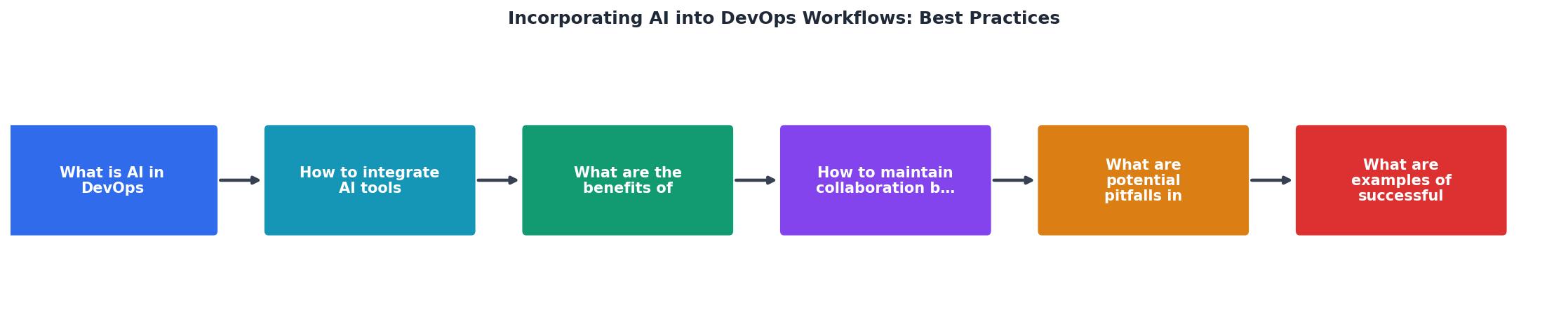
The steps: Identify bottleneck, Select AI tool, Run shadow mode, Compare results, Promote to active, Monitor drift. Shadow mode is critical. Run the AI tool alongside your existing process for two to four weeks, compare its decisions against actual outcomes, and only promote it to active duty when accuracy meets your threshold.
AI-Powered Monitoring and Testing

Static alert thresholds generate noise. A CPU spike to 85% might be normal during batch processing but catastrophic during peak traffic. AI-based monitoring tools learn these patterns.
Anomaly detection tools like Datadog's Watchdog, Dynatrace Davis, and New Relic AI analyze metric baselines per time window and flag deviations that actually matter. Teams using these report a 30-50% reduction in false-positive alerts.
Log analysis with LLMs is a newer category. Tools like Elastic's AI Assistant and Mezmo's AI-powered pipeline parse unstructured logs, cluster similar error patterns, and suggest root causes. Instead of grepping through 10,000 log lines, you get a ranked list of probable issues.
For testing specifically, AI adds value in three areas:
- Flaky test detection - ML models identify tests that pass and fail nondeterministically, quarantining them before they erode trust in the suite.
- Test generation - Tools like Diffblue Cover (for Java) and CodiumAI generate unit tests from existing code, filling coverage gaps.
- Visual regression testing - Applitools and Percy use computer vision to detect UI changes that pixel-diff tools miss, like layout shifts that are technically "correct" but visually broken.
Keeping Humans in the Loop
AI in DevOps works best as a decision-support system, not an autonomous agent. The moment you let an AI model approve production deployments without human oversight, you have created a single point of failure that nobody fully understands.
Effective collaboration patterns:
- AI suggests, human approves - The AI model flags a deployment as low-risk and pre-fills the approval form. A human clicks "deploy." This saves time without removing accountability.
- AI triages, human investigates - During an incident, AI ranks probable root causes and surfaces relevant runbooks. The on-call engineer decides what to act on.
- AI drafts, human reviews - AI generates Terraform changes, Kubernetes manifests, or Dockerfile updates. A human reviews the diff before merge.
| Without AI | With AI (Human-in-Loop) |
|---|---|
| Manual alert triage (30+ min/incident) | AI-ranked root causes (5 min to review) |
| Full test suite every build (45 min) | Predictive selection + nightly full run (12 min) |
| Static deployment windows | Risk-scored releases with human approval |
| Grep-based log analysis | LLM-clustered error patterns |
Common Pitfalls to Avoid
Integrating AI into DevOps goes wrong in predictable ways. Here are the ones I see most often:
- Skipping shadow mode - Deploying an AI tool directly into the critical path without validating its decisions first. One team let an AI model auto-skip "low-risk" tests and missed a critical regression that cost two days of rollback work.
- Ignoring model drift - ML models degrade as your codebase, traffic patterns, and infrastructure change. Schedule quarterly reviews of model accuracy. If your anomaly detector's precision drops below 80%, retrain or recalibrate.
- Tool sprawl - Adding five AI tools at once creates integration headaches and conflicting recommendations. Pick one integration point, prove value, then expand.
- Over-trusting AI output - AI-generated Terraform or Kubernetes configs can contain subtle errors (wrong resource limits, missing security groups). Treat AI output like junior developer code: review everything.
- No rollback plan - If the AI tool goes down or starts making bad decisions, your pipeline should degrade gracefully to the non-AI path. Build kill switches from day one.
Real-World Integration Examples
Several companies have published concrete results from AI-DevOps integration:
- Spotify uses ML-based test selection to cut CI times on their monorepo. Their system analyzes code changes and selects a subset of tests, running the full suite only on merge to main.
- Netflix built Kayenta, an automated canary analysis tool that uses statistical models to compare canary and baseline metrics during deployments. It decides whether to promote or roll back without human intervention for low-risk services.
- Google uses ML to predict build failures before they happen, routing likely-to-fail builds to faster feedback loops and saving developer wait time.
- GitLab integrates AI-powered code review suggestions directly into merge requests, catching security vulnerabilities and suggesting fixes inline.
The following dashboard illustrates what a typical AI-enhanced DevOps metrics view looks like for a mid-size engineering team:
AI-Enhanced DevOps Metrics (Example Team)
AI-DevOps Integration Checklist
Your progress is saved automatically in your browser.
FAQ
Frequently Asked Questions
What is the first bottleneck in your pipeline where AI could save the most time? Share your experience or questions below.
Additional Resources
- The Role of AI in DevOps - Best practices for using AI in DevOps · Start small and iterate · Involve the right stakeholders · Continuously evaluate and improve · Maintain transparency and ...
- AI in DevOps: A Comprehensive Guide - Learn about implementing AI in DevOps, including its benefits, challenges, popular AI tools and a step-by-step AI-DevOps integration ...
- Best Practices for Integrating AI into Your Dev Team's ... - Best Practices for Integrating AI into Your Dev Team's Workflow · Use AI to Streamline Repetitive Tasks · Keep the Human in the Loop for Critical Decisions.
Ready to Master Vibe Coding?
Learn to build software faster with AI assistance using the Vibe Coding Bible.
Get Started