Integrating AI Coding into a Company’s Strategy
Every engineering leader faces the same pressure right now: the board wants AI adoption numbers, the team wants clarity, and nobody has handed you a playbook. Bolting an AI copilot onto existing workflows without a strategy creates inconsistent code quality, security blind spots, and frustrated developers who revert to old habits within weeks. This guide gives you a concrete framework for evaluating tools, aligning AI initiatives with business goals, managing risk, and building the training programs that make adoption stick.


Every engineering leader faces the same pressure right now: the board wants AI adoption numbers, the team wants clarity, and nobody has handed you a playbook. Bolting an AI copilot onto existing workflows without a strategy creates inconsistent code quality, security blind spots, and frustrated developers who revert to old habits within weeks. This guide gives you a concrete framework for evaluating tools, aligning AI initiatives with business goals, managing risk, and building the training programs that make adoption stick.
Photo by ThisIsEngineering from Pexels
TL;DR:- Evaluate AI coding tools against five criteria: integration depth, security posture, output quality, cost structure, and vendor lock-in risk.
- Align every AI initiative to a measurable business outcome before greenlighting it.
- Build a phased rollout with guardrails, policies, and structured upskilling so adoption scales without quality regression.
Why AI Coding Belongs in Your Strategy
Treating AI coding as a developer perk instead of a strategic capability is the fastest way to waste budget. When adoption happens bottom-up without direction, you get five different tools across three teams, no shared review standards, and zero ability to measure impact.
Companies that treat AI coding strategically report up to 40% productivity gains in specific task categories like boilerplate generation, test scaffolding, and documentation. The difference between that outcome and a shelfware subscription is leadership involvement.
"The use of AI in software development offers several key benefits that enhance productivity, efficiency and the quality of applications.">, AI in Software Development
Strategic integration means three things:
- Tool selection tied to your stack and security requirements
- Policy and governance that protect code quality and IP
- Training investment that turns occasional users into consistent practitioners
Evaluate AI Tools Methodically

Picking an AI coding tool based on a demo or a trending tweet is how you end up renegotiating contracts six months later. Use a structured evaluation instead.
Five criteria that matter:
- Integration depth. Does the tool plug into your IDE, CI/CD pipeline, and code review workflow? GitHub Copilot integrates natively with VS Code and JetBrains. Cursor ships its own editor. Amazon CodeWhisperer ties into AWS tooling. Match the tool to where your team already works.
- Security posture. Where does code go? Is it used for model training? Copilot for Business does not retain prompts or suggestions for training. Some open-source alternatives like Tabby run entirely on-premises. If you handle regulated data, this criterion alone can eliminate half the options.
- Output quality. Run a structured pilot: give three developers the same ten tasks across languages your team uses daily. Measure acceptance rate, time-to-completion, and bugs introduced. Raw suggestion quality varies dramatically by language and framework.
- Cost structure. Per-seat pricing (Copilot at $19/month/user) scales linearly. Usage-based API pricing (calling Claude or GPT-4 directly) scales with consumption. Model the cost at your team size and projected usage.
- Vendor lock-in risk. Tools that require proprietary file formats, custom IDE forks, or exclusive cloud integrations create switching costs. Prefer tools with standard interfaces and exportable configurations.
| Criterion | GitHub Copilot | Cursor | Amazon CodeWhisperer |
|---|---|---|---|
| IDE integration | VS Code, JetBrains, Neovim | Custom fork of VS Code | VS Code, JetBrains, AWS Cloud9 |
| On-premises option | No (cloud only) | No (cloud only) | Partial (via AWS VPC) |
| Pricing model | Per seat ($19/mo) | Per seat ($20/mo) | Free tier + per seat |
| Multi-model support | GPT-4 based | Multiple (Claude, GPT-4, etc.) | Amazon Titan + third-party |
| Lock-in risk | Low | Medium (custom editor) | Medium (AWS ecosystem) |
Build the Right Infrastructure
Infrastructure for AI coding goes beyond installing an extension. You need three layers:
- Access layer. Centralized license management, SSO integration, and role-based access. Not every contractor needs the same tool tier as your senior architects.
- Governance layer. A proxy or gateway that logs AI interactions for audit purposes. Tools like Cloudflare AI Gateway or custom middleware let you monitor usage patterns, enforce content policies, and track cost per team.
- Quality layer. Automated checks that catch AI-generated code issues before merge. This means linting rules tuned for common AI patterns (overly verbose code, hallucinated imports, outdated API usage), plus mandatory human review for any AI-assisted PR.
Only about 65% of teams using AI coding tools have any formal infrastructure around them. The other 35% rely on individual developer judgment alone. That gap is where quality incidents happen.
Align each infrastructure investment to a business goal:
- Reduce onboarding time by giving new hires AI-assisted codebase exploration
- Accelerate feature delivery by automating boilerplate and test generation
- Improve code consistency by using AI suggestions that follow your style guide (configured via custom instructions or
.cursorrulesfiles)
Manage Risks Before They Manage You

AI coding introduces four risk categories. Address each one explicitly.
Intellectual property risk. AI models trained on open-source code can suggest snippets that match copyleft-licensed code. Copilot's code reference filter flags exact matches, but near-matches slip through. Mitigation: enable reference checking, require license scanning in CI (using tools like FOSSA or Snyk), and document your AI usage policy for legal review.
Security risk. AI suggestions sometimes include known vulnerable patterns: SQL concatenation instead of parameterized queries, hardcoded secrets in example code, or deprecated cryptographic functions. Mitigation: run SAST tools (Semgrep, CodeQL) on every PR, and add AI-specific rules that flag common hallucination patterns.
Quality risk. AI-generated code compiles and passes basic tests but introduces subtle logic errors, especially in edge cases. Mitigation: require higher test coverage thresholds for AI-assisted PRs, and mandate that the developer who accepts a suggestion can explain what it does.
Dependency risk. AI tools suggest packages that are outdated, unmaintained, or don't exist (hallucinated package names have been used in supply chain attacks). Mitigation: lock your dependency allowlist and flag any new package additions for manual review.
The following diagram shows how these risk management steps fit into the overall integration process:
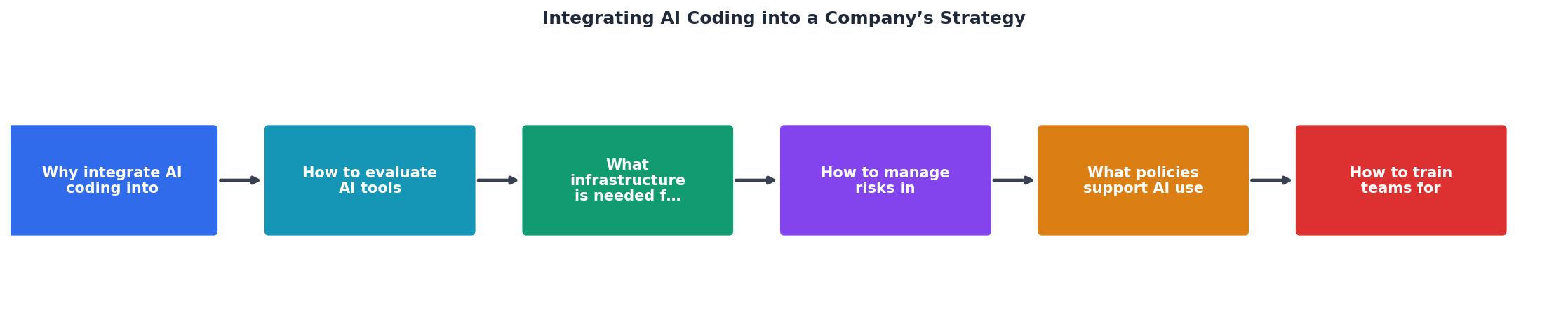
The process flows through five stages: Evaluate Tools, Set Up Infrastructure, Define Policies, Train Teams, and Measure & Iterate. Risk management runs parallel to every stage, not as a one-time gate.
Define Clear AI Policies
A policy document does not need to be 50 pages. It needs to answer six questions:
- Which tools are approved? List them by name and version. "AI coding tools" is not a policy.
- What code can be sent to AI services? Define boundaries: no customer data, no proprietary algorithms, no security-critical modules.
- Who reviews AI-assisted code? Require the same review standards as human-written code, plus an explicit flag in the PR indicating AI assistance.
- How is AI usage tracked? Decide whether developers self-report, whether tooling logs usage automatically, or both.
- What happens when AI introduces a bug? The developer who accepted the suggestion owns it. AI is a tool, not a teammate.
- How often is the policy updated? Quarterly review minimum. The tooling landscape changes fast.
Here is an example dashboard showing how a mid-size engineering team might track AI policy compliance and tool adoption across departments:
AI Coding Adoption Dashboard
Train Teams for Real Adoption

Installing a tool is not training. Developers need to learn three distinct skills:
Prompt engineering for code. Writing effective prompts is different from writing code. Developers need practice with context-setting (providing file structure, naming conventions, and constraints), iterative refinement (narrowing broad suggestions into usable code), and task decomposition (breaking complex features into AI-sized chunks). Run workshops where pairs solve real backlog items using AI, then review the prompts and outputs together.
Critical evaluation of AI output. The biggest risk is not bad suggestions. It is developers accepting suggestions without reading them. Train your team to treat every AI suggestion like a junior developer's PR: read every line, question the approach, verify edge cases. Build this into your code review culture explicitly.
Knowing when NOT to use AI. AI excels at boilerplate, test scaffolding, documentation, and pattern-based code. It struggles with novel algorithms, complex state management, security-critical paths, and domain-specific business logic. Your team needs a shared mental model of where AI helps and where it hurts.
Teams that invest in structured AI training programs see roughly 3x faster onboarding compared to teams that rely on self-directed exploration. The difference is not the tool. It is the shared vocabulary and expectations around how to use it.
A practical training program looks like this:
- Week 1: Tool setup, basic prompt patterns, company policy review
- Week 2: Paired coding sessions on real tasks, prompt library creation
- Week 3: Code review workshop focused on AI-generated code patterns
- Week 4: Retrospective, policy refinement, advanced techniques (multi-file context, custom instructions)
Real-World Integration Examples
Shopify rolled out AI coding tools across their engineering organization with a clear mandate: measure impact on cycle time, not lines of code. They tracked PR merge velocity and found measurable improvements in their deploy frequency for standard feature work. The key was tying the metric to business outcomes (features shipped) rather than vanity metrics (suggestions accepted).
Duolingo used AI to accelerate content generation and localization workflows, reducing the time to produce new course content significantly. Their approach combined AI generation with human expert review, creating a hybrid workflow that maintained quality while increasing throughput.
Smaller companies (50-200 engineers) often see the fastest strategic impact because they can standardize on a single tool, enforce a unified policy, and measure results across the whole organization within one quarter. The playbook: pick one tool, run a four-week pilot with two teams, measure three metrics (cycle time, bug rate, developer satisfaction), then decide.
AI Coding Strategy Integration Checklist
Your progress is saved automatically in your browser.
FAQ
Frequently Asked Questions
Additional Resources
- AI in Software Development - AI is fundamentally redefining the role of software engineers and developers, moving them from code implementers to orchestrators of technology.
- How to implement collaborative AI coding in enterprise teams - Complete guide to implementing collaborative AI coding in enterprise environments. Covers team workflows, security, training frameworks, ...
- How to Integrate AI Coding Tools into Your Enterprise ... - 10 Strategic Steps to Integrate AI Coding Tools Seamlessly · 1. Evaluate Business Goals and Development Needs · 2. Conduct a Workflow Audit · 3. Choose the Right ...
Ready to Master Vibe Coding?
Learn to build software faster with AI assistance using the Vibe Coding Bible.
Get Started