Integrating AI with Legacy Systems: A Practical Approach
That COBOL payroll system from 1997 still runs every Friday at 2 AM. It works. Nobody wants to touch it. But now the business wants AI-driven analytics, automated anomaly detection, and predictive insights layered on top of infrastructure that predates the iPhone.

That COBOL payroll system from 1997 still runs every Friday at 2 AM. It works. Nobody wants to touch it. But now the business wants AI-driven analytics, automated anomaly detection, and predictive insights layered on top of infrastructure that predates the iPhone. Connecting modern AI capabilities to legacy systems is not about ripping everything out and starting over. It is about building bridges that let old and new coexist, and this guide walks through exactly how to do it.
Photo by Zayed Hossain from Pexels
TL;DR:- Legacy systems hold critical business logic but lack modern interfaces, making AI integration tricky.
- Wrap legacy components behind APIs, use middleware adapters, and feed data into AI services without rewriting core systems.
- Start with a focused pilot (one data pipeline, one prediction task), prove value, then expand.
What counts as a legacy system?
A legacy system is any software or hardware that remains in active use despite being built on outdated technology. Think mainframes running COBOL, on-premise ERP installations from the early 2000s, monolithic Java applications deployed before microservices existed, or custom-built databases with no REST API.
These systems persist for good reasons: they encode decades of business rules, they handle mission-critical workloads, and replacing them carries enormous risk. Banks, hospitals, government agencies, and manufacturing plants depend on them daily.
The challenge is straightforward. Legacy systems were designed for stability and specific workflows, not for the kind of data exchange that modern AI tools expect. They often lack APIs, use proprietary data formats, run on isolated networks, and have minimal logging.
"Many systems run on outdated hardware, rely on inflexible data models, or include software components that are no longer supported, all of which limit compatibility with AI technologies.">, A Practical Guide to Integrating AI Into Legacy Systems
That quote captures the core friction. You are not dealing with one problem. You are dealing with hardware constraints, rigid data models, and unsupported software stacked on top of each other.
Assess your existing infrastructure

Before writing a single line of integration code, you need a clear picture of what you are working with. Skip this step and you will burn weeks building connectors to the wrong endpoints.
Inventory your systems. List every legacy component: databases, batch processors, file-based integrations, mainframe programs, and internal tools. For each one, document:
- Data format (flat files, XML, proprietary binary, SQL tables)
- Access method (direct DB connection, FTP, message queue, screen scraping)
- Update frequency (real-time, hourly batch, nightly ETL)
- Owner/maintainer (who understands this system today?)
- Criticality level (what breaks if this goes down for an hour?)
Identify integration points. Look for places where data already leaves the legacy system. Existing exports, log files, database replication streams, and message queues are your best candidates. Building on existing data egress points is far safer than creating new ones inside a system nobody fully understands.
Choose compatible AI tools

Not every AI tool fits every legacy environment. The selection criteria matter more than the brand name on the box.
Selection criteria for legacy-compatible AI tools:
- Input flexibility. The tool must accept the data formats your legacy system produces. If your mainframe exports fixed-width text files, your AI pipeline needs to parse those natively.
- Deployment options. Cloud-only AI services do not work if your legacy system sits on an air-gapped network. Look for tools that offer on-premise or hybrid deployment.
- Batch and streaming support. Legacy systems often operate in batch mode. Your AI tool should handle both batch ingestion and (eventually) streaming data.
- API-first architecture. Tools with well-documented REST or gRPC APIs integrate more cleanly with the middleware layer you will build.
| Category | Examples | Legacy fit |
|---|---|---|
| ML platforms | Azure ML, AWS SageMaker, Google Vertex AI | Good with API adapters; cloud-dependent |
| Data integration | Apache Kafka, MuleSoft, Talend | Excellent for bridging old and new data flows |
| AI coding assistants | Cursor, GitHub Copilot, Claude | Help write the integration code itself |
| Lightweight ML libraries | scikit-learn, XGBoost, Prophet | Run anywhere Python runs; minimal infrastructure |
Implement without disruption
This is where most integration projects fail. Someone connects directly to the production database, runs heavy queries during business hours, and the legacy system grinds to a halt. Here is the step-by-step approach that avoids that disaster.
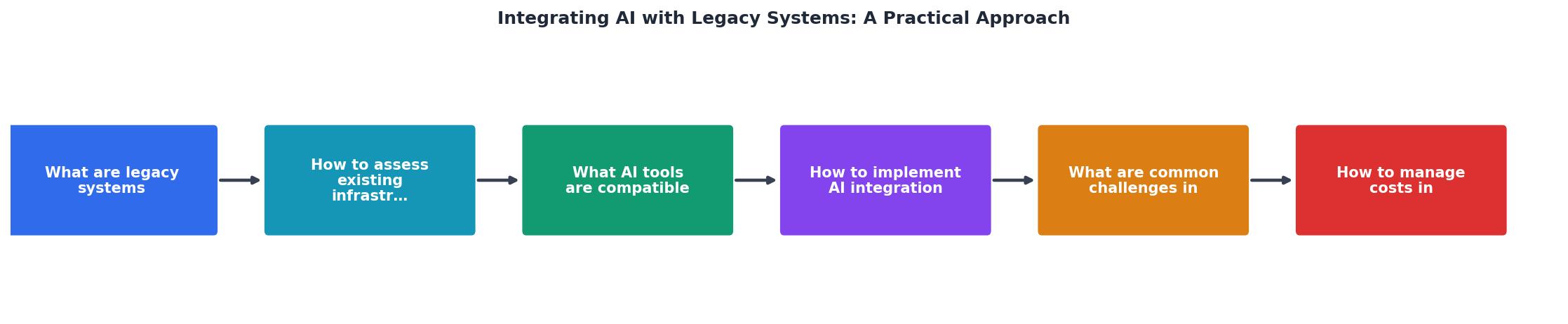
The diagram above shows the core flow: Assess the legacy system, Extract data through safe channels, Transform it into AI-ready formats, Process with your AI model, and Deliver results back to stakeholders or downstream systems.
Step 1: Build the adapter layer. Create a middleware service that sits between your legacy system and the AI pipeline. This adapter handles data extraction, format conversion, and error handling. It never modifies the legacy system directly.
Step 2: Extract data safely. Use read-only database replicas, existing export files, or change data capture (CDC) tools like Debezium. Never run AI workloads against the production legacy database.
Step 3: Transform and normalize. Convert legacy data formats into something your AI tools consume. Fixed-width COBOL output becomes JSON or Parquet. Proprietary date formats become ISO 8601. Character encodings get standardized to UTF-8.
Step 4: Run AI processing. Feed the normalized data into your ML pipeline. Start with a single, well-defined use case: predicting equipment failures from maintenance logs, detecting anomalies in transaction data, or classifying support tickets.
Step 5: Deliver results. Push AI outputs to a dashboard, a notification system, or back into a format the legacy system can consume (yes, sometimes that means generating a flat file and dropping it on an FTP server).
Step 6: Monitor everything. Log every data extraction, transformation, and AI prediction. When something breaks at 3 AM, you need to know exactly where the pipeline failed.
Common integration challenges

Every legacy integration hits predictable walls. Knowing them in advance saves you from panic-driven decisions.
Data quality issues. Legacy systems accumulate decades of inconsistent data. Duplicate records, missing fields, outdated codes, and encoding problems are the norm. Budget significant time for data cleaning before any AI model training.
Missing documentation. The original developers left years ago. The database schema has columns named FLD_07 and XTRA_AMT with no comments. You will spend time reverse-engineering data meanings.
Performance constraints. Legacy hardware has limited CPU, memory, and I/O capacity. Even read-only data extraction can slow things down if you pull too much data during peak hours. Schedule extractions during off-peak windows.
Security and compliance. Legacy systems in regulated industries (healthcare, finance, government) have strict data handling requirements. Moving data to cloud AI services may require encryption in transit, data masking, or regulatory approval.
Organizational resistance. The team maintaining the legacy system has kept it running for years. They are protective of it, and rightly so. Involve them early, respect their expertise, and demonstrate that your integration will not destabilize their system.
| Direct Integration | Adapter-Layer Integration |
|---|---|
| Modifies legacy system | Legacy system untouched |
| High risk of downtime | Zero-downtime approach |
| Tight coupling | Loose coupling |
| Hard to roll back | Easy to disconnect |
| Fast initial setup | More upfront design work |
Manage integration costs
AI integration does not have to be expensive, but costs spiral when scope creeps or when you pick enterprise tools for a problem that a Python script solves.
Cost drivers to watch:
- Data extraction infrastructure (replicas, CDC tools, middleware hosting)
- Cloud AI service fees (per-prediction pricing adds up with high-volume legacy data)
- Data cleaning and transformation (often the largest hidden cost)
- Testing and validation (you need to verify AI outputs against known legacy results)
- Ongoing maintenance (legacy systems change slowly, but they do change)
- Start with open-source tools (Python, scikit-learn, Kafka) before committing to enterprise platforms.
- Use a single pilot project to prove ROI before expanding.
- Automate data extraction and transformation to reduce manual effort.
- Run AI workloads on spot instances or reserved capacity for predictable batch jobs.
- Track per-prediction costs from day one so you can optimize before the bill surprises you.
The following dashboard illustrates a typical cost breakdown for a mid-size legacy AI integration project, showing where budget actually goes versus where teams expect it to go.
Legacy AI Integration Cost Breakdown
Notice that data cleaning dominates the budget. Teams consistently underestimate this. The AI model itself is rarely the expensive part.
For more structured approaches to managing AI-driven projects on budget and on schedule, the Vibe Coding Bible at vibecodingbible.org covers project planning techniques that apply directly to legacy integration work.
Step-by-step integration guide
Legacy System AI Integration Checklist
Your progress is saved automatically in your browser.
FAQ
Frequently Asked Questions
What legacy system are you considering connecting to AI, and what is the first use case you would tackle? Share your scenario and the community can help you pick the right approach.
Additional Resources
- A Practical Guide to Integrating AI Into Legacy Systems - Integrating AI successfully into legacy systems requires strategic planning and expert guidance to maximize effectiveness and minimize ...
- AI Integration with Legacy Systems: A Practical Guide (2025) - Discover strategies for integrating AI into legacy systems. Improve efficiency, scalability, and Measurable ROI with frameworks, use cases, ...
- Integrating AI with Legacy Systems: A Seamless Approach ... - AI sits above legacy systems, consuming data and generating insights without interfering with transaction processing. Examples include demand ...
Ready to Master Vibe Coding?
Learn to build software faster with AI assistance using the Vibe Coding Bible.
Get Started