Security audit for an ai-built app: Practical Guide
You shipped an app with AI in weeks. It works. Users are signing up. Then a security researcher finds a vulnerability that could expose customer data.



You shipped an app with AI in weeks. It works. Users are signing up. Then a security researcher finds a vulnerability that could expose customer data. Your stomach drops. The problem is not the AI code itself, it's that you never ran a real security audit, and now you're scrambling to patch holes you didn't know existed. A security audit for an AI-built app is not optional; it's the difference between a product people trust and a liability waiting to explode.
TL;DR
- AI-built apps need security audits just like traditional code, but with extra focus on supply chain risks, prompt injection, and data handling.
- Start with threat modeling and dependency scanning, then move to code review, penetration testing, and compliance checks.
- Use a phased approach: quick wins (scanning tools, dependency audits) first, then deeper manual review and testing.
- Automate what you can (SAST, dependency checks) and do hands-on testing for attack vectors unique to AI apps.
- Common mistakes: skipping threat modeling, trusting AI output too much, and ignoring third-party supply chain risks.
Why security matters now
Building fast with AI is effective. But fast + insecure = fast disaster. Unlike traditional software built over months with intentional security gates, AI-built apps often ship without the defensive thinking baked in. You're relying on AI to produce code that is often good enough to run, but not audited for attack vectors.
The stakes are real. Data breaches are expensive. Regulatory fines are brutal. User trust, once lost, is nearly impossible to rebuild. A security audit is not a luxury or a checkbox, it's the foundation of a product people will actually keep using.
Common mistakes and misconceptions
Before you start, understand what people get wrong about security in AI-built apps.
Mistake 1: "AI code must be secure because it came from a trained model."
AI models generate plausible code, not vetted code. They don't think about threat models. They don't know your business logic or where data flows. A model can generate SQL that looks perfect but contains an injection vector. Your job is to verify, not to trust.
Mistake 2: "A security audit is a one-time event."
Security is continuous. New dependencies introduce new CVEs. Your API evolves. Attackers find new angles. An audit is a snapshot. You need ongoing scanning, monitoring, and periodic re-audits, especially as you scale.
Mistake 3: "We'll do security later when we have budget."
By then, bad patterns are embedded in your codebase. Fixing architectural security issues is 10x harder than building securely upfront. Security that starts late is patchy and expensive.
Mistake 4: "We don't need to audit third-party libraries."
Your app is only as secure as your supply chain. A compromised dependency can blow open everything. This is where real attacks happen, not in your code, but in code you imported.
Mistake 5: "Manual code review is enough."
Manual review catches logic bugs. But it misses supply chain risks, missing security headers, unencrypted data flows, and subtle misconfigurations. Combine manual review with automated scanning for comprehensive coverage.
Step-by-step approach
Phase 1: Prepare and scope
Start by knowing what you're auditing. Document your app's architecture, the data it handles, where it deploys, and who it serves.
Define your threat model. Ask:- What data does my app store and process? (API keys, user PII, payment info, etc.)
- Who would want to attack it? (Casual hackers, competitors, nation-states, insiders?)
- What would a breach cost? (Regulatory fines, lost users, reputation damage?)
- What are my compliance requirements? (GDPR, HIPAA, PCI-DSS, SOC 2?)
Inventory your dependencies. Run:
npm list
pip freeze
go mod graph
Every imported package is potential attack surface. You need to know what you depend on before you audit.
Phase 2: Automated scanning and quick wins
Use tools to find the low-hanging fruit fast. These catch known vulnerabilities and misconfigurations in minutes.
Dependency vulnerability scanning:- npm audit (Node.js) or pip-audit (Python): Scans for known CVEs in your dependencies.
- Snyk or Dependabot: Continuous scanning with PR alerts for outdated packages.
- SonarQube: Finds code quality and security issues.
- Semgrep: Fast, pattern-based detection of bugs and security smells.
- GitHub Security (built-in): Scans for secrets, vulnerabilities, and dependency issues.
- API keys and tokens
- Database credentials
- Private keys
.env and credential files to .gitignore.
Phase 3: Code review with security mindset

Automated tools miss context. Manual review is where you catch logic flaws and understand whether the code actually does what it claims.
Focus on high-risk areas first:- Authentication: Passwords hashed? Sessions properly managed? MFA supported?
- Authorization: Does the app check permissions before returning data? Can a user view someone else's data by changing an ID?
- API endpoints: Are they rate-limited? Do they validate input? Can they be abused?
- Data handling: Is sensitive data encrypted at rest and in transit? Are database queries parameterized?
- Error messages: Do they leak information an attacker could use?
- Off-by-one errors in loops or pagination
- Incomplete null checks
- Silent failures that hide errors
- Overly permissive CORS or CSRF policies
- Missing input validation
Phase 4: Threat-specific testing

Generic scanning doesn't catch everything. Probe your app for specific vulnerabilities.
Test for injection attacks:- Craft SQL injection payloads and feed them to search and filter fields.
- Try command injection: test fields with
; rm -rf /or backticks. - Try XSS: inject
into text fields and see if it executes in the browser.
- Try accessing endpoints without a token. Do they reject you?
- Try accessing someone else's data by changing an ID or user ID in the URL or payload.
- Can you escalate privileges? Can a regular user become an admin?
- Try password reset flows. Can you reset someone else's password?
- Hammer an endpoint with 1,000 requests per second. Does it rate-limit?
- Can you enumerate user IDs by iterating through ID ranges?
- Is sensitive data sent over HTTPS? Use browser dev tools or curl to check.
- Are cookies marked
SecureandHttpOnly? - Is data encrypted at rest in your database?
- Can you place an order with a negative quantity or price?
- Can you bypass payment by editing form fields?
- Can you trigger race conditions by making two requests simultaneously?
Phase 5: Compliance and infrastructure
Review your deployment and operations:
HTTPS and certificates:- Is your domain on HTTPS everywhere? Use SSL Labs to verify certificate strength and expiration.
- Do you set
Content-Security-Policyto prevent XSS? - Do you set
X-Frame-Optionsto prevent clickjacking? - Do you set
Strict-Transport-Securityto force HTTPS?
- Do you log authentication attempts?
- Do you log API calls and data access?
- Can you detect and alert on suspicious activity?
- Where are logs stored, and who can access them?
- Do you have backups? How often? Are they tested?
- Can you restore from backup? How long does recovery take?
- Who has production access?
- Are there audit logs of who did what?
- Is there a process for revoking access when someone leaves?
Tools and workflows that help
Here's a realistic toolkit for a small team or indie builder:
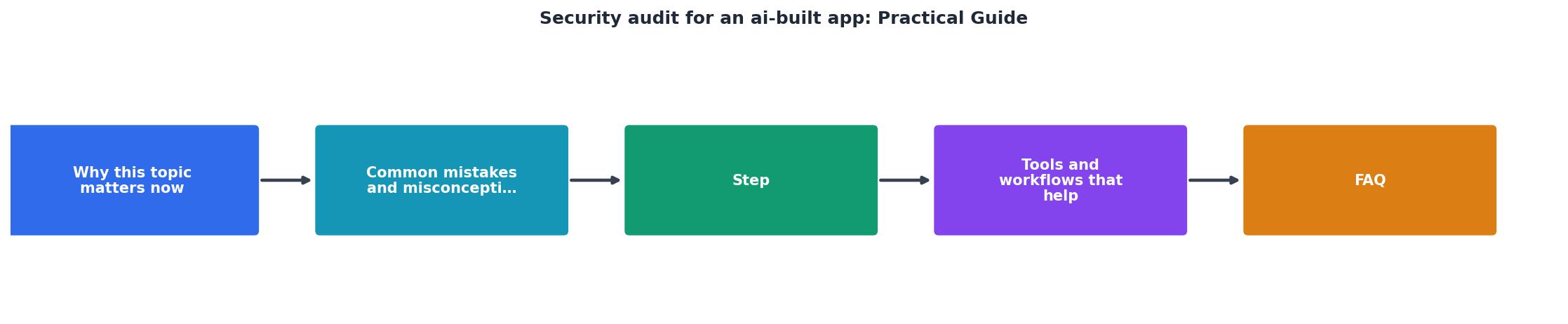
Security Audit Workflow by Phase
Phase 1: Scope
- Threat modeling
- Dependency inventory
- Data flow map
Phase 2: Scan
- npm/pip audit
- SAST (SonarQube)
- Secrets scanner
Phase 3: Review
- Code review
- Auth logic
- Data handling
Phase 4: Test
- Injection tests
- Privilege escalation
- Business logic
Phase 5: Infrastructure
- HTTPS & certs
- Security headers
- Logging & backup
A practical toolkit for most indie and small team projects:
Essential (free or cheap):- GitHub or GitLab: Built-in security scanning on every push.
- npm audit / pip-audit: Dependency scanning included with your package manager.
- Semgrep: Fast static analysis. Free tier covers most projects.
- Burp Suite Community: Free penetration testing tool with browser proxy.
- OWASP ZAP: Free automated security scanning for web apps.
- Snyk: Continuous dependency monitoring with automated PR fixes.
- SonarQube: Enterprise-grade static analysis and code quality.
- Gitleaks: Secret scanning in CI/CD pipelines.
Actionable audit process
Security Audit Checklist
Your progress is saved automatically in your browser.
"The studies focused on four critical vulnerability categories that account for approximately 70% of financial losses in Ethereum smart contract attacks.">, Medium
FAQ
Frequently Asked Questions
Additional Resources
- AI-Assisted Security Audits - In this article, we explore the current state of AI tools available to blockchain security auditors, examining their practical applications, ...
- Application Security Audit: Best Practices - An application security audit is a systematic approach for evaluating , and risky practices before they can be exploited. AI-assisted ...
- Improving Your Code with Skills: Security and Accessibility ... - In this post I want to walk through two Skills I built for my development work: a security audit and an accessibility compliance audit.
Ready to Master Vibe Coding?
Learn to build software faster with AI assistance using the Vibe Coding Bible.
Get Started