Upskilling Teams for AI-Assisted Development
Your CEO just told you to "get the team using AI." You nodded, opened a spreadsheet, and realized you have no idea how to turn that mandate into actual skill growth across eight engineers with wildly different comfort levels. The gap between "we should use AI" and "we use AI well" is where most teams stall, burn budget on random courses, and end up right where they started. This guide gives you a concrete framework for designing, running, and measuring an upskilling program that sticks.

Your CEO just told you to "get the team using AI." You nodded, opened a spreadsheet, and realized you have no idea how to turn that mandate into actual skill growth across eight engineers with wildly different comfort levels. The gap between "we should use AI" and "we use AI well" is where most teams stall, burn budget on random courses, and end up right where they started. This guide gives you a concrete framework for designing, running, and measuring an upskilling program that sticks.
Photo by Nemuel Sereti from Pexels
TL;DR:- Assess your team's current AI skill levels before picking any training content.
- Build a structured program with weekly practice slots, paired exercises, and clear milestones.
- Measure outcomes with code-level metrics (review pass rate, time-to-merge, defect density) rather than course completion certificates.
- Protect learning time from sprint pressure by treating it as scheduled, non-negotiable capacity.
Why upskilling matters now
Six months ago, one or two developers on your team probably experimented with GitHub Copilot or ChatGPT on their own. Today, the expectation is that everyone uses AI tools daily. The problem: self-taught adoption creates massive variance. One engineer writes precise prompts and ships features 40% faster. Another pastes entire files into a chat window and introduces subtle bugs that take days to find.
That variance is your risk. Inconsistent AI usage means inconsistent code quality, unpredictable review cycles, and security gaps nobody catches because nobody agreed on what "good AI-assisted code" looks like. A deliberate upskilling program eliminates that variance by giving every team member the same baseline, the same vocabulary, and the same quality bar.
The ROI is straightforward. Teams that invest in structured AI training report measurable gains in throughput within the first quarter. Teams that skip it spend that same quarter cleaning up AI-generated technical debt.
Assess skills before you train

Buying a Coursera subscription for the whole team is not a training strategy. Before you spend a dollar, map where each person actually stands. A simple skill matrix works:
- Prompt engineering - Can they write specific, context-rich prompts? Or do they type "fix this" and hope?
- Output evaluation - Can they spot hallucinated APIs, incorrect logic, or insecure patterns in AI-generated code?
- Tool fluency - Do they know the shortcuts, inline completions, and chat features of their specific AI tool (Cursor, Copilot, Claude)?
- Workflow integration - Have they built AI into their actual development loop (commit, review, test), or is it a separate side activity?
- Security awareness - Do they check AI output for injection vulnerabilities, leaked secrets, or license-contaminated code?
Most teams skip this step entirely. Only about 35% of engineering organizations run any kind of formal assessment before launching AI training. The rest guess, and guessing leads to training that is too basic for seniors and too advanced for juniors.
Design a training program that works
Generic "intro to AI" courses waste time. Your program needs to be specific to your stack, your tools, and your team's actual gaps. Here is a structure that works for teams of 4 to 30 engineers:
Week 1-2: Foundation alignment. Everyone completes the same core material covering prompt engineering fundamentals, output evaluation techniques, and your team's chosen AI tools. This is the only phase where off-the-shelf courses make sense. Pick one focused resource, not five.
Week 3-4: Paired practice. Pair a stronger AI user with a weaker one. Give them real tickets from the backlog. The goal is not to ship faster but to build habits: writing prompts together, reviewing AI output together, discussing what to accept and what to rewrite.
Week 5-6: Solo application with review. Each engineer works independently with AI on real tasks. A designated reviewer (your strongest AI user or yourself) reviews not just the code but the process: Were the prompts specific? Was the output validated? Were tests generated and actually run?
Week 7-8: Retrospective and standards. The team writes its own AI usage guidelines based on what they learned. These are not abstract policies handed down from management. They are practical rules the team discovered through experience.
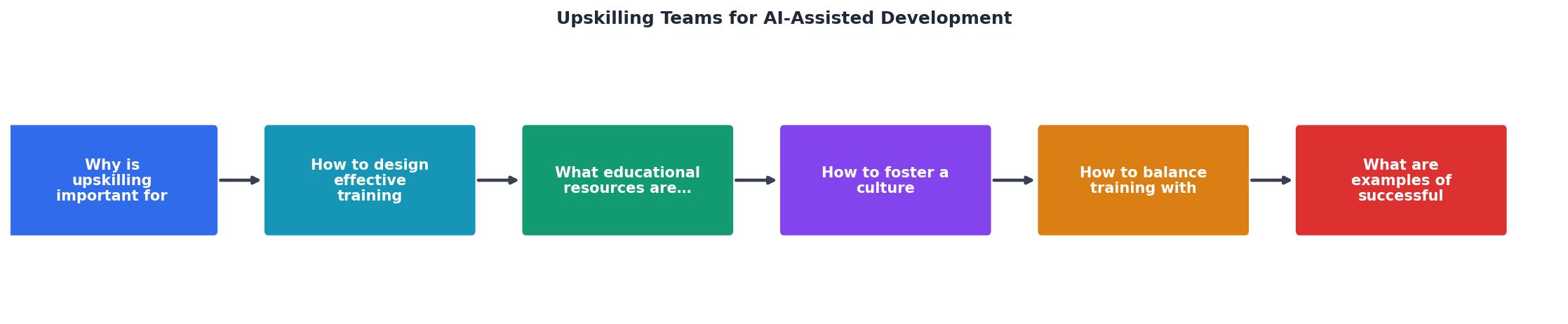
The diagram above shows the flow: Assess, Foundation, Paired Practice, Solo Application, Retrospective, and Continuous Learning. Each phase feeds into the next. Skipping Assess means Foundation targets the wrong level. Skipping Paired Practice means Solo Application produces the same bad habits people had before.
Pick the right resources

The market is flooded with AI courses. Most are surface-level overviews that teach you what a large language model is but not how to use one to ship production code. Here is what actually works for engineering teams:
For prompt engineering and AI-assisted coding:- Vibe Coding Bible (vibecodingbible.org) covers the full workflow from prompting to production deployment, specifically for teams that need to ship real software, not toy projects.
- GitHub Copilot documentation and labs provide tool-specific exercises if Copilot is your primary tool.
- Cursor's built-in tutorial and community forums are the fastest path to fluency if your team uses Cursor.
- OWASP AI Security guidelines give your team a concrete checklist for reviewing AI-generated code for vulnerabilities.
- Internal code review sessions where the team reviews AI-generated PRs together are more effective than any external course.
- IBM's AI upskilling resources provide frameworks for measuring organizational AI readiness.
"According to LinkedIn's most recent workplace learning report, 84% of employees say learning adds purpose to their work.">, AI Upskilling Strategy
The best resource is always your own codebase. Take a recent PR, strip out the AI-generated parts, and use it as a training exercise: "How would you prompt for this? How would you verify the output? What would you change?"
| Generic AI Courses | Team-Specific Training |
|---|---|
| Broad theory, little practice | Focused on your stack and tools |
| Same content for all levels | Tailored to assessed skill gaps |
| Completion certificates | Measurable code quality metrics |
| Individual learning | Paired and team-based exercises |
| One-time event | Ongoing 8-week program |
Build a continuous learning culture

An 8-week program gets you a baseline. Keeping skills sharp requires ongoing habits. AI tools change fast. Copilot's capabilities in January look different from Copilot's capabilities in July. New tools like Cursor, Windsurf, and Claude Code ship features monthly.
Weekly AI show-and-tell (30 minutes). One engineer demonstrates a technique they discovered that week. Could be a prompting pattern, a workflow shortcut, or a failure they learned from. Keep it informal. No slides required.
Shared prompt library. Create a team repository (or a Notion page, or a Slack channel) where people post prompts that worked well. Include the context: what task, what tool, what the prompt was, and what the output looked like. This becomes your team's institutional knowledge.
Quarterly skill reassessment. Run the same practical exercise from your initial assessment every quarter. Compare results. Celebrate improvement. Identify new gaps.
Rotation of the "AI champion" role. Each sprint, one team member is responsible for staying current on AI tool updates and sharing relevant changes with the team. This distributes the learning load and prevents knowledge from concentrating in one person.
Balance training with delivery
This is the hard part. Your sprint commitments do not disappear because you decided to upskill. Here is how to protect learning time without tanking velocity:
- Reduce sprint capacity by 10-15% during the 8-week program. Communicate this to stakeholders upfront with a clear explanation: "We are investing 8 weeks of reduced capacity to gain sustained 30-40% throughput improvement."
- Schedule learning blocks on the calendar. Tuesday and Thursday mornings, 9:00-10:30, are for AI practice. If it is not on the calendar, it will not happen.
- Use real backlog items for practice. Training exercises should be actual tickets, not contrived examples. This way, learning time still produces deliverables, just at a slower pace.
- Protect the time from interruptions. No Slack, no standups, no "quick questions" during learning blocks. Treat them like deep work sessions.
Teams that follow this structure typically see a 70% net productivity gain within three months of completing the program. The initial 10-15% velocity dip during training is recovered within the first two sprints after the program ends.
The following dashboard illustrates what a typical team's training metrics look like at the midpoint of an 8-week program:
Team AI Upskilling Dashboard
Example: 8-person team, Week 4 of 8
Successful upskilling in practice
Shopify's AI-first mandate. When Shopify's CEO declared that teams must demonstrate they cannot solve a problem with AI before requesting additional headcount, it forced every engineer to build real AI fluency. The key was not the mandate itself but the support structure: internal prompt libraries, shared Slack channels for AI techniques, and managers who evaluated AI usage in performance reviews.
Stripe's internal AI bootcamp. Stripe ran a focused 6-week internal program where engineers paired up to rebuild existing features using AI assistance. The goal was not to replace the existing code but to learn the workflow. Engineers who completed the bootcamp showed a measurable reduction in time-to-merge on subsequent PRs.
A pattern across both cases: Neither company relied on external courses alone. Both built internal practice loops, used real codebases for training, and measured outcomes with engineering metrics rather than training completion rates.
The common thread in successful programs is measurement. Teams that track specific metrics (review pass rate, defect density, cycle time) can prove the ROI of training. Teams that only track "hours of training completed" cannot.
Measure training effectiveness
You need a framework that connects training activities to business outcomes. Here is one that works:
Level 1: Engagement. Did people show up? Did they complete the exercises? This is necessary but insufficient.
Level 2: Skill acquisition. Can they demonstrate improved prompting, output evaluation, and tool fluency in a practical exercise? Compare against the baseline assessment.
Level 3: Behavior change. Are they actually using AI differently in their daily work? Check PR metadata: Are AI-assisted PRs increasing? Are review comments decreasing? Is test coverage stable or improving?
Level 4: Business impact. Has cycle time decreased? Has defect escape rate changed? Has the team's throughput (story points, features shipped, whatever you measure) improved?
Most teams stop at Level 1. The teams that get continued investment in training are the ones that can show Level 3 and Level 4 results.
Steps to Design a Team Upskilling Program
Your progress is saved automatically in your browser.
FAQ
Frequently Asked Questions
Additional Resources
- AI Upskilling Strategy - Explore how organizations can provide AI upskilling and reskilling for employees, and why leaders have a vested interest in doing so.
- Five Must-Haves for Effective AI Upskilling - Create upskilling working groups that consist of C-level leaders, learning and development heads, and business unit leaders. Use the network ...
- AI Upskilling for Professionals and Teams - AI upskilling means learning the skills needed to understand, work with, and apply artificial intelligence tools - regardless of your role.
Ready to Master Vibe Coding?
Learn to build software faster with AI assistance using the Vibe Coding Bible.
Get Started