Ship checklist: React app built with AI assistance (for solo developers)
You built a React app with AI. It works on your machine. Now you want to ship it, but you're not sure if it's actually ready. Most AI-built projects get 80% of the way there and stall because nobody asked the hard questions: Is the code maintainable?

Photo by Tima Miroshnichenko from Pexels
You built a React app with AI. It works on your machine. Now you want to ship it, but you're not sure if it's actually ready. Most AI-built projects get 80% of the way there and stall because nobody asked the hard questions: Is the code maintainable? Will it break under load? What happens when a user does something unexpected? This checklist answers those questions and gives you a clear path from "works locally" to "works in production."
TL;DR:- Test your app across browsers and devices, not just your dev setup
- Secure secrets, environment variables, and API keys before shipping
- Set up error logging and monitoring to catch issues in production
- Optimize bundle size and performance to keep load times under control
- Document code decisions and deployment steps so you can maintain it later
Why shipping matters
Building with AI is fast. Shipping is the hard part. You can prototype in hours, but a production app demands security, performance, error handling, and maintainability. Skip these, and your app becomes a liability the moment users touch it. This checklist is built for solo developers who want to ship confidently without becoming a full-time DevOps engineer.
"How to ship your AI app in 2026 🚀
Although building software is easier than ever, most AI projects still stall halfway through."
>, Ship AI Apps in 5 Steps: Claude, MVP, and Tech Stack
The gap between "works" and "ships" is real. This guide closes it.
Common mistakes solo developers make
AI code is fast, but it often skips the unglamorous work. Here are the traps.
Shipping without testing on real devices. Your React app might work perfectly on a MacBook Pro in Chrome. Try it on a three-year-old Android phone on 3G, and things fall apart. AI doesn't usually think about slow networks, small screens, or older browsers unless you ask.
Hardcoding secrets. API keys, database passwords, and auth tokens end up in source code because the AI doesn't know better. One public GitHub push and your infrastructure is compromised.
No error handling. AI often generates happy-path code. What happens when the API returns 500? When the network times out? When a user uploads a 500 MB file? The app crashes silently.
Ignoring bundle size. Each library the AI adds increases your JavaScript bundle. After three or four AI sessions, you're shipping 2 MB of JavaScript. Your users wait. Your analytics show bounce rates spike.
Missing observability. You deploy and hope. Then a user reports a bug. You have no logs, no error tracking, no performance metrics. You're flying blind.
No deployment plan. "Ship it" doesn't mean copying files to a server. Where does the app run? How do you deploy updates? What happens if something breaks?
Each of these is fixable. That's what this checklist does.
Testing and validation

Testing is where most AI-built apps fail. The AI generates code that passes the happy path, but reality is messier.
Test on real devices and networks. Use BrowserStack, LambdaTest, or just borrow devices from friends. Test on:- iPhone 12 and iPhone SE (two sizes, two performance levels)
- Samsung Galaxy S10 and a budget Android phone
- Chrome, Safari, and Firefox on desktop
- Slow 3G networks (Chrome DevTools can simulate this)
- Pull your network cable while the app is loading data
- Wait for an API to timeout (use Charles Proxy or Fiddler to simulate)
- Upload a file larger than your limit
- Use the browser back button unexpectedly
- Open the app in two tabs and interact with both
- First Contentful Paint under 2 seconds
- Time to Interactive under 5 seconds
- Lighthouse score above 80
source-map-explorer show where the bytes are going.
Security fundamentals
Security is not optional. Your app handles user data. Treat it like it matters.
Move secrets out of code. Environment variables go in .env files (add .env to .gitignore so it never commits). In your React code:
const apiKey = process.env.REACT_APP_API_KEY;
On deploy (Vercel, Netlify, or your own server), set these variables in the platform's UI or a secrets manager. Never paste them into code.
Use HTTPS everywhere. This is non-negotiable. Most hosting platforms (Vercel, Netlify) provide free SSL certificates. If not, use Let's Encrypt.
Validate on the backend. AI often generates frontend validation (checking if an email looks valid). But frontend validation is for UX, not security. Always validate on the backend. A user can bypass your frontend checks in seconds. Your server can't.
Check for XSS vulnerabilities. If your app renders user input directly, sanitize it. Libraries like DOMPurify strip malicious code. React's default JSX escaping helps, but file uploads and rich text need extra care.
Rate-limit API calls. If your app lets users bulk-download data or run expensive operations, add rate limiting on the backend. Otherwise, one loop will crush your server.
.env files or hardcode secrets like sk_live_... API keys. Use a secrets manager or environment variables. Most breaches start here.Performance optimization
Slow apps lose users.
esbuild --analyze to see what's eating space. Common culprits:
- Large charting libraries (use recharts or visx instead of d3)
- Multiple lodash utilities (often you only need 3 functions)
- Date libraries (date-fns is smaller than moment)
lazy() and Suspense to load pages on demand:
const Home = lazy(() => import('./pages/Home'));
const Dashboard = lazy(() => import('./pages/Dashboard'));
Lazy-load images. Add loading="lazy" to img tags or use the Intersection Observer API. Users below the fold don't need to download images they won't see.
Cache aggressively. Set long cache headers (1 year) for assets with content hashes. Set short cache (no cache) for HTML. Your hosting platform (Vercel, Netlify) handles this automatically, but if you're self-hosting, configure it.
Monitor real performance. Use Sentry's performance monitoring or LogRocket to see how your app behaves for real users, not just in your browser.
Error handling and logging

Errors will happen. The question is whether you know about them.
Set up error tracking. Sentry, LogRocket, or Rollbar catch uncaught errors and send them to your inbox. This alone has prevented thousands of silent bugs. Free tier of Sentry handles small apps:
import * as Sentry from "@sentry/react";

Sentry.init({
  dsn: process.env.REACT_APP_SENTRY_DSN,
  environment: process.env.NODE_ENV,
});
Log API failures gracefully. When an API call fails, don't just crash. Show the user a message and let them retry:
try {
  const data = await fetchData();
  setData(data);
} catch (error) {
  console.error('Failed to fetch:', error);
  setError('Could not load data. Try again.');
  Sentry.captureException(error);
}
Add a fallback UI. If something breaks, show a friendly error message instead of a blank screen or a cryptic stack trace.
Monitor network requests. Use your browser DevTools Network tab in production (or tools like Fiddler) to see if requests are slow or failing. Set up alerts if response times spike.
Deployment and infrastructure
Where does your app live? This matters more than most solo developers realize.
Use a platform over a raw server. Vercel, Netlify, and AWS Amplify handle most of the boring stuff: SSL, caching, CDNs, scaling, and rollbacks. You focus on code.
Set up CI/CD. GitHub Actions (free) runs tests and deploys on every push to main:
name: Deploy
on:
push:
branches: [main]
jobs:
deploy:
runs-on: ubuntu-latest
steps:
- uses: actions/checkout@v2
- uses: vercel/action@master
with:
vercel-token: ${{ secrets.VERCEL_TOKEN }}
Keep staging and production separate. Deploy to staging first. Test real scenarios (not just automated tests). Then deploy to production.
Plan for rollbacks. If you deploy code and it breaks, can you roll back in under 5 minutes? Vercel and Netlify let you do this with one click.
Monitor uptime. Use Uptime Robot (free tier) to ping your app every 5 minutes. If it goes down, you get an SMS.
A visual overview of the shipping process
The process diagram below shows the typical flow from "built locally" to "running in production":
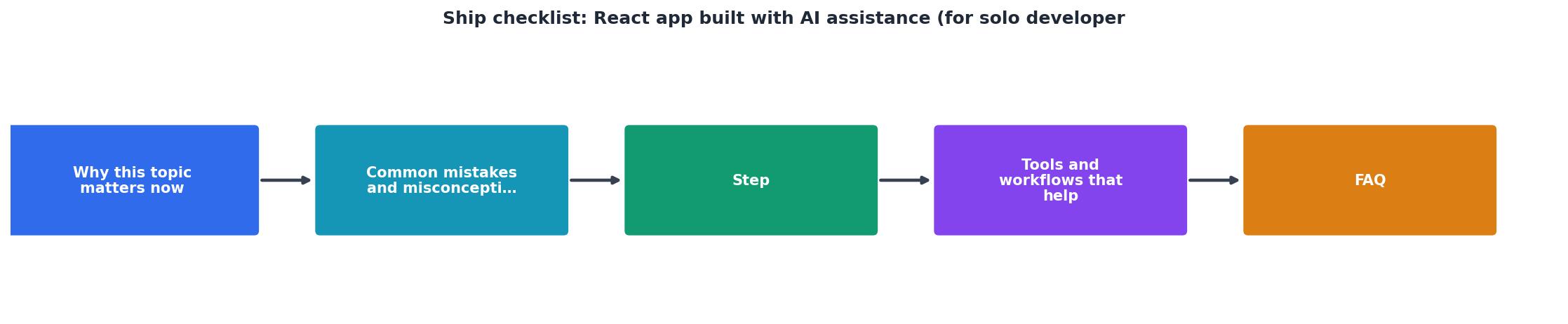
Each stage has clear gates. Don't skip to production until you've passed each one. The cost of skipping is high.
Your deployment readiness dashboard
To help you track where you are in the shipping process, here's an interactive visualization showing typical readiness metrics for a React app moving from development to production:
This dashboard represents a typical mid-stage React app. Your metrics might differ, that's expected. Use it to identify weak spots. If Performance Optimization is at 40%, spend a day on bundle analysis before you ship. The readiness score tells you which areas need the most attention before going live.
Practical shipping checklist
Use this checklist to validate that your React app is ready for production:
React App Production Readiness
Your progress is saved automatically in your browser.
FAQ
Frequently Asked Questions
The gap between "built" and "shipped" is where most AI projects die. You're not there yet. Use this checklist to close that gap, and you'll ship something your users can actually rely on.
Additional Resources
- Ship AI Apps in 5 Steps: Claude, MVP, and Tech Stack - Here's the 5-step process I use to ship ideas tuck. Step 1: Have an idea While. Step 2: Scope the MVP Another ・ 2. Gemini 3 Pro ✅. Gemini Code ...
- How to Actually Build Mobile Apps with AI in 2026 - In this video, you will learn how to build a full Duolingo clone in React Native using a workflow called Practical Vibe Coding. AI has ...
- Ship Faster: A 5-Step Release Checklist for Solo Devs - Follow this 5-step checklist, and you'll ship faster than 90% of developers stuck in procrastination loops. get there? Ship it. AI initiatives, ...
Ready to Master Vibe Coding?
Learn to build software faster with AI assistance using the Vibe Coding Bible.
Get Started